Unlock a world of possibilities! Login now and discover the exclusive benefits awaiting you.

- Qlik Community
- :
- All Forums
- :
- Qlik NPrinting
- :
- Re: NPrinting conditional formatting excel loses r...
- Subscribe to RSS Feed
- Mark Topic as New
- Mark Topic as Read
- Float this Topic for Current User
- Bookmark
- Subscribe
- Mute
- Printer Friendly Page

 GemBo
GemBo
- Mark as New
- Bookmark
- Subscribe
- Mute
- Subscribe to RSS Feed
- Permalink
- Report Inappropriate Content
NPrinting conditional formatting excel loses reference when running report
Hello,
I am fairly new to Nprinting and I have a problem when using conditional formatting in Nprinting in an Excel report.
What I did is that I created a conditional format using the following formula:
=AND(H1="FAB";N1="-")
However, when previewing the report, or running a task with the report I get the following:
=AND(#REF!="FAB";#REF!="-")
And when I try to copy the original formula in the generated report it works, so I think there is nothing wrong with my formula.
I find it also very strange that my other conditional formatting formulas work without problem.
For example: =IF(WEEKNUMBER($I19;21)=VALUE(O$18);TRUE;UNTRUE)
I hope someone here can help me have a workaround for this problem.
With kind regards,
Gemma
P.S. unfortunately I cannot share usable screenshots of this as my excel is in Dutch.
Accepted Solutions

 Lech_Miszkiewic
- Mark as New
- Bookmark
- Subscribe
- Mute
- Subscribe to RSS Feed
- Permalink
- Report Inappropriate Content
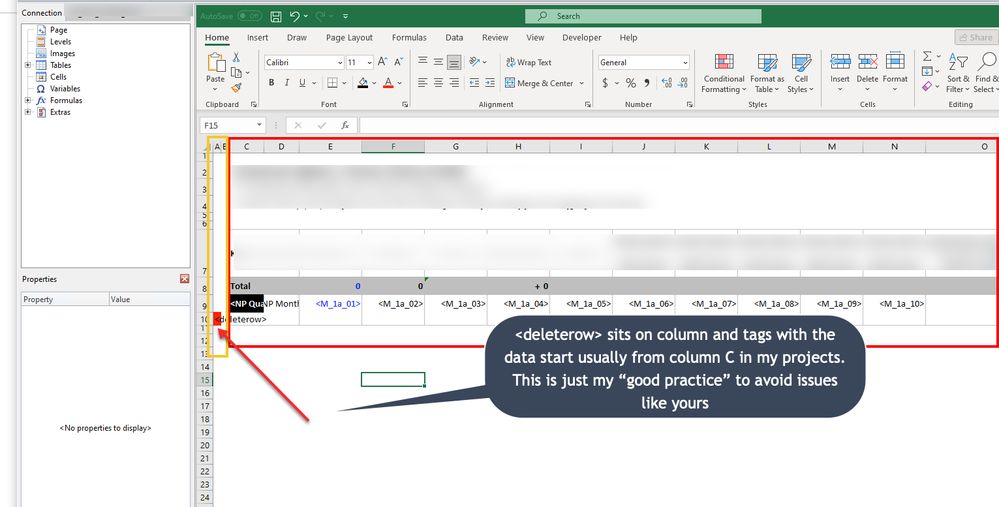
yes - this is obviously wrongly designed
you need to move deleterow tag to other column in source data so it is not picked up by project number column in table/does not belong to project number slicer
Typically for that I always reserve columns A and B in excel and I start populating data from column C onwards
See screen below:
 Lech_Miszkiewic
- Mark as New
- Bookmark
- Subscribe
- Mute
- Subscribe to RSS Feed
- Permalink
- Report Inappropriate Content
I am assuming you are setting this format on the cells which get deleted like:
- Level tag row
- or deleterow tag row
Sharing the template screenshot would clarify this, otherwise it is just a guess...
GemBo
- Mark as New
- Bookmark
- Subscribe
- Mute
- Subscribe to RSS Feed
- Permalink
- Report Inappropriate Content
Dear Lech,
Thank you for your reply.
I hope it is more clear here. I am going to check if the problem was indeed in the deleterow.
I have also added a screenshot of the template editor.
 Lech_Miszkiewic
- Mark as New
- Bookmark
- Subscribe
- Mute
- Subscribe to RSS Feed
- Permalink
- Report Inappropriate Content
yes - this is obviously wrongly designed
you need to move deleterow tag to other column in source data so it is not picked up by project number column in table/does not belong to project number slicer
Typically for that I always reserve columns A and B in excel and I start populating data from column C onwards
See screen below:
