Unlock a world of possibilities! Login now and discover the exclusive benefits awaiting you.

- Qlik Community
- :
- All Forums
- :
- Qlik NPrinting
- :
- Re: NPrinting output folder
- Subscribe to RSS Feed
- Mark Topic as New
- Mark Topic as Read
- Float this Topic for Current User
- Bookmark
- Subscribe
- Mute
- Printer Friendly Page

 JustinDallas
- Mark as New
- Bookmark
- Subscribe
- Mute
- Subscribe to RSS Feed
- Permalink
- Report Inappropriate Content
NPrinting output folder
Hello Folks,
So in NPrinting, there is an option to have an output folder be the destination. Where exactly should I be looking for this folder? My NPrinting installation lives at "C:\Program Files\NPrintingServer", "C:\Program Files (x86)\NPrinting" and "C:\ProgramData\NPrinting"
Any help is greatly appreciated.
- Tags:
- qliksense
Accepted Solutions
 Daniel_Jenkins
- Mark as New
- Bookmark
- Subscribe
- Mute
- Subscribe to RSS Feed
- Permalink
- Report Inappropriate Content
Hi Justin,
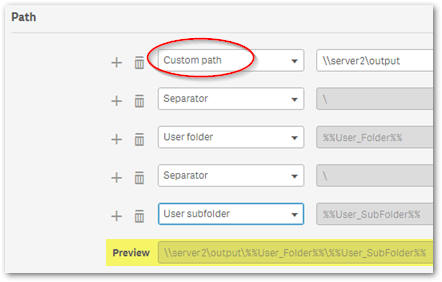
You can use Custom path to specify the root. E.g., C:\Output\. If using a share location use it's UNC path (as opposed to a mapped drive) e.g.,\\servername\share\. All paths are relative to the NPrinting server.
More details on the online help site: https://help.qlik.com/en-US/nprinting/June2018/Content/AdministeringQVNprinting/Folder-destination.h...
HTH - Daniel.

 Frank_S
- Mark as New
- Bookmark
- Subscribe
- Mute
- Subscribe to RSS Feed
- Permalink
- Report Inappropriate Content
- The output folder location is not static.
- You can define the location on the local NP server or on your network.
- Just make sure that the NP service account has full network permission access to open/read/write for that folder.
JustinDallas
- Mark as New
- Bookmark
- Subscribe
- Mute
- Subscribe to RSS Feed
- Permalink
- Report Inappropriate Content
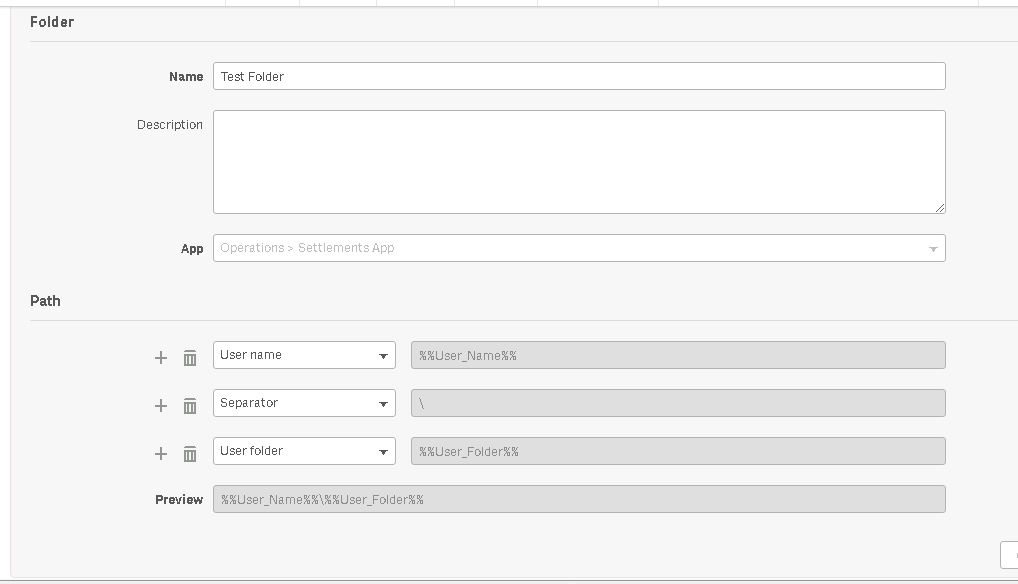
But it has to be somewhat static because when I create the folder, I can't select where it's root will be. I can only select properties of how the folder path should be constructed.
Daniel_Jenkins
- Mark as New
- Bookmark
- Subscribe
- Mute
- Subscribe to RSS Feed
- Permalink
- Report Inappropriate Content
Hi Justin,
You can use Custom path to specify the root. E.g., C:\Output\. If using a share location use it's UNC path (as opposed to a mapped drive) e.g.,\\servername\share\. All paths are relative to the NPrinting server.
More details on the online help site: https://help.qlik.com/en-US/nprinting/June2018/Content/AdministeringQVNprinting/Folder-destination.h...
HTH - Daniel.
