Unlock a world of possibilities! Login now and discover the exclusive benefits awaiting you.

- Qlik Community
- :
- All Forums
- :
- Qlik NPrinting
- :
- Qlik NPrinting Connection issue
- Subscribe to RSS Feed
- Mark Topic as New
- Mark Topic as Read
- Float this Topic for Current User
- Bookmark
- Subscribe
- Mute
- Printer Friendly Page

 sivaboggarapu20
- Mark as New
- Bookmark
- Subscribe
- Mute
- Subscribe to RSS Feed
- Permalink
- Report Inappropriate Content
Qlik NPrinting Connection issue
Hi Team,
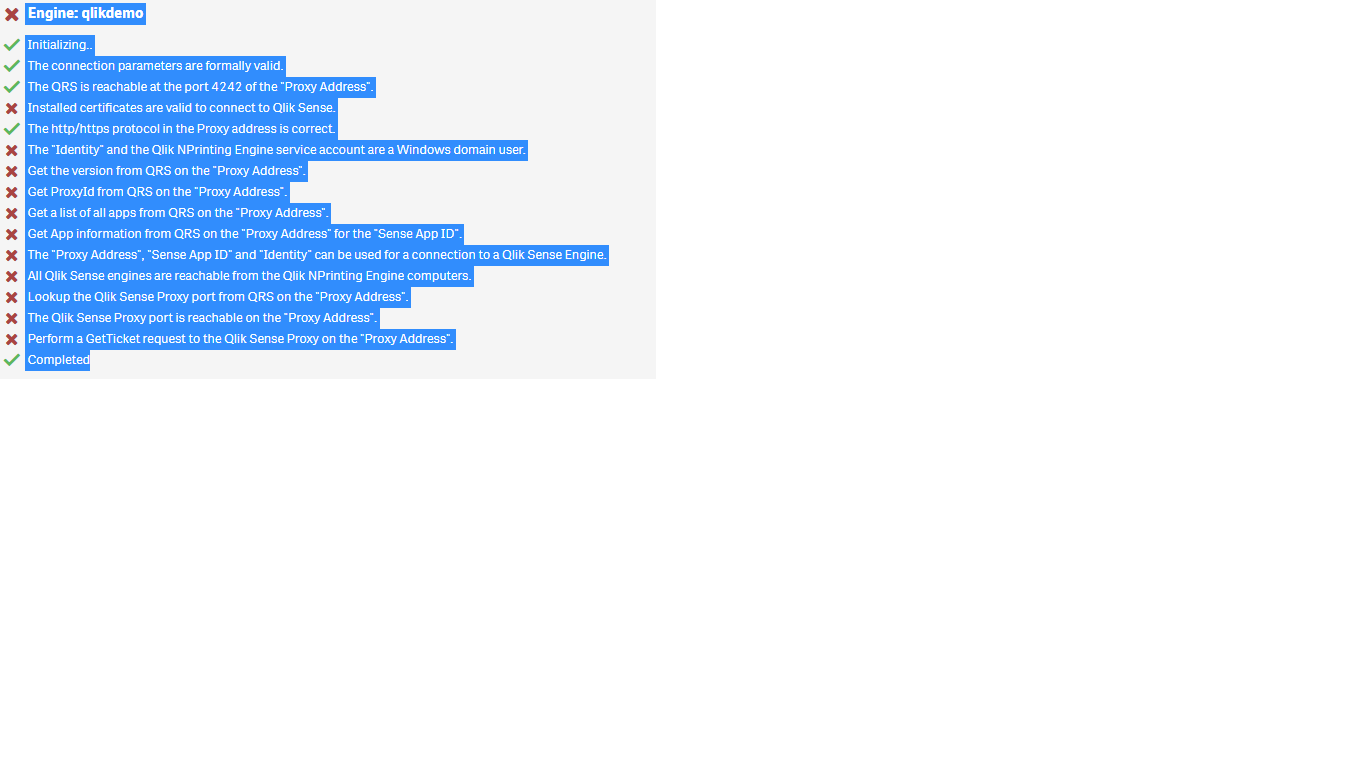
I am creating QlikNPrinting connection. But I am not able to create connection. Following errors are coming while create connection
Engine: qlikdemo
Initializing..
The connection parameters are formally valid.
The QRS is reachable at the port 4242 of the "Proxy Address".
Installed certificates are valid to connect to Qlik Sense.
The http/https protocol in the Proxy address is correct.
The "Identity" and the Qlik NPrinting Engine service account are a Windows domain user.
Get the version from QRS on the "Proxy Address".
Get ProxyId from QRS on the "Proxy Address".
Get a list of all apps from QRS on the "Proxy Address".
Get App information from QRS on the "Proxy Address" for the "Sense App ID".
The "Proxy Address", "Sense App ID" and "Identity" can be used for a connection to a Qlik Sense Engine.
All Qlik Sense engines are reachable from the Qlik NPrinting Engine computers.
Lookup the Qlik Sense Proxy port from QRS on the "Proxy Address".
The Qlik Sense Proxy port is reachable on the "Proxy Address".
Perform a GetTicket request to the Qlik Sense Proxy on the "Proxy Address".
Completed
- Tags:
- qliksense
Accepted Solutions

 Daniel_Jenkins
- Mark as New
- Bookmark
- Subscribe
- Mute
- Subscribe to RSS Feed
- Permalink
- Report Inappropriate Content
Hi Siva,
Your verification process has detected several issues with your setup. A red X denotes that that verification check has failed. I would start with trying to resolve the first one - Qlik Sense certificates: https://help.qlik.com/en-US/nprinting/February2018/Content/DeployingQVNprinting/NPrinting-with-Sense...
HTH - Daniel.
Daniel_Jenkins
- Mark as New
- Bookmark
- Subscribe
- Mute
- Subscribe to RSS Feed
- Permalink
- Report Inappropriate Content
Hi Siva,
Your verification process has detected several issues with your setup. A red X denotes that that verification check has failed. I would start with trying to resolve the first one - Qlik Sense certificates: https://help.qlik.com/en-US/nprinting/February2018/Content/DeployingQVNprinting/NPrinting-with-Sense...
HTH - Daniel.

 Ruggero_Piccoli
- Mark as New
- Bookmark
- Subscribe
- Mute
- Subscribe to RSS Feed
- Permalink
- Report Inappropriate Content
Yes, always start to solve the issues from the first because it could be that solving the first will solve also all others.
BR,
Ruggero
Best Regards,
Ruggero
---------------------------------------------
When applicable please mark the appropriate replies as CORRECT. This will help community members and Qlik Employees know which discussions have already been addressed and have a possible known solution. Please mark threads with a LIKE if the provided solution is helpful to the problem, but does not necessarily solve the indicated problem. You can mark multiple threads with LIKEs if you feel additional info is useful to others.
