Unlock a world of possibilities! Login now and discover the exclusive benefits awaiting you.

- Qlik Community
- :
- All Forums
- :
- Qlik NPrinting
- :
- Re: Retrive Group users info from Nprinting API
- Subscribe to RSS Feed
- Mark Topic as New
- Mark Topic as Read
- Float this Topic for Current User
- Bookmark
- Subscribe
- Mute
- Printer Friendly Page

 Woojtek_96
- Mark as New
- Bookmark
- Subscribe
- Mute
- Subscribe to RSS Feed
- Permalink
- Report Inappropriate Content
Retrive Group users info from Nprinting API
Hi all,
I'm trying to retrive info about users in my groups from NPrinting API.
I stuck at:
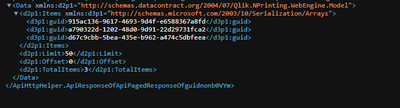
So far I managed to retrive info about tasks, users, groups. In this request I want to retrive users from particular group.
In place where I load data i have to select desired fields but when i write "guid" i don't have any resposne. The same is for Guid, guId, GuID etc. I had tried many combinations.
For example when I was retriving info for users i have field named "UserName" but in qlik script field name is "userName" finally worked
I had readed many websites and topics on this forum and didn't find anything helpful.
Other case is to know which fields I'm getting from API, I can't make select * so maybe some kind of for.. each?
but I don't know how to write it (in Select Statement?)
In addition i'm pasting my QV script:

Thanks for all help
Accepted Solutions
.png "Miguel_Angel_Baeyens")
 Miguel_Angel_Ba
- Mark as New
- Bookmark
- Subscribe
- Mute
- Subscribe to RSS Feed
- Permalink
- Report Inappropriate Content
Since you already have the user IDs, you can use something like this:
LET vAllGroups = 'https://server:4993' & '/api/v1/users/' & '$(vNPUserID)' & '/groups' ;
... do something ...
For example, to add a user to a group
Table:
SQL SELECT
"__KEY_data"
FROM JSON "data" PK "__KEY_data"
WITH CONNECTION
(
URL "$(vAllGroups)",
BODY "$(vGroupIDs)", //ID or IDs of groups
HTTPHEADER "Origin" "$(vQlikSenseServer)",
HTTPHEADER "Content-Type" "application/json",
HTTPHEADER "X-HTTP-Method-Override" "PUT",
HTTPHEADER "cookie" "$(vCookie)",
QUERY "Limit" "1000000"
);
Some other good examples here: https://community.qlik.com/t5/Connectivity-Data-Prep/Nprinting-Rest-Get-user-groups/td-p/1535570

 JHuis
JHuis
- Mark as New
- Bookmark
- Subscribe
- Mute
- Subscribe to RSS Feed
- Permalink
- Report Inappropriate Content
Hi,
You could use the next links they were a real life saver. I hope this helps?
https://nprintingadventures.com/2019/11/28/nprinting-api-qlik-rest-subroutines-v1-1/
Or
https://nprintingadventures.com/2019/11/28/nprinting-api-qlik-rest-subroutines-v1-1/
Woojtek_96
- Mark as New
- Bookmark
- Subscribe
- Mute
- Subscribe to RSS Feed
- Permalink
- Report Inappropriate Content
Unfortunately, I didn't find any useful info in this links. But thank you very much for help
Miguel_Angel_Ba- Mark as New
- Bookmark
- Subscribe
- Mute
- Subscribe to RSS Feed
- Permalink
- Report Inappropriate Content
Take the examples from here:
Although it refers to Qlik Sense script, the logic and syntax is all valid except for the data connection.
Woojtek_96
- Mark as New
- Bookmark
- Subscribe
- Mute
- Subscribe to RSS Feed
- Permalink
- Report Inappropriate Content
@Miguel_Angel_Baeyens I Based on this with creating tables for authentication, tasks andusers. But in this doc there isn't anything about groups
Miguel_Angel_Ba- Mark as New
- Bookmark
- Subscribe
- Mute
- Subscribe to RSS Feed
- Permalink
- Report Inappropriate Content
Since you already have the user IDs, you can use something like this:
LET vAllGroups = 'https://server:4993' & '/api/v1/users/' & '$(vNPUserID)' & '/groups' ;
... do something ...
For example, to add a user to a group
Table:
SQL SELECT
"__KEY_data"
FROM JSON "data" PK "__KEY_data"
WITH CONNECTION
(
URL "$(vAllGroups)",
BODY "$(vGroupIDs)", //ID or IDs of groups
HTTPHEADER "Origin" "$(vQlikSenseServer)",
HTTPHEADER "Content-Type" "application/json",
HTTPHEADER "X-HTTP-Method-Override" "PUT",
HTTPHEADER "cookie" "$(vCookie)",
QUERY "Limit" "1000000"
);
Some other good examples here: https://community.qlik.com/t5/Connectivity-Data-Prep/Nprinting-Rest-Get-user-groups/td-p/1535570
Woojtek_96
- Mark as New
- Bookmark
- Subscribe
- Mute
- Subscribe to RSS Feed
- Permalink
- Report Inappropriate Content
@Miguel_Angel_Baeyens This is what i looking for.
Thank you very much and have a nice day
