Unlock a world of possibilities! Login now and discover the exclusive benefits awaiting you.

- Qlik Community
- :
- All Forums
- :
- Qlik NPrinting
- :
- Re: Running Macro Inside Template?
- Subscribe to RSS Feed
- Mark Topic as New
- Mark Topic as Read
- Float this Topic for Current User
- Bookmark
- Subscribe
- Mute
- Printer Friendly Page

 devarasu07
- Mark as New
- Bookmark
- Subscribe
- Mute
- Subscribe to RSS Feed
- Permalink
- Report Inappropriate Content
Running Macro Inside Template?
Hi All,@Daniel Jenkins
I've created an Nprint Excel template with enabled macros and it should AutoRun every time the file is opened. However, when NPrinting is creating a report using this template, the macro does not run. But when I go to edit my template inside the report editor, the macro in the background runs without any problems. please refer to the attachment. kindly advise me. THanks
Accepted Solutions

 Daniel_Jenkins
- Mark as New
- Bookmark
- Subscribe
- Mute
- Subscribe to RSS Feed
- Permalink
- Report Inappropriate Content
I don't see your macro in the template.
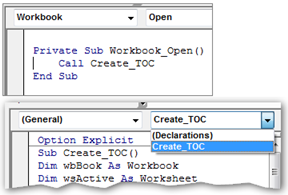
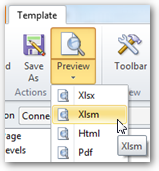
I tested my project again and it works just fine. Remember to Preview as Xlsm:
- Daniel.

 woutermak
- Mark as New
- Bookmark
- Subscribe
- Mute
- Subscribe to RSS Feed
- Permalink
- Report Inappropriate Content
Isn't it the problem that in the publish task, or preview a .xlsx is used and not a xlsm file?
Only a xlsm can handle marco's
Daniel_Jenkins
- Mark as New
- Bookmark
- Subscribe
- Mute
- Subscribe to RSS Feed
- Permalink
- Report Inappropriate Content
Hi Deva,
Since you are on version 16.x, take a look at this example: Index on page loop excel
HTH - Daniel.
devarasu07
- Mark as New
- Bookmark
- Subscribe
- Mute
- Subscribe to RSS Feed
- Permalink
- Report Inappropriate Content
Hi djk,
I've gone through your post and added below macro into your template after that when i preview the macro not auto running it? but if ran manually and it works . can u advise me. thanks in advance 
Sub sbHello()
Range("A1").Value = Range("B9")
End Sub
THanks,
Deva
Daniel_Jenkins
- Mark as New
- Bookmark
- Subscribe
- Mute
- Subscribe to RSS Feed
- Permalink
- Report Inappropriate Content
I don't see your macro in the template.
I tested my project again and it works just fine. Remember to Preview as Xlsm:
- Daniel.
devarasu07
- Mark as New
- Bookmark
- Subscribe
- Mute
- Subscribe to RSS Feed
- Permalink
- Report Inappropriate Content
Hi djk,
Working fine. Tks
Private Sub Workbook_Open()
Call sbHello
End Sub
Option Explicit
Sub sbHello()
Sheet2.Range("A1").Value = "hello"
End Sub
