Unlock a world of possibilities! Login now and discover the exclusive benefits awaiting you.

- Qlik Community
- :
- All Forums
- :
- Qlik NPrinting
- :
- Using Variables in Fields when creating a Filter
- Subscribe to RSS Feed
- Mark Topic as New
- Mark Topic as Read
- Float this Topic for Current User
- Bookmark
- Subscribe
- Mute
- Printer Friendly Page

- Mark as New
- Bookmark
- Subscribe
- Mute
- Subscribe to RSS Feed
- Permalink
- Report Inappropriate Content
Using Variables in Fields when creating a Filter
I am new to Nprinting and wanted to know if it was possible to have a filter based on a variable?
For example, the document I use has a variable (vLastMonth), and I want to filter a field (Acctg Mon) to whatever the last month was so the report is created only showing the data from the past month. I tried using =vLastMonth and just vLastMonth in the value for the field filter.
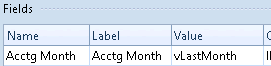
When I brought them into the report and applied them to the image, I was getting an error on my charts that said it couldn't be calculated.

Am I missing some step somewhere in the process of applying a filter with a variable expression, or is this not the right way to go about this.
I read through the article below but couldn't find anything related to this specific problem.
How to Create Static and Dynamic Filters Based on Fields
Thanks in advance.
- Tags:
- dynamic filter
- filter
Accepted Solutions

 vikasmahajan
- Mark as New
- Bookmark
- Subscribe
- Mute
- Subscribe to RSS Feed
- Permalink
- Report Inappropriate Content
try with =$(vLastMonth)
Vikas
If the issue is solved please mark the answer with Accept as Solution & like it.
If you want to go quickly, go alone. If you want to go far, go together.

 Stephen_Jasiono
- Mark as New
- Bookmark
- Subscribe
- Mute
- Subscribe to RSS Feed
- Permalink
- Report Inappropriate Content
You can create filters in NPrinting using QlikView variables. It's in the ribbon in the same right next to Fields. See the following tutorial: Set a QlikView Variable to a Specific Value Using Filters
Or you can have a dynamic filter based on a QlikView expression. What is the logic behing vLastMonth? If it is something like month(now)-1, then you can use that syntax in the value column, and not use the variable at all. You would have to check "Evaluate" if using this method.
vikasmahajan
- Mark as New
- Bookmark
- Subscribe
- Mute
- Subscribe to RSS Feed
- Permalink
- Report Inappropriate Content
try with =$(vLastMonth)
Vikas
If the issue is solved please mark the answer with Accept as Solution & like it.
If you want to go quickly, go alone. If you want to go far, go together.