Unlock a world of possibilities! Login now and discover the exclusive benefits awaiting you.

- Qlik Community
- :
- All Forums
- :
- QlikView App Dev
- :
- split data
- Subscribe to RSS Feed
- Mark Topic as New
- Mark Topic as Read
- Float this Topic for Current User
- Bookmark
- Subscribe
- Mute
- Printer Friendly Page

 surajap123
- Mark as New
- Bookmark
- Subscribe
- Mute
- Subscribe to RSS Feed
- Permalink
- Report Inappropriate Content
split data
Hi All,
I have below data. The values in the location column has both Location and Sub-Location data. So i want to move the sub-location values into separate fields.
Lookup_Table: //Location to Sub-location mapping table.
LOAD * INLINE
[
Location,SubLocation
NCR,Del
];
data:
LOAD * INLINE [
Product, Location,Sales
A, NCR,100
A, Del,150
A, NCR,200
B, SN,200
];
As location also include sub-location the total sales of NCR location should be 450.
So, when a user click on NCR value sales should be shown as 450. If user click on Del the sales should be 150.
In the UI i want to put Location and Sub-Location in each listbox. so location should have location values and sub-location should have only sub-location values in it.
Please help.

- Mark as New
- Bookmark
- Subscribe
- Mute
- Subscribe to RSS Feed
- Permalink
- Report Inappropriate Content
Hi Suraj,
You may need the look table in the attached mapping table format. Find the attachment and let me know if still facing any issues.
-Jai

 PrashantSangle
- Mark as New
- Bookmark
- Subscribe
- Mute
- Subscribe to RSS Feed
- Permalink
- Report Inappropriate Content
Load same table twice with alising
like below,
Final:
Load Location as finalLocation
from Test;
concatenate
Load SubLocation as finalLocation
from Test;
Regards,
Please appreciate our Qlik community members by giving Kudos for sharing their time for your query. If your query is answered, please mark the topic as resolved 🙂
surajap123
- Mark as New
- Bookmark
- Subscribe
- Mute
- Subscribe to RSS Feed
- Permalink
- Report Inappropriate Content
Thanks for your reply.
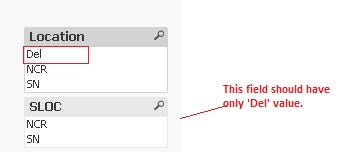
The location values should not be in Sub-location and vice versa. The ones highlighted below should not be in present in their respective fields.
Expected output-->
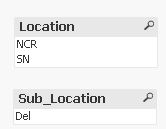
Please help.

 antoniotiman
- Mark as New
- Bookmark
- Subscribe
- Mute
- Subscribe to RSS Feed
- Permalink
- Report Inappropriate Content
Where "user click on Del", in Location or SubLocation Listbox ?
surajap123
- Mark as New
- Bookmark
- Subscribe
- Mute
- Subscribe to RSS Feed
- Permalink
- Report Inappropriate Content
Hi Prashant,
I didn't get how i can solve by concatenation. There is no SubLocation field in my main table and i want data to be splitted, so that sub-location data is not in location field and location data is not in sub-location field. However the Location with sub-location should show complete sales(ie. sales of both location and its sub-location.)
surajap123
- Mark as New
- Bookmark
- Subscribe
- Mute
- Subscribe to RSS Feed
- Permalink
- Report Inappropriate Content
Sub-Location.
Please see the lookup table.
PrashantSangle
- Mark as New
- Bookmark
- Subscribe
- Mute
- Subscribe to RSS Feed
- Permalink
- Report Inappropriate Content
Sorry my bad.
I interpret incorrectly.
Regards,
Please appreciate our Qlik community members by giving Kudos for sharing their time for your query. If your query is answered, please mark the topic as resolved 🙂

 el_aprendiz111
- Mark as New
- Bookmark
- Subscribe
- Mute
- Subscribe to RSS Feed
- Permalink
- Report Inappropriate Content
Hi,