Unlock a world of possibilities! Login now and discover the exclusive benefits awaiting you.

- Qlik Community
- :
- All Forums
- :
- QlikView
- :
- Re: Date
- Subscribe to RSS Feed
- Mark Topic as New
- Mark Topic as Read
- Float this Topic for Current User
- Bookmark
- Subscribe
- Mute
- Printer Friendly Page

- Mark as New
- Bookmark
- Subscribe
- Mute
- Subscribe to RSS Feed
- Permalink
- Report Inappropriate Content
Date
Hi Experts,
I will get data from different sources and my date format is different in each source. How to maintain single format in QV.
Please find attached sample data
Thanks
- Tags:
- date calendar
- « Previous Replies
-
- 1
- 2
- Next Replies »
Accepted Solutions

 jagan
jagan
- Mark as New
- Bookmark
- Subscribe
- Mute
- Subscribe to RSS Feed
- Permalink
- Report Inappropriate Content
Hi,
Try like this for Timestamp also
Data:
LOAD [Product ID],
[Product name],
Timestamp(Alt(Num#([Start Date]), Date#(Left([Start Date], 18) & ' ' & Right([Start Date], 2), 'DD-MMM-YY hh.mm.ss TT'))) AS StartDate,
Timestamp(Alt(Num#([End Date]), Date#(Left([End Date], 18) & ' ' & Right([End Date], 2), 'DD-MMM-YY hh.mm.ss TT'))) AS EndDate
FROM
[Sample Date (1).xlsx]
(ooxml, embedded labels, table is Sheet1);
Regards,
Jagan.

 settu_periasamy
- Mark as New
- Bookmark
- Subscribe
- Mute
- Subscribe to RSS Feed
- Permalink
- Report Inappropriate Content
Hi,
Check the Attachment.
Directory;
LOAD [Product ID],
[Product name],
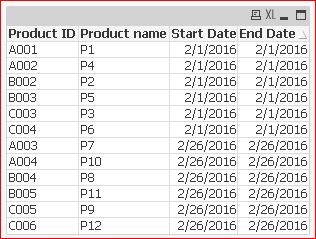
Date(floor(Alt(Timestamp([Start Date]),Date#(SubField([Start Date],' ',1),'DD-MMM-YY')))) as [Start Date],
Date(floor(Alt(Timestamp([End Date]),Date#(SubField([Start Date],' ',1),'DD-MMM-YY')))) as [End Date]
FROM
[Sample Date.xlsx]
(ooxml, embedded labels, table is Sheet1);
jagan
- Mark as New
- Bookmark
- Subscribe
- Mute
- Subscribe to RSS Feed
- Permalink
- Report Inappropriate Content
Hi,
Try like this
Data:
LOAD [Product ID],
[Product name],
Date(Alt(Num#([Start Date]), Date#(Left([Start Date], 9), 'DD-MMM-YY'))) AS StartDate,
Date(Alt(Num#([End Date]), Date#(Left([End Date], 9), 'DD-MMM-YY'))) AS EndDate
FROM
[Sample Date.xlsx]
(ooxml, embedded labels, table is Sheet1);
Hope this helps you.
Regards,
Jagan.
jagan
- Mark as New
- Bookmark
- Subscribe
- Mute
- Subscribe to RSS Feed
- Permalink
- Report Inappropriate Content
HI,
Check for help in Qlikview help file for Alt(), Date#() and Num#().
Regards,
Jagan.
- Mark as New
- Bookmark
- Subscribe
- Mute
- Subscribe to RSS Feed
- Permalink
- Report Inappropriate Content
Please find attached file.
I want to change the two different formats into one format. !
jagan
- Mark as New
- Bookmark
- Subscribe
- Mute
- Subscribe to RSS Feed
- Permalink
- Report Inappropriate Content
HI,
What are this date formats? 61057599:36.7
What is the source for this date field? How to identify what year, month & Date?
Regards,
Jagan.
settu_periasamy
- Mark as New
- Bookmark
- Subscribe
- Mute
- Subscribe to RSS Feed
- Permalink
- Report Inappropriate Content
Hi,
Try this..
Directory;
T1:
LOAD [Product ID],
     [Product name],
     [Start Date],
     [End Date],
     Date(MonthStart(DateTime), 'MMM YYYY') AS Month,
     Date(Floor(DateTime)) AS ServiceStartDate,
     Hour(DateTime) AS ServiceHour;
LOAD [Product ID],
     [Product name],
     Date(Floor(Timestamp(Alt([Start Date],Timestamp#([Start Date],'DD-MMM-YY h.mm.ss[.fff] TT'))))) as [Start Date],
     Date(Floor(Timestamp(Alt([End Date],Timestamp#([End Date],'DD-MMM-YY h.mm.ss[.fff] TT'))))) as [End Date],
     Timestamp(Alt([Start Date],Timestamp#([Start Date],'DD-MMM-YY h.mm.ss[.fff] TT'))) as DateTime
FROM
[Sample Date.xlsx]
(ooxml, embedded labels, table is Sheet1);
- Mark as New
- Bookmark
- Subscribe
- Mute
- Subscribe to RSS Feed
- Permalink
- Report Inappropriate Content
In attached Sample Excel file we are able to see the Date format
jagan
- Mark as New
- Bookmark
- Subscribe
- Mute
- Subscribe to RSS Feed
- Permalink
- Report Inappropriate Content
Hi,
Did you tried this script
Data:
LOAD [Product ID],
[Product name],
Date(Alt(Num#([Start Date]), Date#(Left([Start Date], 9), 'DD-MMM-YY'))) AS StartDate,
Date(Alt(Num#([End Date]), Date#(Left([End Date], 9), 'DD-MMM-YY'))) AS EndDate
FROM
[Sample Date.xlsx]
(ooxml, embedded labels, table is Sheet1);
Regards,
Jagan.
jagan
- Mark as New
- Bookmark
- Subscribe
- Mute
- Subscribe to RSS Feed
- Permalink
- Report Inappropriate Content
Hi,
Try like this for Timestamp also
Data:
LOAD [Product ID],
[Product name],
Timestamp(Alt(Num#([Start Date]), Date#(Left([Start Date], 18) & ' ' & Right([Start Date], 2), 'DD-MMM-YY hh.mm.ss TT'))) AS StartDate,
Timestamp(Alt(Num#([End Date]), Date#(Left([End Date], 18) & ' ' & Right([End Date], 2), 'DD-MMM-YY hh.mm.ss TT'))) AS EndDate
FROM
[Sample Date (1).xlsx]
(ooxml, embedded labels, table is Sheet1);
Regards,
Jagan.
- « Previous Replies
-
- 1
- 2
- Next Replies »