Unlock a world of possibilities! Login now and discover the exclusive benefits awaiting you.

- Qlik Community
- :
- All Forums
- :
- QlikView
- :
- Pivot Table expression
- Subscribe to RSS Feed
- Mark Topic as New
- Mark Topic as Read
- Float this Topic for Current User
- Bookmark
- Subscribe
- Mute
- Printer Friendly Page

 tomcatxx
- Mark as New
- Bookmark
- Subscribe
- Mute
- Subscribe to RSS Feed
- Permalink
- Report Inappropriate Content
Pivot Table expression
Hi, there. I want to make a pivot table like that. There are only 2 dimensions 'Minifabrik' and 'Day'.
| Minifabrik | Day | We | Th | Fr | Avg | Target |
|---|---|---|---|---|---|---|
| MF1 | % | % | % | % | % | |
| MF2 | % | % | % | % | % | |
| MF3 | % | % | % | % | % | |
| MF4 | % | % | % | % | % |
I made a table but not finished.
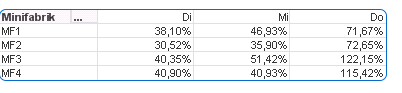
Values for column We Th and Fr are Sum(A)/Sum(B).
Can u help me to write expression for column Avgerage and Target? Target = avg(T)
Thank you.
data source
Load Minifabrik,
Day,
A,
B,
T
From xx.qvd
- « Previous Replies
-
- 1
- 2
- Next Replies »

 niclaz79
- Mark as New
- Bookmark
- Subscribe
- Mute
- Subscribe to RSS Feed
- Permalink
- Report Inappropriate Content
Avg(RangeSum(Before(Sum(A)/Sum(B),0,7)) maybe?

 suhaskharat
- Mark as New
- Bookmark
- Subscribe
- Mute
- Subscribe to RSS Feed
- Permalink
- Report Inappropriate Content
Use below formula for average
Column(1)+Column(2)+Column(3)/3
for target as u have mentioned
(Column(1)+Column(2)+Column(3)/3)/100
tomcatxx
- Mark as New
- Bookmark
- Subscribe
- Mute
- Subscribe to RSS Feed
- Permalink
- Report Inappropriate Content
Thank u, but it doesn't work.

tomcatxx
- Mark as New
- Bookmark
- Subscribe
- Mute
- Subscribe to RSS Feed
- Permalink
- Report Inappropriate Content
Can u you write Expression for that? And sometimes I have data for 7 days(Mo~So). In this table, the null value just will not be showed.
niclaz79
- Mark as New
- Bookmark
- Subscribe
- Mute
- Subscribe to RSS Feed
- Permalink
- Report Inappropriate Content
Ok, try the following
Avg(Sum(TOTAL <MF> A)/Sum(TOTAL <MF> B))

 sunny_talwar
- Mark as New
- Bookmark
- Subscribe
- Mute
- Subscribe to RSS Feed
- Permalink
- Report Inappropriate Content
Would you be able to share some raw data or a sample app?
tomcatxx
- Mark as New
- Bookmark
- Subscribe
- Mute
- Subscribe to RSS Feed
- Permalink
- Report Inappropriate Content
Yes, I made a test.

 BalaBhaskar_Qli
- Mark as New
- Bookmark
- Subscribe
- Mute
- Subscribe to RSS Feed
- Permalink
- Report Inappropriate Content
May be like this:
=Sum(Sales) / Count(DISTINCT Date)
sunny_talwar
- Mark as New
- Bookmark
- Subscribe
- Mute
- Subscribe to RSS Feed
- Permalink
- Report Inappropriate Content
Where is the test file? can you share it with us?

- « Previous Replies
-
- 1
- 2
- Next Replies »