Unlock a world of possibilities! Login now and discover the exclusive benefits awaiting you.

- Qlik Community
- :
- All Forums
- :
- QlikView
- :
- Re: YTD(Year to date)
- Subscribe to RSS Feed
- Mark Topic as New
- Mark Topic as Read
- Float this Topic for Current User
- Bookmark
- Subscribe
- Mute
- Printer Friendly Page

- Mark as New
- Bookmark
- Subscribe
- Mute
- Subscribe to RSS Feed
- Permalink
- Report Inappropriate Content
YTD(Year to date)
Hi All,
I have Ratio say sum(amount_paid)/sum(confirmed_policy_premium) and Dimension as a Year.
I want to the ratio for all the years. This works fine.
But i have a scenario where if Current month is September then Current Years will be calculated from January to September and other Previous years from January to December.
I want other Years to be calculated from January to September.
How to achieve this.
Please help me with this. I don't have QVW to attach.
Thanks & regards,
Keerthi
- « Previous Replies
-
- 1
- 2
- Next Replies »
- Mark as New
- Bookmark
- Subscribe
- Mute
- Subscribe to RSS Feed
- Permalink
- Report Inappropriate Content
Thanks a lot henric 
If i select any year say 2012 then i will get for the complete year right ??

 MK_QSL
- Mark as New
- Bookmark
- Subscribe
- Mute
- Subscribe to RSS Feed
- Permalink
- Report Inappropriate Content
Genius...!!!
I was also searching for the short and easy method...

 bernice_gonzale
- Mark as New
- Bookmark
- Subscribe
- Mute
- Subscribe to RSS Feed
- Permalink
- Report Inappropriate Content
Is this working for you?
What happens when you select a year, i.e. 2013?
 vikasmahajan
- Mark as New
- Bookmark
- Subscribe
- Mute
- Subscribe to RSS Feed
- Permalink
- Report Inappropriate Content
How to calculate previous year ytd same period last year ytd?
Vikas
If the issue is solved please mark the answer with Accept as Solution & like it.
If you want to go quickly, go alone. If you want to go far, go together.

.png "Former Employee") hic
hic
- Mark as New
- Bookmark
- Subscribe
- Mute
- Subscribe to RSS Feed
- Permalink
- Report Inappropriate Content
Take a look at Year-over-Year Comparisons. The field IsInYTD can be used for any year, not just current year.
HIC
bernice_gonzale
- Mark as New
- Bookmark
- Subscribe
- Mute
- Subscribe to RSS Feed
- Permalink
- Report Inappropriate Content
This is my project and how I resolved it.
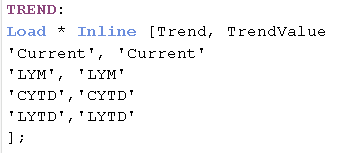
1.- I needed in a Pivot table to have these columns: Actual (current months selection) , LYM, CYTD, LYTD

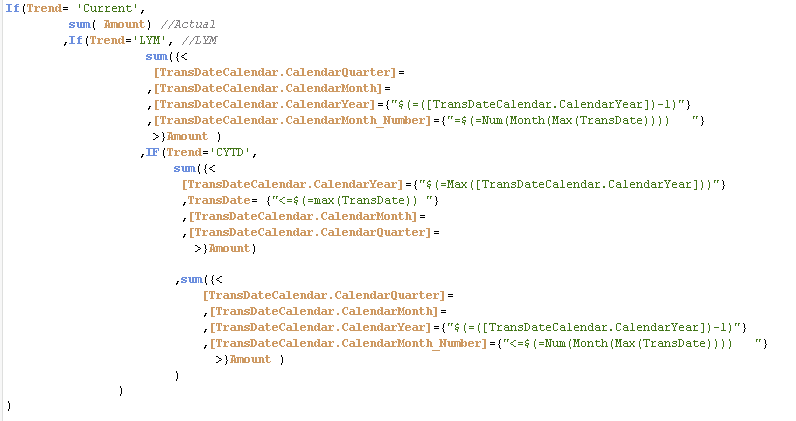
2.-My Measures or calculation are row.
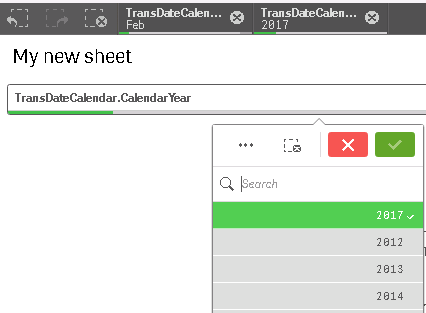
3.- The user should be able to select any year of information and Months. That mean, Current Year can be change to be 2017 or 2016, in consequences the rest of the columns should adjust.
Solutions:
For 1: I create an inline table. With the values I need in my columns.
For 2: In my measures, I added the set analysis that makes the calculation based on a column. Like a Case scenario. I had to use CalendarMonth_Number, because using AddYears(( TransDate) ,-1) was not working for me.
For 3: I'm already using Dimensions as filters.

 StacyCui
- Mark as New
- Bookmark
- Subscribe
- Mute
- Subscribe to RSS Feed
- Permalink
- Report Inappropriate Content
Hi, As you mentioned about YTD, I met an issue recently. In my business scope, we need put 'YTD' and Period in a filter for selecting. I created a master calendar that set today as 'YTD'. But when I selected 'YTD' , if there is no order today, that causes other filter in gray. In other words, 'YTD' is not a period time, just only one day. If that function could solve it? I post this issue, could you please help out with it? Thank you so much.
- « Previous Replies
-
- 1
- 2
- Next Replies »