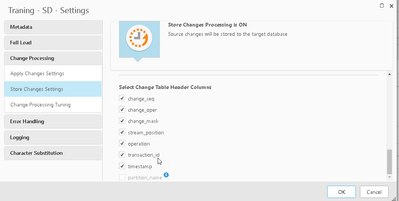
As a part of our requirement, we would like to have all columns including CT table columns asUpper Case. But in the task settings for Change Processing, Replicate is creating all of the Header columns in CT tables as lower case. We would like to have them as Upper Case as we need to double quote them to query unless they are created with Upper Case. Is there a way to create them Upper Case with Global Transformation or something?
I've also checked with support, they've requested me to post this as an Ideation topic for future enhancement (Case - 02165229)
Our source is 'SQL Server' and target is 'Snowflake on Azure'.
Use Case:
If we want to query header columns from CT tables, we had to double-quote the values as they were created in lower-case which is not recommended by our developing team to use double-quotes around few objects & not around few (cause we are converting all of our tables/columns to uppercase with Global Transformations). So we would like this feature enabled to able to create header columns as uppercase in order to have consistent coding standards.
While moving objects to Snowflake, Replicate automatically enables double-quotes around objects (there is no option to disable it in replicate) and hence these header columns are created in lower-case. Moreover Replicate sets the session paramerter 'quoted_identifiers_ignore_case' to 'false' by default(can't be updated to 'true') which rules out the option of case-sensitivity from Snowflake standpoint.
So, inorder to not use double-quotes for these header columns - only option is to create them with uppercase and there is no way around to do that in Replicate currently.
We do plan to expose an internal parameter for Snowflake with the upcoming May release to control QUOTED_IDENTIFIERS_IGNORE_CASE parameter.
Would this alleviate the issue for you? You can try this with the Technical Preview that is currently available and add the internal parameter "setIgnoreCaseFlag" to true.
Are you editing the parameters for the Snowflake target though? The internal parameters are set for each individual endpoint, and in your screenshot it looks like you have another endpoint selected (a SQL source).