Show the CORRECT title of a filter dimension in the selection bar
Attachments
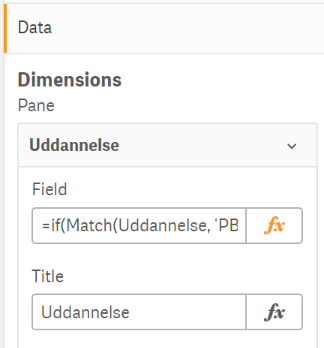
Sometimes I use an if-statement in a filter pane. I give the filter a title (e.g. "Uddannelse"). When a user selects one of the values in the filter, the selection bar shows not the title of the filter, but the if-statement, which confuses the user, as he / she cannot see which filter is actually being used.
I have attached screen dumps that shows the problem.
Unfortunately, that does not work here. GIF works fine although I cannot quite see what it is that you write in front of 'AciiNum' under "Label description" in the master dimension? Is it a "-" or "="? "-" is not accepted, and "=" does not give the desired result (I still get "if(...)" in the selection bar.
Qlik Sense seems to have a very erratic behaviour. This morning, when I select a filter in a filter pane, where I have used an if-statement, it actually shows the title that I have defined for the filter...! And this is the exact same filter pane from the other day and I have not changed anything. That is really weird, but I also read of another user who experienced this strange and changing behaviour. See this link: https://community.qlik.com/t5/Ideas/Show-dimension-Title-in-filter-bar/idi-p/1600590
Also, this morning the solution that you provided works.
I am confused, though, about the behaviour of Qlik Sense.
In this post I will be explaining how you can switch between different views on a dashboard using a parameter as taught by Coach Kriebel in our parameters class a couple of weeks ago. Trust me the end result will be MAGIC. This works by showing the view we want and hiding the view(s) we don’t want to see on our dashboard mcdvoice.com
You must be a registered user to add a comment. If you've already registered, sign in. Otherwise, register and sign in.