Unlock a world of possibilities! Login now and discover the exclusive benefits awaiting you.

- Qlik Community
- :
- Forums
- :
- Analytics & AI
- :
- Products & Topics
- :
- Visualization and Usability
- :
- Re: Bar Graphs to take input from multiple fields(...
- Subscribe to RSS Feed
- Mark Topic as New
- Mark Topic as Read
- Float this Topic for Current User
- Bookmark
- Subscribe
- Mute
- Printer Friendly Page

- Mark as New
- Bookmark
- Subscribe
- Mute
- Subscribe to RSS Feed
- Permalink
- Report Inappropriate Content
Bar Graphs to take input from multiple fields(columns in db) combining those to produce single value
Hello All,
As i am new to QlikSense, i have a task to produce the graph and which takes data from the db.
DB Tables:
Survey
survey_id lender_offer_id answer_text
10 1 Strongly Agree
11 1 Agree
12 2 Excellent
13 2 Above Average
14 3 Strongly Agree
15 3 Agree
Here is my Script:
LOAD `survey_id`,
`lender_offer_id`,
`survey_question_id`,
`answer_text`;
SQL SELECT `survey_id`,
`user_id`,
`lender_offer_id`,
`batch_meta_data_id`,
`survey_question_id`,
`answer_text`
FROM SURVEY;
My Goal is to produce a bargraph that must produce a percentage to know how much percent of people opted to particular Option in the Survey.
But restriction here is i must take Strongly Agree and Excellent as Strongly Agree, Agree and Above Average as Agree by totalling.
For eg:
In the above table total 3 persons opted for Strongly Agree(Included Excellent) and 3 for Agree(included Above Average).
How can i do that using QlikSense.
- « Previous Replies
-
- 1
- 2
- Next Replies »

 OmarBenSalem
- Mark as New
- Bookmark
- Subscribe
- Mute
- Subscribe to RSS Feed
- Permalink
- Report Inappropriate Content
Can you share your app please?
So I can see your full script?
- Mark as New
- Bookmark
- Subscribe
- Mute
- Subscribe to RSS Feed
- Permalink
- Report Inappropriate Content
Ok bro i'll
- Mark as New
- Bookmark
- Subscribe
- Mute
- Subscribe to RSS Feed
- Permalink
- Report Inappropriate Content
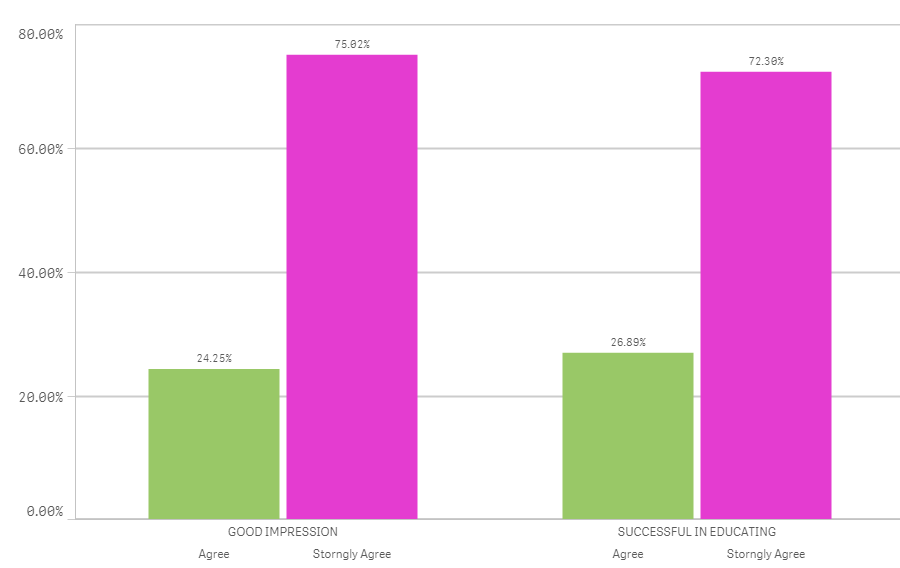
In Bar Graph:
Red color: Strongly Agree
Blue:Agree
Two Pair of Bars stands for Q1 and Q2,,
Changes in expressions recommended.
OmarBenSalem
- Mark as New
- Bookmark
- Subscribe
- Mute
- Subscribe to RSS Feed
- Permalink
- Report Inappropriate Content
Maybe you'd want to change your expression as follow?
count(distinct{<question_id={'Q1','Q2'}>} lender_offer_id)/count(distinct {<question_id={'Q1','Q2'}>} total lender_offer_id)
- Mark as New
- Bookmark
- Subscribe
- Mute
- Subscribe to RSS Feed
- Permalink
- Report Inappropriate Content
What about dimensions,all good?
OmarBenSalem
- Mark as New
- Bookmark
- Subscribe
- Mute
- Subscribe to RSS Feed
- Permalink
- Report Inappropriate Content
I would change your second one as follow:
=if((Match(answer_text,'Strongly Agree','Excellent')),'Strongly Agree',if(Match(answer_text,'Agree','Above Average'),'Agree'))
- Mark as New
- Bookmark
- Subscribe
- Mute
- Subscribe to RSS Feed
- Permalink
- Report Inappropriate Content
It worked,,i need to check the counts,,,to verify whether it is coming the exact percentage
Thank u so much,,,
- « Previous Replies
-
- 1
- 2
- Next Replies »