Unlock a world of possibilities! Login now and discover the exclusive benefits awaiting you.

- Qlik Community
- :
- Forums
- :
- Analytics & AI
- :
- Products & Topics
- :
- Visualization and Usability
- :
- Re: Binary Load in Qlik Sense cloud
- Subscribe to RSS Feed
- Mark Topic as New
- Mark Topic as Read
- Float this Topic for Current User
- Bookmark
- Subscribe
- Mute
- Printer Friendly Page

 vangurideepu
- Mark as New
- Bookmark
- Subscribe
- Mute
- Subscribe to RSS Feed
- Permalink
- Report Inappropriate Content
Binary Load in Qlik Sense cloud
I tried so many times in Qlik sense desktop and as well in cloud, can anyone explain the Binary load with example.
thanks in advance, help would be appreciated.
Regards
Pradeep
- Tags:
- binary load*
- load
Accepted Solutions
 ChennaiahNallan
- Mark as New
- Bookmark
- Subscribe
- Mute
- Subscribe to RSS Feed
- Permalink
- Report Inappropriate Content
ChennaiahNallan- Mark as New
- Bookmark
- Subscribe
- Mute
- Subscribe to RSS Feed
- Permalink
- Report Inappropriate Content
see this video,
vangurideepu
- Mark as New
- Bookmark
- Subscribe
- Mute
- Subscribe to RSS Feed
- Permalink
- Report Inappropriate Content
Hello Chennaiah,
Thanks for quick reply.

 McDonald-1022
- Mark as New
- Bookmark
- Subscribe
- Mute
- Subscribe to RSS Feed
- Permalink
- Report Inappropriate Content
Great for the Desktop......doesn't help Cloud

 RamanaKumarChin
- Mark as New
- Bookmark
- Subscribe
- Mute
- Subscribe to RSS Feed
- Permalink
- Report Inappropriate Content
Hi @vangurideepu ,
Here is the Binary Loading in the Qlik Sense Cloud/SaaS
We have one limitation with in the Qlik Sense SaaS for Binary Load
You cannot upload QVW or QVF files to the /DataFiles folder. Instead,
you can upload the file to a file share, for example AWS S3 or Google Drive,
and then load the data from a data connection connected to the file share.
Reference Link:
Below is the process to do Binary Loading in Qlik Sense Cloud:
Example: I have already an application name called Section_8_Data_Validation .qvf This application already loads some data.
This application is loaded into One-Drive
I create a new application, naming it Binaryload.qvf
With its Data Load Editor I created a new connection with One-Drive and authenticate as with required details.

Then, on the very first line of the script (It must be the very first line) the statement Binary
[lib://Banking:OneDrive/Binaryloading/Section_8_Data_Validation .qvf]
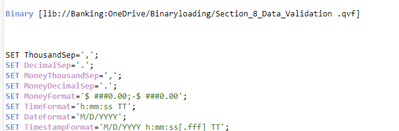
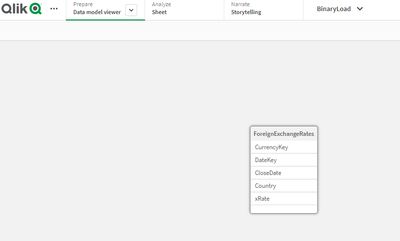
Now I clicked on the Load data button, and the new application, Binary-Load now features the same Data Model from the Section_8_Data_Validation .qvf
I was able to create a different UI for the new application;
For Qlik Sense Enterprise on windows Please follow below link:
I Hope this will helps!!!
