Unlock a world of possibilities! Login now and discover the exclusive benefits awaiting you.

- Qlik Community
- :
- Forums
- :
- Analytics & AI
- :
- Products & Topics
- :
- Visualization and Usability
- :
- Re: Calculate compound rate
- Subscribe to RSS Feed
- Mark Topic as New
- Mark Topic as Read
- Float this Topic for Current User
- Bookmark
- Subscribe
- Mute
- Printer Friendly Page

 SariPari
- Mark as New
- Bookmark
- Subscribe
- Mute
- Subscribe to RSS Feed
- Permalink
- Report Inappropriate Content
Calculate compound rate
Hi - I have the issue where I need to calculate the expense Increase /Decrease based on the Rates and the year.
I have the solution using variables but that is not the ideal way of doing this for sure.This method is messing the performace as I have almost 3000 Address with different Construction years.I have the working app attached.
I have data as below and the required calculation is in the screenshot (Column named Calculation)
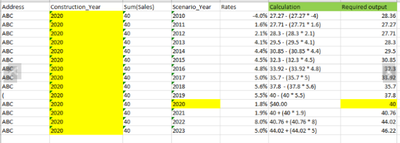
Ex:
2020 is $40
2019 = 2020's value - % change of 2019 = 40 - (40 * 5.5) = 37.80
2018 = 2019's value - % change of 2018 = 37.80 - (37.80 * 5.6) = 35.70
2017 = 2019's value - % change of 2017 = 35.70 - (35.70 * 5.0) = 33.92
so on until 2010
for year 2021 onwards it will add the % change
2021 = 2020's value + % change of 2021 = 40 - (40 * 1.9) = 40.76
2022 = 2021's value + % change of 2022 = 40.76 - (40.76)= 44.02
so on until 2023.
Any help is much appreciated.
@theoat @henrikalmen @stevedark @marcus_sommer @sunny_talwar @swuehl @hic @Gysbert_Wassenaar @jagan
Thank you so much!
- « Previous Replies
- Next Replies »
SariPari
- Mark as New
- Bookmark
- Subscribe
- Mute
- Subscribe to RSS Feed
- Permalink
- Report Inappropriate Content
@Anil_Babu_Samineni - I found a way of calculating the numbers but I would say, this is a donkey way of doing for sure.I am hoping there is a better way of calculating this as this is messing up the performace of the dashboard as I have almost 3,000 locations!
1st sheet has the right #'s.I used variables to calculate....
Please let me know if you can think of any better way to calulate using qlik functions...
Thank you much!
SariPari
- Mark as New
- Bookmark
- Subscribe
- Mute
- Subscribe to RSS Feed
- Permalink
- Report Inappropriate Content
Hi - I have the issue where I need to calculate the expense Increase /Decrease based on the Rates and the year.
I have the solution using variables but that is not the ideal way of doing this for sure.This method is messing the performace as I have almost 3000 Address with different Construction years.I have the working app attached.
I have data as below and the required calculation is in the screenshot (Column named Calculation)

Ex:
2020 is $40
2019 = 2020's value - % change of 2019 = 40 - (40 * 5.5) = 37.80
2018 = 2019's value - % change of 2018 = 37.80 - (37.80 * 5.6) = 35.70
2017 = 2019's value - % change of 2017 = 35.70 - (35.70 * 5.0) = 33.92
so on until 2010
for year 2021 onwards it will add the % change
2021 = 2020's value + % change of 2021 = 40 - (40 * 1.9) = 40.76
2022 = 2021's value + % change of 2022 = 40.76 - (40.76)= 44.02
so on until 2023.
Any help is much appreciated.
@theoat @henrikalmen @stevedark @marcus_sommer @sunny_talwar @swuehl @hic @Gysbert_Wassenaar @jagan @Lech_Miszkiewicz


- Mark as New
- Bookmark
- Subscribe
- Mute
- Subscribe to RSS Feed
- Permalink
- Report Inappropriate Content
@SariPari Have you checked my expression already?
An example for this data point below, I have calculated and produced the same as per given logic.
2019 = 2020's value - % change of 2019 = 40 - (40 * 5.5) = 37.80
PS: I will recommend you to split into different expressions like 3 expressions for 40, 40 and 5.5 - Then do final calculation to understand what has happened and find a way if you can see the result what I have shared earlier.
Do you still need our help, please reach out to us!
SariPari
- Mark as New
- Bookmark
- Subscribe
- Mute
- Subscribe to RSS Feed
- Permalink
- Report Inappropriate Content
@Anil_Babu_Samineni - yeah, I tried the expression you provided....that gives the right number for 2021 only, same as the expression I had using 'pow' function but after 2021 the #'s are not as expected
See the attached.
Expression using Variables #'s are correct but fuction #'s aren't and I am not able to use the Variable expression as I have over 3,000 records and the app performace is very bad.
BTW thank you getting back on this.I had lost hope 🙂
Thank you!
SariPari
- Mark as New
- Bookmark
- Subscribe
- Mute
- Subscribe to RSS Feed
- Permalink
- Report Inappropriate Content
@Anil_Babu_Samineni - any thoughts ?
- Mark as New
- Bookmark
- Subscribe
- Mute
- Subscribe to RSS Feed
- Permalink
- Report Inappropriate Content
@SariPari Like I mentioned, please divide them into different expressions to match your needs and finally you can merge into one to get the expected result.
The expression I have given is for whole, So if you split that to needs, it may give well understand. Did you tried already that? If so, I will have a look.

- « Previous Replies
- Next Replies »