Unlock a world of possibilities! Login now and discover the exclusive benefits awaiting you.

- Qlik Community
- :
- Forums
- :
- Analytics & AI
- :
- Products & Topics
- :
- Visualization and Usability
- :
- Re: Change number format to thousand
- Subscribe to RSS Feed
- Mark Topic as New
- Mark Topic as Read
- Float this Topic for Current User
- Bookmark
- Subscribe
- Mute
- Printer Friendly Page

- Mark as New
- Bookmark
- Subscribe
- Mute
- Subscribe to RSS Feed
- Permalink
- Report Inappropriate Content
Change number format to thousand
Hi
I have values for measure as 100000, 2000000, 300000 etc. I want values to be resprented as 100k, 200k, 300k.
I used expression like below but i am values like 100, 200 instead of 100k, 200k
If(SUM([Vbl.Val./COCrcy]) >= 1000000,
Num(SUM([Vbl.Val./COCrcy])/1000000, '#.##0 M'),
Num(SUM([Vbl.Val./COCrcy])/1000, '#.##0 K')
)
Can you please let me know what i am missing
Thanks

 ramoncova06
- Mark as New
- Bookmark
- Subscribe
- Mute
- Subscribe to RSS Feed
- Permalink
- Report Inappropriate Content
is this in a table or a text object ?
if it inside a table go to numbers and change the symbol to "K"
for the one you were already working on remove the symbols from the num and use & to append them
the other option is
If(SUM([Vbl.Val./COCrcy]) >= 1000000,
Num(SUM([Vbl.Val./COCrcy])/1000000, '#.##0')&'M',
Num(SUM([Vbl.Val./COCrcy])/1000, '#.##0)&'K'
)

.png "Former Employee") ian_wilson
ian_wilson
- Mark as New
- Bookmark
- Subscribe
- Mute
- Subscribe to RSS Feed
- Permalink
- Report Inappropriate Content
try this (i am using "Sales" instead "[Vbl.Val./COCrcy]"):
If(Sum(Sales) >= 1000000,
Num(Sum(Sales)/1000000, '#.##0M'),
Num(Sum(Sales)/1000, '#.##0K')
)
- Mark as New
- Bookmark
- Subscribe
- Mute
- Subscribe to RSS Feed
- Permalink
- Report Inappropriate Content
sorry about forgot to mention it is stacked bar chart. Not sure if it is still possible.
ian_wilson
- Mark as New
- Bookmark
- Subscribe
- Mute
- Subscribe to RSS Feed
- Permalink
- Report Inappropriate Content
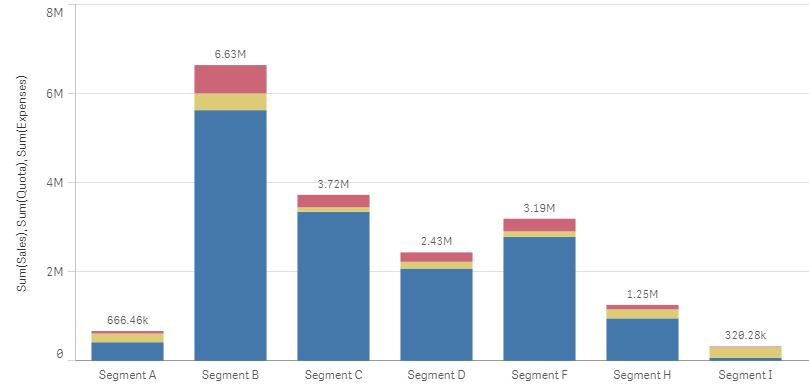
The number formatting for the Y-axis and the value labels on the stacked bar chart in Qlik Sense are auto-formatted. And they will display K and M as needed. Here's an example of both K's and M's showing automatically with Qlik Sense:
- Mark as New
- Bookmark
- Subscribe
- Mute
- Subscribe to RSS Feed
- Permalink
- Report Inappropriate Content
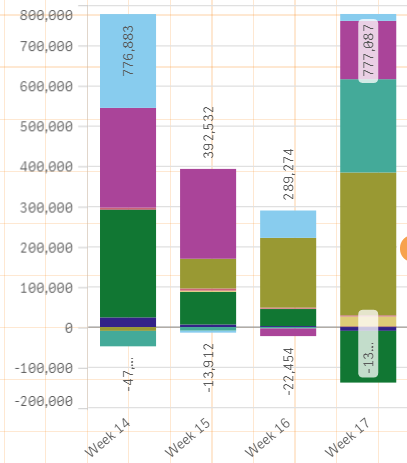
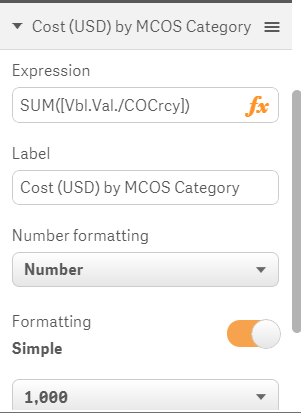
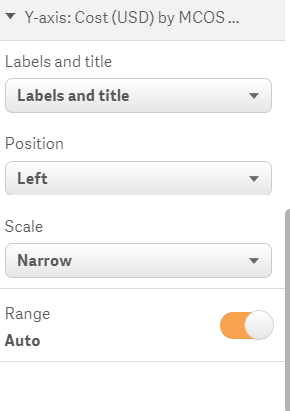
Thanks for the reply.it does not show for me converting to automatically.My expression is SUM(fieldname)
Am i doing anything wrong
Thanks
- Mark as New
- Bookmark
- Subscribe
- Mute
- Subscribe to RSS Feed
- Permalink
- Report Inappropriate Content
I am able to achieve this now. had to change it to custom and change format pattern.