Unlock a world of possibilities! Login now and discover the exclusive benefits awaiting you.

- Qlik Community
- :
- Forums
- :
- Analytics & AI
- :
- Products & Topics
- :
- Visualization and Usability
- :
- Re: Custom color changes in list box selection
- Subscribe to RSS Feed
- Mark Topic as New
- Mark Topic as Read
- Float this Topic for Current User
- Bookmark
- Subscribe
- Mute
- Printer Friendly Page

 manmadha
- Mark as New
- Bookmark
- Subscribe
- Mute
- Subscribe to RSS Feed
- Permalink
- Report Inappropriate Content
Custom color changes in list box selection
Hi Experts,
I need your help to changes list box parameter selection custom color change (the default color is Green).
kindly help me on that.
- « Previous Replies
-
- 1
- 2
- Next Replies »

 EliGohar
- Mark as New
- Bookmark
- Subscribe
- Mute
- Subscribe to RSS Feed
- Permalink
- Report Inappropriate Content
@ester_pr Can you attach a screenshot of the part you want to edit?
 ester_pr
- Mark as New
- Bookmark
- Subscribe
- Mute
- Subscribe to RSS Feed
- Permalink
- Report Inappropriate Content
@EliGohar Hi,
I used your code and I have no idea what the code is for "not selected" color 😞
EliGohar
- Mark as New
- Bookmark
- Subscribe
- Mute
- Subscribe to RSS Feed
- Permalink
- Report Inappropriate Content
@ester_pr I think I understood your request, If you mean this part (value 2020):
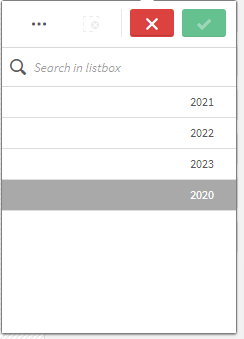
Then try this CSS:
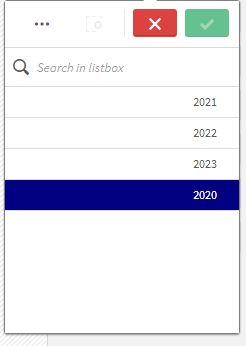
.qv-listbox li.serverExcluded, .qv-listbox li.serverExcludedLock, .qv-listbox li.serverSelectedExcluded {
    background-color: navy!important;
    color: white!important;
}
Result:
 AJerbi
- Mark as New
- Bookmark
- Subscribe
- Mute
- Subscribe to RSS Feed
- Permalink
- Report Inappropriate Content
Hi again @EliGohar
Can you please guide me on how to do the same (changing the selection color from green to custom color) but on a pivot table ?
ester_pr
- Mark as New
- Bookmark
- Subscribe
- Mute
- Subscribe to RSS Feed
- Permalink
- Report Inappropriate Content
Thank you very much, I will try it

 Onkar_Kulkarni
- Mark as New
- Bookmark
- Subscribe
- Mute
- Subscribe to RSS Feed
- Permalink
- Report Inappropriate Content
@EliGohar - this is really useful CSS code, can I have similar blue colour instead of Green at below places as well?
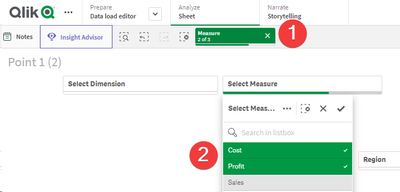
Thanks a lot.
EliGohar
- Mark as New
- Bookmark
- Subscribe
- Mute
- Subscribe to RSS Feed
- Permalink
- Report Inappropriate Content
@Onkar_Kulkarni Hi, what's the version you are using?

 Aasir
Aasir
- Mark as New
- Bookmark
- Subscribe
- Mute
- Subscribe to RSS Feed
- Permalink
- Report Inappropriate Content
Create a text object and use conditional formating
if(GetFieldSelections(YourField) = 'YourSelection', RGB(255, 0, 0), RGB(0, 128, 0))
Onkar_Kulkarni
- Mark as New
- Bookmark
- Subscribe
- Mute
- Subscribe to RSS Feed
- Permalink
- Report Inappropriate Content
@EliGohar - Thanks for your reply. I am using it on the Qlik cloud tenant.

- « Previous Replies
-
- 1
- 2
- Next Replies »