Unlock a world of possibilities! Login now and discover the exclusive benefits awaiting you.

- Qlik Community
- :
- Forums
- :
- Analytics & AI
- :
- Products & Topics
- :
- Visualization and Usability
- :
- Re: Date & Time Wise Calculation
- Subscribe to RSS Feed
- Mark Topic as New
- Mark Topic as Read
- Float this Topic for Current User
- Bookmark
- Subscribe
- Mute
- Printer Friendly Page

 KKumar92
- Mark as New
- Bookmark
- Subscribe
- Mute
- Subscribe to RSS Feed
- Permalink
- Report Inappropriate Content
Date & Time Wise Calculation
Hi All,
I am currently working on a report, where my purpose is to show the difference between standard and stock movement quantities.
Two table as follow;
| Standard Requirement | |
| Date | Qty_Required |
| 1/2/2020 | 15000 |
| 1/3/2020 | 8500 |
| 1/4/2020 | 6500 |
| Stock_Movement | ||
| Date | Time | Qty |
| 1/1/2020 | 1:00 | 8500 |
| 1/1/2020 | 2:00 | 120 |
| 1/1/2020 | 4:00 | 365 |
| 1/1/2020 | 16:00 | 785 |
| 1/1/2020 | 21:00 | 950 |
| 1/1/2020 | 23:00 | 350 |
| 1/2/2020 | 1:00 | 450 |
| 1/2/2020 | 2:00 | 320 |
| 1/2/2020 | 4:00 | 450 |
| 1/2/2020 | 16:00 | 320 |
| 1/2/2020 | 21:00 | 980 |
| 1/2/2020 | 23:00 | 750 |
| 1/3/2020 | 1:00 | 1000 |
| 1/3/2020 | 2:00 | 1200 |
| 1/3/2020 | 4:00 | 3200 |
| 1/3/2020 | 16:00 | 250 |
| 1/3/2020 | 21:00 | 350 |
| 1/3/2020 | 23:00 | 400 |
| 1/4/2020 | 1:00 | 300 |
| 1/4/2020 | 2:00 | 780 |
| 1/4/2020 | 4:00 | 650 |
| 1/4/2020 | 16:00 | 900 |
| 1/4/2020 | 21:00 | 620 |
| 1/4/2020 | 23:00 | 700 |
Combining these two tables I want to create an output as follow;
| Variance | |||
| Date | Standard_Qty_Required | Stock_Movement_Qty | Difference |
| 1/2/2020 | 15000 | 12290 | 2710 |
| 1/3/2020 | 8500 | 19740 | -11240 |
| 1/4/2020 | 6500 | 22470 | -15970 |
As you can see, For a given date "1/2/2020" the Standard_Qty_Required can be taken directly from Standard Requirement Table. However, the Stock_Movement_Qty should be calculated as follow;
Assuming that the system started to capture data from 1/1/2020, to calculate the Stock_Movement_Qty for 1/2/2020, I want to take the sum of quantity of previous day till 6 am of 1/2/2020. Similarly to calculate the Stock_Movement_Qty for 1/3/2020, I want to take the sum of quantity from 1/1/2020 to 6am of 1/3/2020.
Please advise on the above.
Thanks

 Oliver_F
- Mark as New
- Bookmark
- Subscribe
- Mute
- Subscribe to RSS Feed
- Permalink
- Report Inappropriate Content
Hi,
if I undertand this correctly Stockmovement from 0 to 6 am should be assigned to the previous day. Can't you do this in the script: If time < 6:00 then Date = Date -1.
With that you would have solved your first problem.
Second problem is that
1/1 = 1 /1
1/2 = 1/1 + 1/2
1/3 = 1/1 + 1/2 + 1/3 (if I got that right)
You should be able to solve that using the above statement in the chart expression.
KKumar92
- Mark as New
- Bookmark
- Subscribe
- Mute
- Subscribe to RSS Feed
- Permalink
- Report Inappropriate Content
Hi Oliver,
Here I have made an assumption, where system will record details from 1/1. Therefore, I want to calculate the stock movement as follow;
1/2 = 1/1 (12am to 11.59pm) + 1/2 (12am to 6am)
1/3 = 1/1 (12am to 11.59pm) + 1/2 (12am to 11.59pm) + 1/3 (12am to 6am)
1/4 = 1/1 (12am to 11.59pm) + 1/2 (12am to 11.59pm) + 1/3(12am to 11.59pm) + 1/4 (12am to 6am)
I hope this would give you more clear view on the question I have raised.
Thanks.
Oliver_F
- Mark as New
- Bookmark
- Subscribe
- Mute
- Subscribe to RSS Feed
- Permalink
- Report Inappropriate Content
Hi,
I still think that my above solution will do that (only edge case is 1/1).
But maybe you prefer a little more straight forward approach:
1) Create a Key from Date & Time (e.g. Date &'-'& Time as Key)
2) Create a new Table with Date2.
3) Now you need to built a logic that assigns each Date2 all the right Keys from your original Table.
But I think this will only be a good idea if your data has not to many rows, because this will expand your data a bit.


- Mark as New
- Bookmark
- Subscribe
- Mute
- Subscribe to RSS Feed
- Permalink
- Report Inappropriate Content
Try this. Also Please check your SUM.
tab1:
LOAD *, If(Time>='0:00' And Time<'12:00','Y') As K1,
	If(Time>='0:00' And Time<='6:00','Y') As K2;
LOAD RecNo() As ID,* INLINE [
    Date, Time, Qty
    1/1/2020, 1:00, 8500
    1/1/2020, 2:00, 120
    1/1/2020, 4:00, 365
    1/1/2020, 16:00, 785
    1/1/2020, 21:00, 950
    1/1/2020, 23:00, 350
    1/2/2020, 1:00, 450
    1/2/2020, 2:00, 320
    1/2/2020, 4:00, 450
    1/2/2020, 16:00, 320
    1/2/2020, 21:00, 980
    1/2/2020, 23:00, 750
    1/3/2020, 1:00, 1000
    1/3/2020, 2:00, 1200
    1/3/2020, 4:00, 3200
    1/3/2020, 16:00, 250
    1/3/2020, 21:00, 350
    1/3/2020, 23:00, 400
    1/4/2020, 1:00, 300
    1/4/2020, 2:00, 780
    1/4/2020, 4:00, 650
    1/4/2020, 16:00, 900
    1/4/2020, 21:00, 620
    1/4/2020, 23:00, 700
];

MinDt:
LOAD Min(Date) as MinDate
Resident tab1;

LET vMinDate = Peek('MinDate');

AsOfTable:
LOAD DISTINCT Date as AsOfDate,
	Date - IterNo() + 1 as Date
Resident tab1
While Date - IterNo() + 1 >= $(vMinDate)
;

Drop Table MinDt;- Mark as New
- Bookmark
- Subscribe
- Mute
- Subscribe to RSS Feed
- Permalink
- Report Inappropriate Content
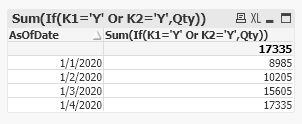
Output: