Unlock a world of possibilities! Login now and discover the exclusive benefits awaiting you.

Announcements
Qlik and ServiceNow Partner to Bring Trusted Enterprise Context into AI-Powered Workflows. Learn More!
- Qlik Community
- :
- Forums
- :
- Analytics & AI
- :
- Products & Topics
- :
- Visualization and Usability
- :
- Re: Filter Pane > Excluded Values Appearing Top of...
Options
- Subscribe to RSS Feed
- Mark Topic as New
- Mark Topic as Read
- Float this Topic for Current User
- Bookmark
- Subscribe
- Mute
- Printer Friendly Page
Turn on suggestions
Auto-suggest helps you quickly narrow down your search results by suggesting possible matches as you type.
Showing results for

 Purushothaman
Partner - Creator III
2022-05-19
03:19 AM
- Mark as New
- Bookmark
- Subscribe
- Mute
- Subscribe to RSS Feed
- Permalink
- Report Inappropriate Content
Filter Pane > Excluded Values Appearing Top of the list
Hi Experts,
In Filter pane, Excluded Values are appearing top of the list.
How to bring the excluded value to bring down to list?
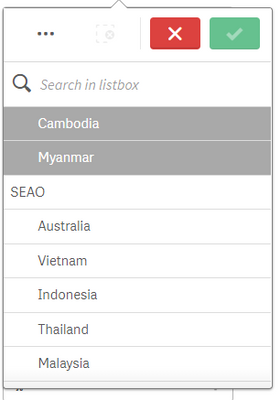
Anyone, Please help!!
Thank you!!
Regards,
Labels (9)
Labels
- Subscribe by Topic:
-
Chart
-
Developers
-
dimension
-
expression
-
filter
-
General Question
-
Script
-
Set Analysis
-
Visualization
624 Views
1 Solution
Accepted Solutions

 saranyadurai
Contributor III
2022-05-19
03:45 AM
- Mark as New
- Bookmark
- Subscribe
- Mute
- Subscribe to RSS Feed
- Permalink
- Report Inappropriate Content
Hi @Purushothaman ,
Try this,
Go to Filter pane Sorting selection ->Click Sort by State -> Select "Descending"

Thanks
1 Reply
saranyadurai
Contributor III
2022-05-19
03:45 AM
- Mark as New
- Bookmark
- Subscribe
- Mute
- Subscribe to RSS Feed
- Permalink
- Report Inappropriate Content
Hi @Purushothaman ,
Try this,
Go to Filter pane Sorting selection ->Click Sort by State -> Select "Descending"
Thanks
