Unlock a world of possibilities! Login now and discover the exclusive benefits awaiting you.

Announcements
Share your agentic AI experience, learn from others, and earn a new badge: Put Agentic AI to Work
- Qlik Community
- :
- Forums
- :
- Analytics & AI
- :
- Products & Topics
- :
- Visualization and Usability
- :
- Re: Filter Pane
Options
- Subscribe to RSS Feed
- Mark Topic as New
- Mark Topic as Read
- Float this Topic for Current User
- Bookmark
- Subscribe
- Mute
- Printer Friendly Page
Turn on suggestions
Auto-suggest helps you quickly narrow down your search results by suggesting possible matches as you type.
Showing results for

 UserID2626
Partner - Creator III
2019-02-04
08:05 AM
- Mark as New
- Bookmark
- Subscribe
- Mute
- Subscribe to RSS Feed
- Permalink
- Report Inappropriate Content
Filter Pane
Hi,
Need to create a Simple filter pane as range value like below image without creating a range value manually
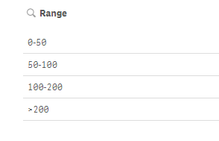
And selection of filter will reflect in table
if i select 0-50, the value falls under 0-50 should be displayed
thanks,
2,124 Views
1 Solution
Accepted Solutions

 pradosh_thakur
Master II
2019-02-04
08:25 AM
- Mark as New
- Bookmark
- Subscribe
- Mute
- Subscribe to RSS Feed
- Permalink
- Report Inappropriate Content
if value is your field then
pick(match(-1,value < 50, value >= 50 and value < 100,value >= 100 and value < 150,value >= 150 and value < 200, value >=200),'0-50','50-100','100-150','150-200','>200') as Range
pick(match(-1,value < 50, value >= 50 and value < 100,value >= 100 and value < 150,value >= 150 and value < 200, value >=200),'0-50','50-100','100-150','150-200','>200') as Range
Learning never stops.
4 Replies
pradosh_thakur
Master II
2019-02-04
08:25 AM
- Mark as New
- Bookmark
- Subscribe
- Mute
- Subscribe to RSS Feed
- Permalink
- Report Inappropriate Content
if value is your field then
pick(match(-1,value < 50, value >= 50 and value < 100,value >= 100 and value < 150,value >= 150 and value < 200, value >=200),'0-50','50-100','100-150','150-200','>200') as Range
pick(match(-1,value < 50, value >= 50 and value < 100,value >= 100 and value < 150,value >= 150 and value < 200, value >=200),'0-50','50-100','100-150','150-200','>200') as Range
Learning never stops.
UserID2626
Partner - Creator III
2019-02-04
08:44 AM
Author
- Mark as New
- Bookmark
- Subscribe
- Mute
- Subscribe to RSS Feed
- Permalink
- Report Inappropriate Content
Could you please explain why you given -1 in match() function
Thanks 🙂
Thanks 🙂
2,100 Views
pradosh_thakur
Master II
2019-02-04
08:54 AM
- Mark as New
- Bookmark
- Subscribe
- Mute
- Subscribe to RSS Feed
- Permalink
- Report Inappropriate Content
True is represented -1 and flase as 0 in Qlik. So when the condition is true it will be -1 else 0. So when the value matches the criteria the condition becomes -1 and matches.
Learning never stops.

 vikasmahajan
MVP
2022-04-27
01:13 AM
- Mark as New
- Bookmark
- Subscribe
- Mute
- Subscribe to RSS Feed
- Permalink
- Report Inappropriate Content
if(year(Month_Year)>=year(addyears(max(total {1}[Month Year Num]),-1)) and Month_Year<= $(vDisplayMaxMonthYear) ,Month_Year)
Hope this resolve your issue.
If the issue is solved please mark the answer with Accept as Solution & like it.
If you want to go quickly, go alone. If you want to go far, go together.
If the issue is solved please mark the answer with Accept as Solution & like it.
If you want to go quickly, go alone. If you want to go far, go together.
1,309 Views
