Unlock a world of possibilities! Login now and discover the exclusive benefits awaiting you.

- Qlik Community
- :
- Forums
- :
- Analytics & AI
- :
- Products & Topics
- :
- Visualization and Usability
- :
- Re: Filter pane and set analysis table for top 5.
- Subscribe to RSS Feed
- Mark Topic as New
- Mark Topic as Read
- Float this Topic for Current User
- Bookmark
- Subscribe
- Mute
- Printer Friendly Page

 sanpor1zd
- Mark as New
- Bookmark
- Subscribe
- Mute
- Subscribe to RSS Feed
- Permalink
- Report Inappropriate Content
Filter pane and set analysis table for top 5.
Hello,
I have a filter pane which consists of employee names,
and also a table to show the top 5sales from the selected employee.
i've tried using
Sum({<Employee= {'=Rank(Sum(Sales)) <=5'}>}Sales)
but all i get was one column in my table.
Thank you.
Edited (I have included a sample data)
- « Previous Replies
-
- 1
- 2
- Next Replies »

 sumanta1234
- Mark as New
- Bookmark
- Subscribe
- Mute
- Subscribe to RSS Feed
- Permalink
- Report Inappropriate Content
Hi,
Use below exp:
IF(RANK(SUM([Sales]))<=5,SUM([Sales]))
sanpor1zd
- Mark as New
- Bookmark
- Subscribe
- Mute
- Subscribe to RSS Feed
- Permalink
- Report Inappropriate Content
Hi,
Ive tried the code provided.
But the table only return 1 result.
thank you.

 tresB
tresB
- Mark as New
- Bookmark
- Subscribe
- Mute
- Subscribe to RSS Feed
- Permalink
- Report Inappropriate Content
Since you need to get top Sales, your ranking has to be based on sales. Try lie:
Sum({<Sales= {"=Rank(Sales) <=10"}>}Sales)
sanpor1zd
- Mark as New
- Bookmark
- Subscribe
- Mute
- Subscribe to RSS Feed
- Permalink
- Report Inappropriate Content
Hi,
the code only return 1 result after filtering.
tresB
- Mark as New
- Bookmark
- Subscribe
- Mute
- Subscribe to RSS Feed
- Permalink
- Report Inappropriate Content
Could you share a screenshot of where and how you are trying this?
sanpor1zd
- Mark as New
- Bookmark
- Subscribe
- Mute
- Subscribe to RSS Feed
- Permalink
- Report Inappropriate Content
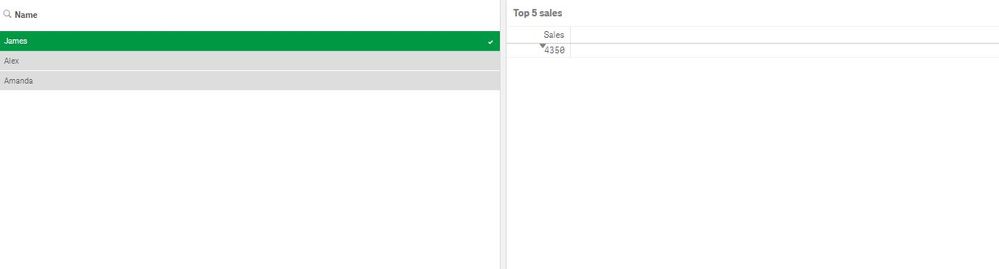
I have edit my post with a sample file for reference.
Whenever i choose a name using the filter pane, it only returns 1 result in my table.
Im trying to return the top 5 sales

 mfarsln
- Mark as New
- Bookmark
- Subscribe
- Mute
- Subscribe to RSS Feed
- Permalink
- Report Inappropriate Content
Hi,
Since you are using only one measure, it simply sums first 5 sales. In order to get 5 rows with top 5 sales, you should add a dimension which should be a rank column.
tresB
- Mark as New
- Bookmark
- Subscribe
- Mute
- Subscribe to RSS Feed
- Permalink
- Report Inappropriate Content
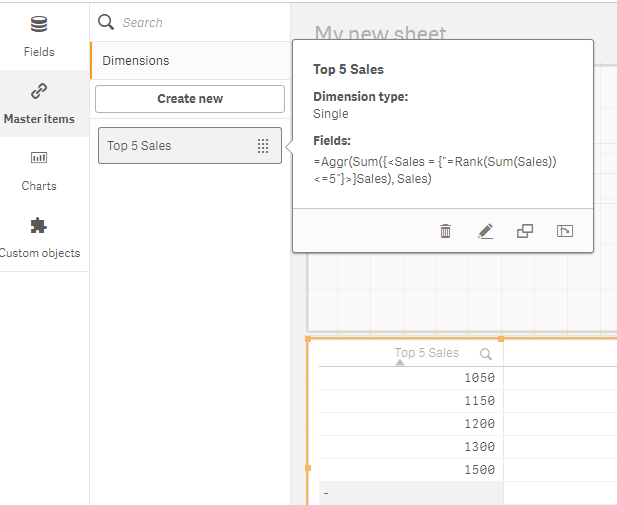
Create a master dimension like:
=Aggr(Sum({<Sales = {"=Rank(Sum(Sales)) <=5"}>}Sales), Sales)
 sanpor1zd
- Mark as New
- Bookmark
- Subscribe
- Mute
- Subscribe to RSS Feed
- Permalink
- Report Inappropriate Content
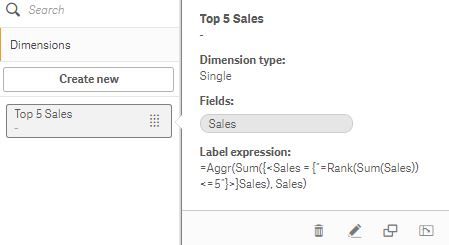
i tried the method, but the table only show the sales which the person have, not the top 5.


- « Previous Replies
-
- 1
- 2
- Next Replies »