Unlock a world of possibilities! Login now and discover the exclusive benefits awaiting you.

- Qlik Community
- :
- Forums
- :
- Analytics & AI
- :
- Products & Topics
- :
- Visualization and Usability
- :
- Re: Hide 0 Value Rows in Pivot or Table
- Subscribe to RSS Feed
- Mark Topic as New
- Mark Topic as Read
- Float this Topic for Current User
- Bookmark
- Subscribe
- Mute
- Printer Friendly Page

- Mark as New
- Bookmark
- Subscribe
- Mute
- Subscribe to RSS Feed
- Permalink
- Report Inappropriate Content
Hide 0 Value Rows in Pivot or Table
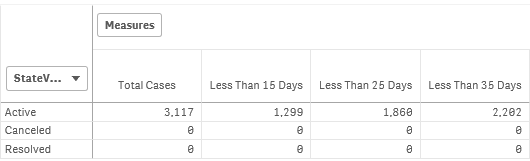
Hello - I have a simple case aging table and StateValue field has Active, Canceled, or Resolved. I have the measures to count only the Active cases by expression, and it is working as below.
COUNT({1<StateValue={"Active"}>}if((today()-IncidentDate<15),1))
Is there a way to just show totals in 1 row and not show the other rows, canceled and resolved because they would be 0 anyways? I tried hiding zero value option but it does not seem to work. I don't actually need to show StateValue. I just want to show total Incident counts by these aging, but there really isn't a dimension I can use to show just 1 row. Thanks for help.
- Tags:
- hide rows
- zero value
Accepted Solutions

 kvanandan1
- Mark as New
- Bookmark
- Subscribe
- Mute
- Subscribe to RSS Feed
- Permalink
- Report Inappropriate Content
Hi Reiko,
In the Pivot table property, there is a section 'Add-on' in that uncheck 'Include Zero values' option.
 jaumecf23
- Mark as New
- Bookmark
- Subscribe
- Mute
- Subscribe to RSS Feed
- Permalink
- Report Inappropriate Content
In the dimension you can create a Calculated Dimension, something like that:
=if(StateValue='Active',StateValue)
Using that like a Dimension you will only face the Active information
kvanandan1
- Mark as New
- Bookmark
- Subscribe
- Mute
- Subscribe to RSS Feed
- Permalink
- Report Inappropriate Content
Hi Reiko,
In the Pivot table property, there is a section 'Add-on' in that uncheck 'Include Zero values' option.
- Mark as New
- Bookmark
- Subscribe
- Mute
- Subscribe to RSS Feed
- Permalink
- Report Inappropriate Content
That was the last place I would look at. ! Thank you so much. That did the trick.
 bvssudhakar
- Mark as New
- Bookmark
- Subscribe
- Mute
- Subscribe to RSS Feed
- Permalink
- Report Inappropriate Content
Hi Anand,
Where is that 'Add-on' Section, Can you please tell me because i am unable to find that section
I want to hide the rows of empty cells for pivot table
Please help me out from this
Thank you in advance
Sudhakar B V S