Unlock a world of possibilities! Login now and discover the exclusive benefits awaiting you.

- Qlik Community
- :
- Forums
- :
- Analytics & AI
- :
- Products & Topics
- :
- Visualization and Usability
- :
- Re: Intersection of a selection
- Subscribe to RSS Feed
- Mark Topic as New
- Mark Topic as Read
- Float this Topic for Current User
- Bookmark
- Subscribe
- Mute
- Printer Friendly Page

- Mark as New
- Bookmark
- Subscribe
- Mute
- Subscribe to RSS Feed
- Permalink
- Report Inappropriate Content
Intersection of a selection
Hello,
I'm new on Qlik Sense and I have a problem.
I have a delivery number. There are multiple products linked to the delivery number.
I have a list of products.
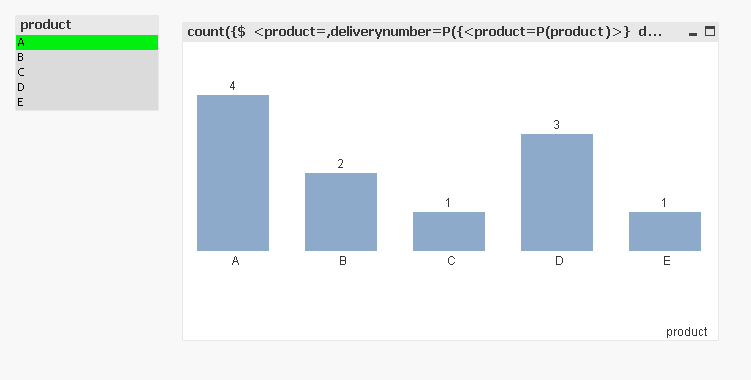
When I select a product in the list, I would like my bar chart to show me, how many delivery numbers the product I selected has in common with each of the other products.
I hope I was clear enough,
Thank you,
- « Previous Replies
-
- 1
- 2
- Next Replies »
Accepted Solutions

 maxgro
- Mark as New
- Bookmark
- Subscribe
- Mute
- Subscribe to RSS Feed
- Permalink
- Report Inappropriate Content
SCRIPT
😧
load * inline [
deliverynumber , product
123 , A ; C ; D
124 , A ; B
125 , B ; C ; E
126 , A ; B ; D
127 , A ; D ; E
];
D1:
NoConcatenate
load deliverynumber, trim(SubField(product, ';')) as product
Resident D;
DROP Table D;
CHART
count({$ <product=,deliverynumber=P({<product=P(product)>} deliverynumber)>} deliverynumber)
 sunny_talwar
- Mark as New
- Bookmark
- Subscribe
- Mute
- Subscribe to RSS Feed
- Permalink
- Report Inappropriate Content
It would be helpful if you can share a sample with expected output to help you better here

 rohitk1609
- Mark as New
- Bookmark
- Subscribe
- Mute
- Subscribe to RSS Feed
- Permalink
- Report Inappropriate Content
Hi Gaeten,
What i understood by your concern, Lets say there are 5 products A,B,C..E and a delivery number 100 and scenario is, If you select a product A then Number will be 20 and 20 is a number calculated or associated by A or C .
Above is just an example .
Can you correct me If I am wrong.
- Mark as New
- Bookmark
- Subscribe
- Mute
- Subscribe to RSS Feed
- Permalink
- Report Inappropriate Content
Here is an example:
Delivery Number Products
123 A ; C ; D
124 A ; B
125 B ; C ; E
126 A ; B ; D
127 A ; D ; E
When I select product A, I want the bar for B to show me 2 because they have two delivery numbers in common
the bar for C will show 1
the bar for D will show 3
...
I hope this is clear enough,
Thank you,
rohitk1609
- Mark as New
- Bookmark
- Subscribe
- Mute
- Subscribe to RSS Feed
- Permalink
- Report Inappropriate Content
Hi Geetan,
Still not cleared. What do you mean by delivery number in common. Secondly, How can you have A ; C ; D in one single entity . Can you attach the sample data in csv or excel please ?
maxgro
- Mark as New
- Bookmark
- Subscribe
- Mute
- Subscribe to RSS Feed
- Permalink
- Report Inappropriate Content
SCRIPT
😧
load * inline [
deliverynumber , product
123 , A ; C ; D
124 , A ; B
125 , B ; C ; E
126 , A ; B ; D
127 , A ; D ; E
];
D1:
NoConcatenate
load deliverynumber, trim(SubField(product, ';')) as product
Resident D;
DROP Table D;
CHART
count({$ <product=,deliverynumber=P({<product=P(product)>} deliverynumber)>} deliverynumber)
- Mark as New
- Bookmark
- Subscribe
- Mute
- Subscribe to RSS Feed
- Permalink
- Report Inappropriate Content
Thank you Massimo, this is exactly what I was looking for !
- Mark as New
- Bookmark
- Subscribe
- Mute
- Subscribe to RSS Feed
- Permalink
- Report Inappropriate Content
It appears that this works, but I have another request that's related:
If I select two selections in [product], how can I get a count of deliverynumbers that have BOTH selections? Right now, it gives me the union, not the intersection.
Thanks!
sunny_talwar
- Mark as New
- Bookmark
- Subscribe
- Mute
- Subscribe to RSS Feed
- Permalink
- Report Inappropriate Content
May be check this link out:
- Mark as New
- Bookmark
- Subscribe
- Mute
- Subscribe to RSS Feed
- Permalink
- Report Inappropriate Content
Perfect! Thanks for your help again Sunny!
- « Previous Replies
-
- 1
- 2
- Next Replies »