Unlock a world of possibilities! Login now and discover the exclusive benefits awaiting you.

- Qlik Community
- :
- Forums
- :
- Analytics & AI
- :
- Products & Topics
- :
- Visualization and Usability
- :
- Re: Last Closing Balance SUM Required
- Subscribe to RSS Feed
- Mark Topic as New
- Mark Topic as Read
- Float this Topic for Current User
- Bookmark
- Subscribe
- Mute
- Printer Friendly Page

 zahidrahim_ocp
- Mark as New
- Bookmark
- Subscribe
- Mute
- Subscribe to RSS Feed
- Permalink
- Report Inappropriate Content
Last Closing Balance SUM Required
Dear Experts,
I have a table with date and segment wise balances.
Now I want to get total of all balances for the segment's last balance at any month closing.
For Example:
Date Segment Balance
01-JAN-2017 A 10
02-JAN-2017 A 11
10-JAN-2017 A 12
31-JAN-2017 A 13
15-JAN-2017 B 20
31-JAN-2017 B 25
Now I want to get JAN Balances
A= 13 (As it is last closing balance)
B = 25 (As it is last closing balance)
For total Jan Balance It should be 13=25=38
Regards,
Zahid Rahim
- « Previous Replies
-
- 1
- 2
- Next Replies »

- Mark as New
- Bookmark
- Subscribe
- Mute
- Subscribe to RSS Feed
- Permalink
- Report Inappropriate Content
Hello Friend,
Try this formula in table:
=aggr(sum(Balance),Segment,Month)
Regards
Jacek.

 mato32188
- Mark as New
- Bookmark
- Subscribe
- Mute
- Subscribe to RSS Feed
- Permalink
- Report Inappropriate Content
Hi Zahid,
in SCRIPT create flag field that flags your max date for each month and segment:
YourTable:
Load
Date,
Segment,
Balance,
Month(Date#(Date,'DD-MMM-YYYY')) as Month
FROM YourSource;
Left Join (YourTable)
tmp:
Load
max(Date) as MaxDate,
Segment,
Month
Resident YourTable
Group by Segment, Month;
FinalTable:
LOAD *,
if(MaxDate=Date,1,0) as @MaxDate
Resident tmp;
DROP Table YourTable;
DROP Field MaxDate;
in FRONT-END:
Create straight table
Dimensions: Month, Segment
Expression: sum({<@MaxDate = {1}>}Balance)
This is performance friendly solution.
BR
Martin
zahidrahim_ocp
- Mark as New
- Bookmark
- Subscribe
- Mute
- Subscribe to RSS Feed
- Permalink
- Report Inappropriate Content
Dear Martin,
I am using qvd tables and letting them join automatically. Do i need to write this further code for a temp table. I am sorry as very much new to this syntax.
Regards,
Zahid Rahim

 antoniotiman
- Mark as New
- Bookmark
- Subscribe
- Mute
- Subscribe to RSS Feed
- Permalink
- Report Inappropriate Content
Hi,
Sum(Aggr(FirstSortedValue(Balance,-Date),Segment))

You can also use in Text Box.
Regards,
Antonio
zahidrahim_ocp
- Mark as New
- Bookmark
- Subscribe
- Mute
- Subscribe to RSS Feed
- Permalink
- Report Inappropriate Content
Dear Antonio,
Thank you very much for the solution.
Can you please guide me for month wise balance as you gave segment wise.
Jan-17 = 38
Suppose we have other months data as well.
Feb-17 = 48
Mar-17 = 58
etc.
Regards,
Zahid Rahim
antoniotiman
- Mark as New
- Bookmark
- Subscribe
- Mute
- Subscribe to RSS Feed
- Permalink
- Report Inappropriate Content
I added Feb 2017 (48) and Mar 2017 (48)
LOAD *,MonthName(Date) as Month Inline [
Date Segment Balance
01-JAN-2017 A 10
02-JAN-2017 A 11
10-JAN-2017 A 12
31-JAN-2017 A 13
15-JAN-2017 B 20
31-JAN-2017 B 25
01-FEB-2017 A 48
02-MAR-2017 A 58
](delimiter is spaces);
Sum(Aggr(FirstSortedValue(Balance,-Date),Segment,Month))
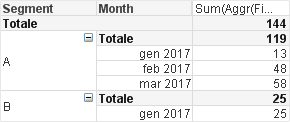
Regards,
Antonio
zahidrahim_ocp
- Mark as New
- Bookmark
- Subscribe
- Mute
- Subscribe to RSS Feed
- Permalink
- Report Inappropriate Content
Dear Antonio,
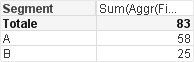
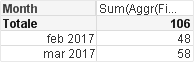
Sorry for disturbing you. Cannot i get monthwise last balances only. I mean without segments.
Regards,
Zahid Rahim
antoniotiman
- Mark as New
- Bookmark
- Subscribe
- Mute
- Subscribe to RSS Feed
- Permalink
- Report Inappropriate Content
Like this ?
antoniotiman
- Mark as New
- Bookmark
- Subscribe
- Mute
- Subscribe to RSS Feed
- Permalink
- Report Inappropriate Content
or this

or this
- « Previous Replies
-
- 1
- 2
- Next Replies »