Unlock a world of possibilities! Login now and discover the exclusive benefits awaiting you.

- Qlik Community
- :
- Forums
- :
- Analytics & AI
- :
- Products & Topics
- :
- Visualization and Usability
- :
- Re: Left Join
- Subscribe to RSS Feed
- Mark Topic as New
- Mark Topic as Read
- Float this Topic for Current User
- Bookmark
- Subscribe
- Mute
- Printer Friendly Page

- Mark as New
- Bookmark
- Subscribe
- Mute
- Subscribe to RSS Feed
- Permalink
- Report Inappropriate Content
Left Join
Hi All
I have 2 tables and I need to take some data from One table - Table A - to the other - Table B.
Table A contains Employee ID's, Names and Types.
Table B contains Employee ID's ,Labor Costs and Labor Hours.
I would like to use table A to bring the Names and Types next to each Employee ID in Table B.
Left join brings all the Employee ID's, so I am getting in Table B empty lines for Employee ID's which exist in Table A but donwt exists in Table B. How can I avoid these empty lines?
In other words, I would like to use something similar to Vlookup in excel.
I know I can use Mapping Load but this clause allows only one filed for each Mapping Load, right?
Also, using Table A as a dimension is not useful to me because of other data in the script. That's why I need to bring the data into Table B rather than use a dimension to create the link between the two tables.
Thank you,
Sandra
Table A:
| EmplyeeID | Name | EmployeeType |
|---|---|---|
| 1 | AAA | type 1 |
| 2 | BBB | type 1 |
| 3 | CCC | type 1 |
| 4 | GGG | type 1 |
| 5 | HHH | type 1 |
| 7 | KKK | type 2 |
| 8 | WWW | type 2 |
| 9 | XXX | type 2 |
| 10 | YYY | type 2 |
| 11 | MMM | type 2 |
| 12 | NNN | type 2 |
| 13 | DDD | type 2 |
| 14 | EEE | type 2 |
Table B:
| EmployeeID | PaidHours | LaborCost |
|---|---|---|
| 1 | 221.15 | 9,335 |
| 2 | 197.80 | 16,946 |
| 3 | 197.80 | 18,231 |
| 4 | 197.80 | 15,001 |
| 5 | 33.41 | 2,529 |
| 6 | 195.53 | 14,799 |
| 7 | 125.90 | 11,205 |
| 8 | 228.38 | 10,922 |
| 9 | 219.43 | 9,908 |
| 10 | 274.03 | 18,449 |
| 11 | 200.80 | 8,837 |
- Tags:
- left join()
- « Previous Replies
-
- 1
- 2
- Next Replies »
Accepted Solutions

 niclaz79
- Mark as New
- Bookmark
- Subscribe
- Mute
- Subscribe to RSS Feed
- Permalink
- Report Inappropriate Content
Hi Sandra,
I did a
left join(TableB)
LOAD
*
Resident TableA;
drop TableA;
And this was the result:
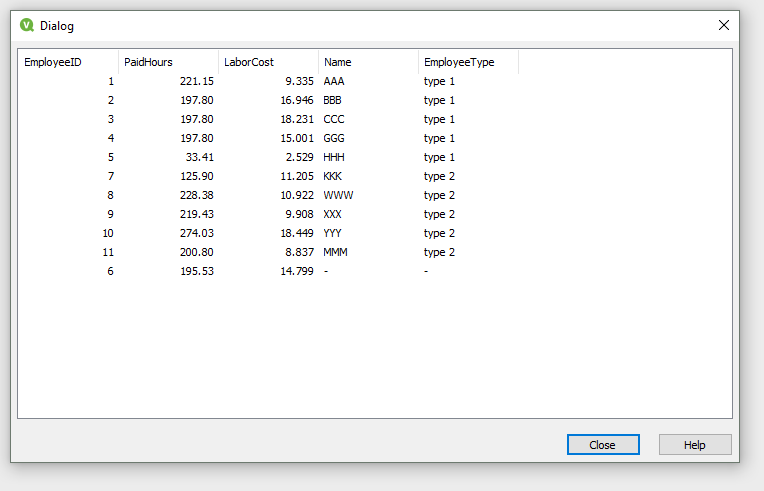
Was this not what you wanted?
 jonathandienst
- Mark as New
- Bookmark
- Subscribe
- Mute
- Subscribe to RSS Feed
- Permalink
- Report Inappropriate Content
Like this?
MAP_TableA_NAME:
Mapping LOAD EmployeeID,
Name
FROM TableA;
MAP_TableA_TYPE:
Mapping LOAD EmployeeID,
EmplyeeType
FROM TableA;
TableB:
LOAD
EmployeeID,
ApplyMap('MAP_TableA_NAME', EmployeeID, 'Unknown') as EmployeeName,
ApplyMap('MAP_TableA_TYPE', EmployeeID, 'Unknown') as EmployeeType,
PaidHours,
LaborCost
FROM TableB;
niclaz79
- Mark as New
- Bookmark
- Subscribe
- Mute
- Subscribe to RSS Feed
- Permalink
- Report Inappropriate Content
Hi Sandra,
I did a
left join(TableB)
LOAD
*
Resident TableA;
drop TableA;
And this was the result:
Was this not what you wanted?
- Mark as New
- Bookmark
- Subscribe
- Mute
- Subscribe to RSS Feed
- Permalink
- Report Inappropriate Content
Thank you Jonathan. This is what I have now in my current script, but I thought some Join Clause would be easier. That is to say, using 2 Apply Maps gets the work done, but is there another, simpler way?
Thanks anyway

 hacr
hacr
- Mark as New
- Bookmark
- Subscribe
- Mute
- Subscribe to RSS Feed
- Permalink
- Report Inappropriate Content
You can read more about the options here: https://help.qlik.com/en-US/sense/September2017/Subsystems/Hub/Content/Scripting/combine-tables-join...
And I think this topic can answer your questions about when to use Joins Joins and Lookups
 siddharth_s3
- Mark as New
- Bookmark
- Subscribe
- Mute
- Subscribe to RSS Feed
- Permalink
- Report Inappropriate Content
You ideally don't have to do mapping load twice. Try with mapping load and subfield
Try this instead:
MappingTable:
Mapping LOAD EmployeeID,
  Name & '-' & EmplyeeType
FROM TableA;


Main:
LOAD
  EmployeeID,
  Subfield(ApplyMap('MappingTable', EmployeeID, 'NA'),'-',1) as EmployeeName,
  Subfield(ApplyMap('MappingTable', EmployeeID, 'NA'),'-',2) as EmployeeType,
  PaidHours,
  LaborCost
FROM TableB;
- Mark as New
- Bookmark
- Subscribe
- Mute
- Subscribe to RSS Feed
- Permalink
- Report Inappropriate Content
Yes. Now I see that my mistake was that I did left join (TableA) instead of B. Thanks a lot!
Sandra
niclaz79
- Mark as New
- Bookmark
- Subscribe
- Mute
- Subscribe to RSS Feed
- Permalink
- Report Inappropriate Content
Great! If you can mark my answer as correct I would be grateful as well! 
niclaz79
- Mark as New
- Bookmark
- Subscribe
- Mute
- Subscribe to RSS Feed
- Permalink
- Report Inappropriate Content
left join(TableB)
LOAD
*
Resident TableA;
drop TableA;
No mapping needed in this case.
siddharth_s3
- Mark as New
- Bookmark
- Subscribe
- Mute
- Subscribe to RSS Feed
- Permalink
- Report Inappropriate Content
True,
I avoid joins if there are below 5 columns I have to map.
Joins can create duplicate data especially if data is coming from Excels, it is dangerous as calculations might go wrong.
I use joins when I have more than 5 columns to join, else subfield and mapping load.
There are many articles which say applymap is faster as well
- « Previous Replies
-
- 1
- 2
- Next Replies »