Unlock a world of possibilities! Login now and discover the exclusive benefits awaiting you.

- Qlik Community
- :
- Forums
- :
- Analytics & AI
- :
- Products & Topics
- :
- Visualization and Usability
- :
- Left Keep causing tables to split
- Subscribe to RSS Feed
- Mark Topic as New
- Mark Topic as Read
- Float this Topic for Current User
- Bookmark
- Subscribe
- Mute
- Printer Friendly Page

 etrotter
- Mark as New
- Bookmark
- Subscribe
- Mute
- Subscribe to RSS Feed
- Permalink
- Report Inappropriate Content
Left Keep causing tables to split
Hello,
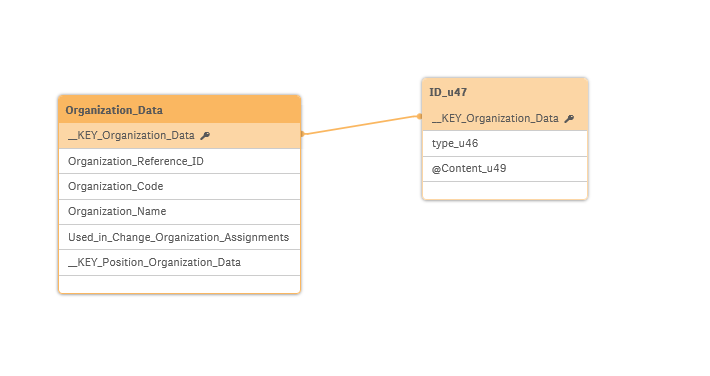
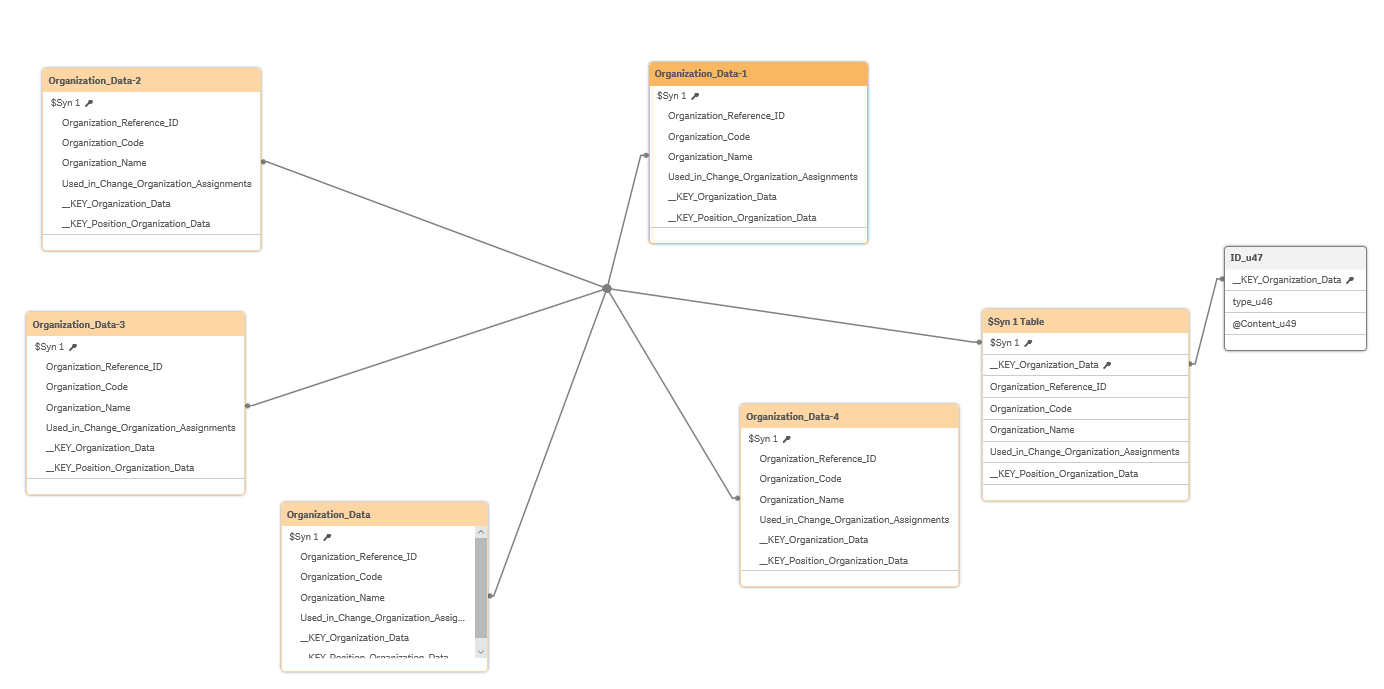
I am experiencing a weird data issue. I created a model using left keeps and everything was working, but I edited the API call, but the tables should have been uneffected, but now all my left keeps cause my tables to split. What causes a left keep to split, and how do I correct this issue?
Before the left join:
After: None of the split tables have any data in them.

 sunny_talwar
- Mark as New
- Bookmark
- Subscribe
- Mute
- Subscribe to RSS Feed
- Permalink
- Report Inappropriate Content
Are you doing a wild card load here to load multiple files?
etrotter
- Mark as New
- Bookmark
- Subscribe
- Mute
- Subscribe to RSS Feed
- Permalink
- Report Inappropriate Content
Not a wildcard load, but there is a loop to load in multiple pages of the API
sunny_talwar
- Mark as New
- Bookmark
- Subscribe
- Mute
- Subscribe to RSS Feed
- Permalink
- Report Inappropriate Content
Would you be able to share the script that you are using?

 JustinDallas
- Mark as New
- Bookmark
- Subscribe
- Mute
- Subscribe to RSS Feed
- Permalink
- Report Inappropriate Content
Was your API call set to page before you made the change? I see that the tables have similar data structure and have such a large synth key shared betwixt them. Is there a field that ISN'T part of the synth key? I'd like to know if a field is possibly keeping the automatic Concatenate function from kicking in.

 rzenere_avvale
- Mark as New
- Bookmark
- Subscribe
- Mute
- Subscribe to RSS Feed
- Permalink
- Report Inappropriate Content
In addition to what Justin and Sunny said, check that you don't do a left keep inside the for loop.
Doing that would cause exactly the split you shown in the screenshot.
If this is the case, to resolve it I would use the left keep only at the end of the API calls.
Hope this helps,
Riccardo
