Unlock a world of possibilities! Login now and discover the exclusive benefits awaiting you.

- Qlik Community
- :
- Forums
- :
- Analytics & AI
- :
- Products & Topics
- :
- Visualization and Usability
- :
- Re: Match List in If Statement
- Subscribe to RSS Feed
- Mark Topic as New
- Mark Topic as Read
- Float this Topic for Current User
- Bookmark
- Subscribe
- Mute
- Printer Friendly Page

 JustinDallas
- Mark as New
- Bookmark
- Subscribe
- Mute
- Subscribe to RSS Feed
- Permalink
- Report Inappropriate Content
Match List in If Statement
Hello Everyone,
I've got a UI where my expression for my dimension used to look like this
If(stp_event = {'IEMT'},
  [Origin City],
    Null()
)
This worked like a charm, but then I found out that I have more "stp_event"s to match against for my requirement. So I then went and did this.

And then in my UI. I have this statement which doesn't work.
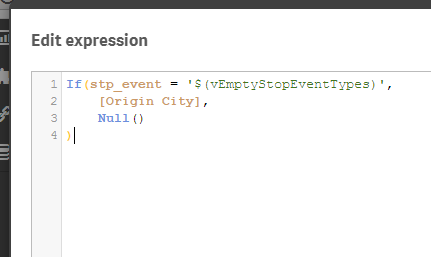
Mind you, the UI behaves as expected when vEmptyBlahBlah = 'IEMT' just not when I add that ,BBT.
Any help is greatly appreciated.
 aarkay29
- Mark as New
- Bookmark
- Subscribe
- Mute
- Subscribe to RSS Feed
- Permalink
- Report Inappropriate Content
May be this:
If(Stp_Event =Subfield($(VEmptyStopEventTypes),',',1) Or Stp_Event =Subfield($(VEmptyStopEventTypes),',',2) , [Origin City], Null())

 antoniotiman
- Mark as New
- Bookmark
- Subscribe
- Mute
- Subscribe to RSS Feed
- Permalink
- Report Inappropriate Content
Hi Justin,
try
SET vEmptyStopEventTypes = 'IEMT','BBT' ;
If(Match(Stp_Event,$(vEmptyStopEventType)),[Origin City],Null())
Regards,
Antonio
 passionate
- Mark as New
- Bookmark
- Subscribe
- Mute
- Subscribe to RSS Feed
- Permalink
- Report Inappropriate Content
HI,
Please use this expression:
Pick(Match(stp_event,'IEMT','BBT')+1,'Null()','[Oigin City]','[Oigin City]')
Regards,
Pankaj

 Kushal_Chawda
- Mark as New
- Bookmark
- Subscribe
- Mute
- Subscribe to RSS Feed
- Permalink
- Report Inappropriate Content
try like below
change variable
LET vEmptyStopEventTypes='IEMT','BBT'
then try below
If(match(stp_event , $(vEmptyStopEventTypes)),
[Origin City],
Null()
)

 jagan
jagan
- Mark as New
- Bookmark
- Subscribe
- Mute
- Subscribe to RSS Feed
- Permalink
- Report Inappropriate Content
Hi Justin,
If there are multiple values then you have use Match() like below
- If(Match(stp_event, $(vEmptyStopEventTypes)),
- [Origin City],
- Null()
- )
It is always better to avoid calculated dimension because of performance issues, instead you can solve this by using set analysis like below
Dimension: stp_event
Expression: Sum({<stp_event={$(vEmptyStopEventTypes)}>} FieldName)
Hope this helps you.
Regards,
jagan.
JustinDallas
- Mark as New
- Bookmark
- Subscribe
- Mute
- Subscribe to RSS Feed
- Permalink
- Report Inappropriate Content
Hi Antonio,
This is the correct answer, the SET part is key. But I don't seem to be able to mark this as "Correct Answer".
