Unlock a world of possibilities! Login now and discover the exclusive benefits awaiting you.

- Qlik Community
- :
- Forums
- :
- Analytics & AI
- :
- Products & Topics
- :
- Visualization and Usability
- :
- Re: Measure not dividing by variable amount
- Subscribe to RSS Feed
- Mark Topic as New
- Mark Topic as Read
- Float this Topic for Current User
- Bookmark
- Subscribe
- Mute
- Printer Friendly Page

 ndeeleysww
- Mark as New
- Bookmark
- Subscribe
- Mute
- Subscribe to RSS Feed
- Permalink
- Report Inappropriate Content
Measure not dividing by variable amount
Hi there,
I'm trying to calculate percentage values in a table.
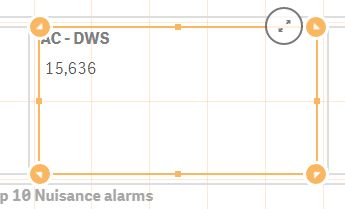
I've created a variable called (AC - DWS) which calculates the total number of records for a measure. This calculates and I can output the results to a text box:
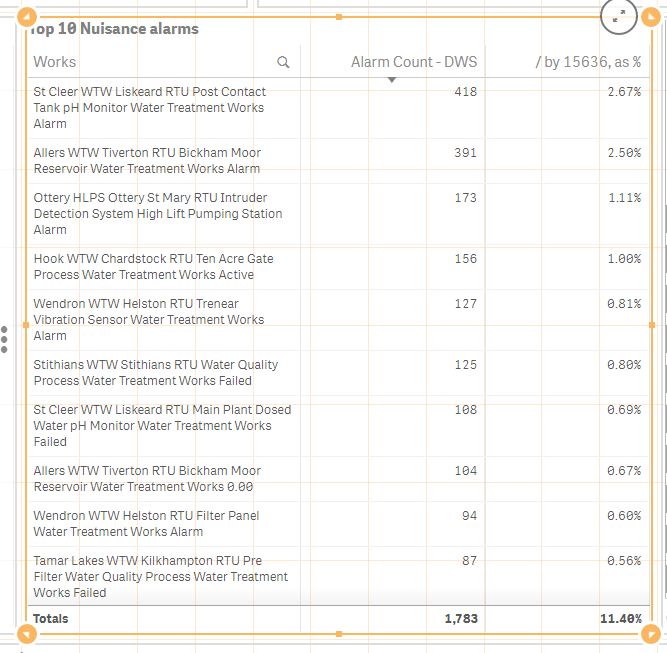
I'm using this variable to divide by the total records for a particular dimension., If I manually add the result as a number, the division works:
If I use the result of the variable, it doesn't:
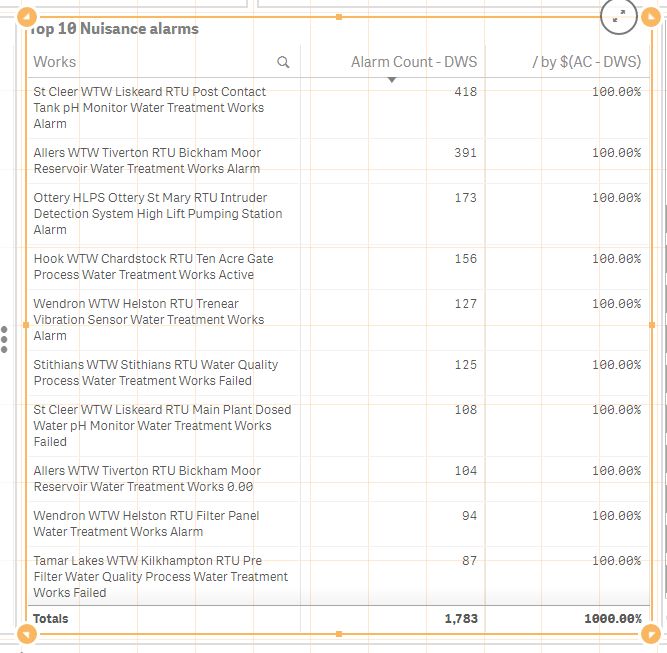
Any idea why? It also doesn't work if I add the calculation used to get the variable value:
Count({1<[Ops Function]={'Drinking Water'}, DataSource={'Alarms'}, [Alarm Status]={3}, Date={'>=$(=Date($(vTodaysDate)))'}>} AlarmCount)
Any help gratefully received!
Accepted Solutions

 sunny_talwar
- Mark as New
- Bookmark
- Subscribe
- Mute
- Subscribe to RSS Feed
- Permalink
- Report Inappropriate Content
Did you try adding a '=' before your Count function in the variable?
=Count({1<[Ops Function]={'Drinking Water'}, DataSource={'Alarms'}, [Alarm Status]={3}, Date={'>=$(=Date($(vTodaysDate)))'}>} AlarmCount)

 rohitk1609
- Mark as New
- Bookmark
- Subscribe
- Mute
- Subscribe to RSS Feed
- Permalink
- Report Inappropriate Content
Hi Neil,
Can you please tell me or show me the expression how you are creating the variable ?
sunny_talwar
- Mark as New
- Bookmark
- Subscribe
- Mute
- Subscribe to RSS Feed
- Permalink
- Report Inappropriate Content
Did you try adding a '=' before your Count function in the variable?
=Count({1<[Ops Function]={'Drinking Water'}, DataSource={'Alarms'}, [Alarm Status]={3}, Date={'>=$(=Date($(vTodaysDate)))'}>} AlarmCount)
ndeeleysww
- Mark as New
- Bookmark
- Subscribe
- Mute
- Subscribe to RSS Feed
- Permalink
- Report Inappropriate Content
Hi Sunny,
Thank you - that worked. The odd thing is that it had already been working up till we had 3.0 installed, so perhaps the syntax has been tightened on variable creation.
sunny_talwar
- Mark as New
- Bookmark
- Subscribe
- Mute
- Subscribe to RSS Feed
- Permalink
- Report Inappropriate Content
I think this blogs talk about what we just saw
ndeeleysww
- Mark as New
- Bookmark
- Subscribe
- Mute
- Subscribe to RSS Feed
- Permalink
- Report Inappropriate Content
I'll read that one thoroughly! Thank you for all your help (again!)
sunny_talwar
- Mark as New
- Bookmark
- Subscribe
- Mute
- Subscribe to RSS Feed
- Permalink
- Report Inappropriate Content
No problem at all 
ndeeleysww
- Mark as New
- Bookmark
- Subscribe
- Mute
- Subscribe to RSS Feed
- Permalink
- Report Inappropriate Content
Hi Rohit,
All solved thank you - Sunny (posts below) showed me the way....
Thank you for posting tho!
Neil
