Unlock a world of possibilities! Login now and discover the exclusive benefits awaiting you.

- Qlik Community
- :
- Forums
- :
- Analytics & AI
- :
- Products & Topics
- :
- Visualization and Usability
- :
- Re: Qlik Sense Engine Services Not Running After S...
- Subscribe to RSS Feed
- Mark Topic as New
- Mark Topic as Read
- Float this Topic for Current User
- Bookmark
- Subscribe
- Mute
- Printer Friendly Page

 tomovangel
- Mark as New
- Bookmark
- Subscribe
- Mute
- Subscribe to RSS Feed
- Permalink
- Report Inappropriate Content
Qlik Sense Engine Services Not Running After Successfull Instalation
Hello guys, This is my first time trying to Install Qlik Sense April 2018
After the installation is finished successfully, I can see in the services, that my Engine services are not running, and when I stop all services, and start the Engine services this is what is popping up:
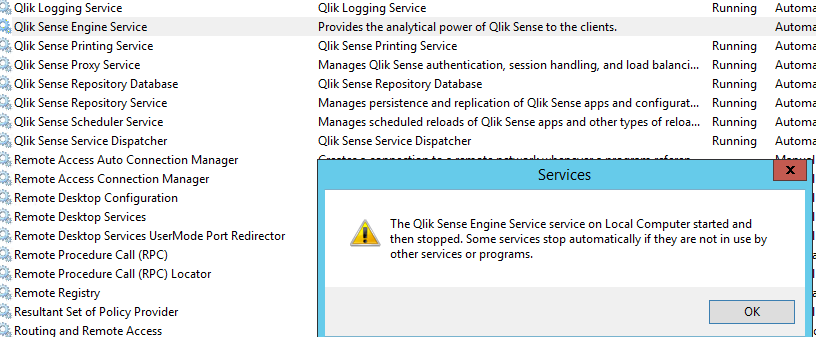
I tried reinstaling and installing the setup again atleast 5 times, still the same result.
I have NO firewall, NO IIS services
What can I do?
Best Regards,
Angel Tomov
- « Previous Replies
-
- 1
- 2
- Next Replies »

 Chanty4u
- Mark as New
- Bookmark
- Subscribe
- Mute
- Subscribe to RSS Feed
- Permalink
- Report Inappropriate Content
yes check below link
Chanty4u
- Mark as New
- Bookmark
- Subscribe
- Mute
- Subscribe to RSS Feed
- Permalink
- Report Inappropriate Content
tomovangel
- Mark as New
- Bookmark
- Subscribe
- Mute
- Subscribe to RSS Feed
- Permalink
- Report Inappropriate Content
How exactly can i check this?
 dionverbeke
- Mark as New
- Bookmark
- Subscribe
- Mute
- Subscribe to RSS Feed
- Permalink
- Report Inappropriate Content
I would say check the logs of the service.
Most of the time it is :
* Ports locked by another program
* Group policy is blocking port activity
* Needs restart of the server
kr,
Dion

- « Previous Replies
-
- 1
- 2
- Next Replies »