Unlock a world of possibilities! Login now and discover the exclusive benefits awaiting you.

- Qlik Community
- :
- Forums
- :
- Analytics & AI
- :
- Products & Topics
- :
- Visualization and Usability
- :
- Re: Ranking in Pivot table
- Subscribe to RSS Feed
- Mark Topic as New
- Mark Topic as Read
- Float this Topic for Current User
- Bookmark
- Subscribe
- Mute
- Printer Friendly Page

 QlikSenseBeginn
- Mark as New
- Bookmark
- Subscribe
- Mute
- Subscribe to RSS Feed
- Permalink
- Report Inappropriate Content
Ranking in Pivot table
Hi everyone,
Good day.
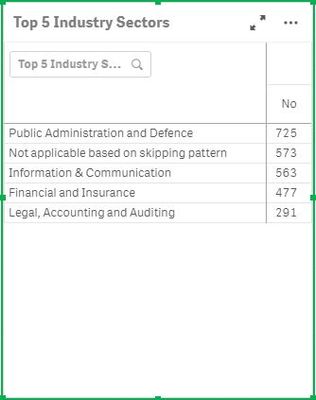
Just wondering if the pivot table can display without those numbers in the 2nd column (Eg 725, 573, 563, etc) and show as ranking instead? Meaning 725 will rank as 1 and 573 will rank as 2, while i can change NO to Ranking.
Accepted Solutions
QlikSenseBeginn- Mark as New
- Bookmark
- Subscribe
- Mute
- Subscribe to RSS Feed
- Permalink
- Report Inappropriate Content
With your heads up, I have resolved the issue with the following code.
if(aggr({<[Top 5 Industry Sectors]-={' Not applicable based on skipping pattern'}>} rank(Count({<[Top 5 Industry Sectors]-={' Not applicable based on skipping pattern'}>}[Top 5 Industry Sectors])), [Top 5 Industry Sectors])<=5,rank(Count({<[Top 5 Industry Sectors]-={' Not applicable based on skipping pattern'}>}[Top 5 Industry Sectors])))
Much thanks.

 anat
anat
- Mark as New
- Bookmark
- Subscribe
- Mute
- Subscribe to RSS Feed
- Permalink
- Report Inappropriate Content
can u give a try like ....Aggr(Rank(Sum(Sales)),[Customer Name])
QlikSenseBeginn- Mark as New
- Bookmark
- Subscribe
- Mute
- Subscribe to RSS Feed
- Permalink
- Report Inappropriate Content
With your heads up, I have resolved the issue with the following code.
if(aggr({<[Top 5 Industry Sectors]-={' Not applicable based on skipping pattern'}>} rank(Count({<[Top 5 Industry Sectors]-={' Not applicable based on skipping pattern'}>}[Top 5 Industry Sectors])), [Top 5 Industry Sectors])<=5,rank(Count({<[Top 5 Industry Sectors]-={' Not applicable based on skipping pattern'}>}[Top 5 Industry Sectors])))
Much thanks.
