Unlock a world of possibilities! Login now and discover the exclusive benefits awaiting you.

- Qlik Community
- :
- Forums
- :
- Analytics & AI
- :
- Products & Topics
- :
- Visualization and Usability
- :
- Re: Refer Calculated Dimension Value for Color Exp...
- Subscribe to RSS Feed
- Mark Topic as New
- Mark Topic as Read
- Float this Topic for Current User
- Bookmark
- Subscribe
- Mute
- Printer Friendly Page

 rpavan17
- Mark as New
- Bookmark
- Subscribe
- Mute
- Subscribe to RSS Feed
- Permalink
- Report Inappropriate Content
Refer Calculated Dimension Value for Color Expression Qlik Sense Pie Chart
Hi,
Can i get help to Refer Calculated Dimension Value for Color Expression Qlik Sense Pie Chart.
=if(Status_Name='Inflow',(IF(Workflow_Age1 >= 0 and Workflow_Age1 <= 3, '0-3 Days',
IF(Workflow_Age1 >=4 and Workflow_Age1 <= 6, '4-6 Days',
IF(Workflow_Age1 >=7 and Workflow_Age1 <= 9, '7-9 Days',
IF(Workflow_Age1 > 9, '>=10 Days' )) ) )))
I would like to have if Dimension Value = '0-3 Days' then green color... etc..,
Thanks

 agigliotti
- Mark as New
- Bookmark
- Subscribe
- Mute
- Subscribe to RSS Feed
- Permalink
- Report Inappropriate Content
what about this in color expression:
=if( Status_Name = 'Inflow' and ( Workflow_Age1 >= 0 and Workflow_Age1 <= 3 ), green(),
and so on...
Follow me on my LinkedIn | Know Gamma Informatica at gammainformatica.it
 priyalvp24
- Mark as New
- Bookmark
- Subscribe
- Mute
- Subscribe to RSS Feed
- Permalink
- Report Inappropriate Content
Use peek & match function.
rpavan17
- Mark as New
- Bookmark
- Subscribe
- Mute
- Subscribe to RSS Feed
- Permalink
- Report Inappropriate Content
Could you please post the formula using this
priyalvp24
- Mark as New
- Bookmark
- Subscribe
- Mute
- Subscribe to RSS Feed
- Permalink
- Report Inappropriate Content
=IF(Workflow_Age1 >= 0 and Workflow_Age1 <= 3,
pick(match(Status_Name ,'Inflow' ),green()) and so on...
rpavan17
- Mark as New
- Bookmark
- Subscribe
- Mute
- Subscribe to RSS Feed
- Permalink
- Report Inappropriate Content
Color not changed using this
priyalvp24
- Mark as New
- Bookmark
- Subscribe
- Mute
- Subscribe to RSS Feed
- Permalink
- Report Inappropriate Content
You have to use Status_Name as pie chart dimension
 ChennaiahNallan
- Mark as New
- Bookmark
- Subscribe
- Mute
- Subscribe to RSS Feed
- Permalink
- Report Inappropriate Content
in Script table:
IF(Workflow_Age1 >= 0 and Workflow_Age1 <= 3, '0-3 Days',
IF(Workflow_Age1 >=4 and Workflow_Age1 <= 6, '4-6 Days',
IF(Workflow_Age1 >=7 and Workflow_Age1 <= 9, '7-9 Days',
IF(Workflow_Age1 > 9, '>=10 Days' )) ) ) as Workflow_Age_Days
=if(Status_Name='Inflow',Workflow_Age_Days)
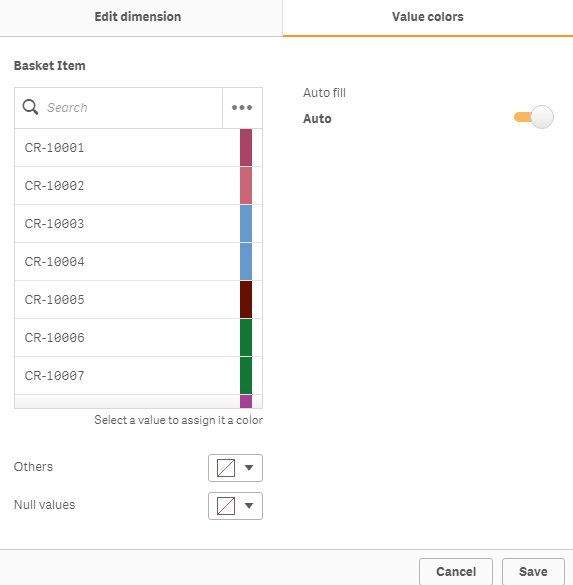
Create Master Dimension with Workflow_Age_Days field and use visual color like below exp..
Drag master dimension field in your chart.