Unlock a world of possibilities! Login now and discover the exclusive benefits awaiting you.

- Qlik Community
- :
- Forums
- :
- Analytics & AI
- :
- Products & Topics
- :
- Visualization and Usability
- :
- Re: Show Zero in Table for Sum
- Subscribe to RSS Feed
- Mark Topic as New
- Mark Topic as Read
- Float this Topic for Current User
- Bookmark
- Subscribe
- Mute
- Printer Friendly Page

 JustinDallas
- Mark as New
- Bookmark
- Subscribe
- Mute
- Subscribe to RSS Feed
- Permalink
- Report Inappropriate Content
Show Zero in Table for Sum
Hello Everyone,
I have a table where I would like every dimension to have a '0' when it doesn't meet the Set Analysis requirement. For instance, I have this dataset.
TestData:
LOAD * Inline
[
'UserId', 'ProductType','Count'
    1, 'Cookies', 3
    1, 'Biscuits', 4
    2, 'Peas', 5
    2, 'Sugar', 6
]
;


EXIT Script
;
Then, I have a table showing the UserId and a Set Analysis value of 'SUM({<[ProductType]={'Peas'}>} Count)'. When a UserId doesn't have any Peas, the table throws the row away, giving me this.
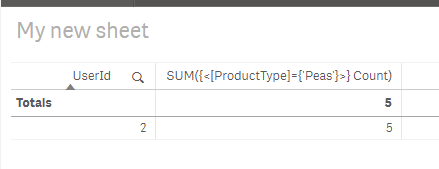
What I would like is something like this.
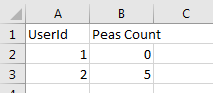
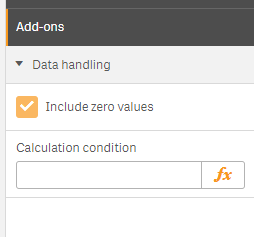
And of course, I've got that 'Include Zero Values' checked (but this isn't quite a zero value, it's more like some kind of Null).
Any help is greatly appreciated.
Accepted Solutions

 sunny_talwar
- Mark as New
- Bookmark
- Subscribe
- Mute
- Subscribe to RSS Feed
- Permalink
- Report Inappropriate Content
sunny_talwar
- Mark as New
- Bookmark
- Subscribe
- Mute
- Subscribe to RSS Feed
- Permalink
- Report Inappropriate Content
May be try this
Sum({<[ProductType]={'Peas'}>} Count) + Sum({1} 0)
sunny_talwar
- Mark as New
- Bookmark
- Subscribe
- Mute
- Subscribe to RSS Feed
- Permalink
- Report Inappropriate Content

JustinDallas
- Mark as New
- Bookmark
- Subscribe
- Mute
- Subscribe to RSS Feed
- Permalink
- Report Inappropriate Content
Ha! That's it! Thanks, I spent all night battling this problem to no avail.

 Jorge_Iturra
- Mark as New
- Bookmark
- Subscribe
- Mute
- Subscribe to RSS Feed
- Permalink
- Report Inappropriate Content
Hey, this work on qlik cloud as well !
Thank you very much.
