Unlock a world of possibilities! Login now and discover the exclusive benefits awaiting you.

- Qlik Community
- :
- Forums
- :
- Analytics & AI
- :
- Products & Topics
- :
- Visualization and Usability
- :
- Tracking occurrence dates and reporting on them
- Subscribe to RSS Feed
- Mark Topic as New
- Mark Topic as Read
- Float this Topic for Current User
- Bookmark
- Subscribe
- Mute
- Printer Friendly Page

- Mark as New
- Bookmark
- Subscribe
- Mute
- Subscribe to RSS Feed
- Permalink
- Report Inappropriate Content
Tracking occurrence dates and reporting on them
Hi,
I've created a daily incremental extract but I need to validate and track some occurrence IDs.
So my data is in this format:
| Date | ID |
|---|---|
| 20/5/2017 | 7526-9856 |
| 20/5/2017 | 4523-1826 |
| 19/5/2017 | 6352-4736 |
| 19/5/2017 | 4545-5236 |
| 19/5/2017 | 4523-1826 |
| 18/5/2017 | 4523-1826 |
I'd like to be able to calculate 3 things:
- On today's date, how many occurrences are pre-existing and how many are new
- The number of days each occurrence has existed
- The average number of days an occurrence existed for
So a table that looks like this:
| Date | Total No of Occurances | Pre-Existing Occurances | New Occurances |
|---|---|---|---|
| 20/5/2017 | 2 | 1 | 1 |
| 19/5/2017 | 3 | 1 | 2 |
| 18/5/2017 | 1 | 0 | 1 |
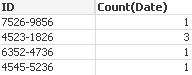
And another table that looks like:
| ID | Days Existing |
|---|---|
| 7526-9856 | 1 |
| 4523-1826 | 3 |
| 6352-4736 | 1 |
| 4545-5236 | 1 |
I would then be able to work out the last one from the second table above.
Thanks....
Accepted Solutions

 antoniotiman
- Mark as New
- Bookmark
- Subscribe
- Mute
- Subscribe to RSS Feed
- Permalink
- Report Inappropriate Content
HI,
Temp:
LOAD Date,
ID
FROM
"https://community.qlik.com/message/1289550"
(html, codepage is 1252, embedded labels, table is @1);
LOAD *,If(ID=Peek(ID),1,0) as Flag Resident Temp Order By ID;
Drop Table Temp;

antoniotiman
- Mark as New
- Bookmark
- Subscribe
- Mute
- Subscribe to RSS Feed
- Permalink
- Report Inappropriate Content
Hi,
see Attachment.
Regards,
Antonio
antoniotiman
- Mark as New
- Bookmark
- Subscribe
- Mute
- Subscribe to RSS Feed
- Permalink
- Report Inappropriate Content
HI,
Temp:
LOAD Date,
ID
FROM
"https://community.qlik.com/message/1289550"
(html, codepage is 1252, embedded labels, table is @1);
LOAD *,If(ID=Peek(ID),1,0) as Flag Resident Temp Order By ID;
Drop Table Temp;