Unlock a world of possibilities! Login now and discover the exclusive benefits awaiting you.

- Qlik Community
- :
- Forums
- :
- Analytics & AI
- :
- Products & Topics
- :
- Visualization and Usability
- :
- Year comparison in bar chart
- Subscribe to RSS Feed
- Mark Topic as New
- Mark Topic as Read
- Float this Topic for Current User
- Bookmark
- Subscribe
- Mute
- Printer Friendly Page

- Mark as New
- Bookmark
- Subscribe
- Mute
- Subscribe to RSS Feed
- Permalink
- Report Inappropriate Content
Year comparison in bar chart
Hello,
I asked almost the same question . Sum of the same companies in different years
but now, I want to add something. I want to compare the same periods of these years.
For example,
Today is 28 February. And I want to compare the data from January 1 to February 28 in these years.
Sum({<Company = p({<Year = {"$(=Max(Year) - 1)"}>})>}Measure)
Sum of the same companies in different years
How this formula can be changed ?
Also,
I want to compare all the companies that are in these years(2016,2017,2018) If I add another year, for example, 2015, it should compare only the companies which are in all these 4years)
I compare these periods -- Year( as dimension)
Measure :=SUM({$<Date = {'>=$(=YearStart(Today()))<=$(=MonthEnd(Today()))'}>}FactSoldAmount) Measure:=SUM({$<Date = {'>=$(=YearStart(AddYears(Today(),-1)))<=$(=MonthEnd(AddYears(Today(),-1)))'}>}FactSoldAmou Measure:=SUM({$<Date = {'>=$(=YearStart(AddYears(Today(),-2)))<=$(=MonthEnd(AddYears(Today(),-2)))'}>}FactSoldAmount)
but I can't unite it with the formula that calculates the same companies in these years.
- « Previous Replies
- Next Replies »
Accepted Solutions

 sunny_talwar
- Mark as New
- Bookmark
- Subscribe
- Mute
- Subscribe to RSS Feed
- Permalink
- Report Inappropriate Content
May be try this
=Sum({$<Date = {">=$(=YearStart(Today()))<=$(=MonthEnd(Today()))"}>} FactSoldAmount)
=Sum({$<Date = {">=$(=YearStart(AddYears(Today(), -1)))<=$(=MonthEnd(AddYears(Today(), -1)))"}, Company = p({<Date = {">=$(=YearStart(Today()))<=$(=MonthEnd(Today()))"}>})>}FactSoldAmount)
=Sum({$<Date = {">=$(=YearStart(AddYears(Today(), -2)))<=$(=MonthEnd(AddYears(Today(), -2)))"}, Company = p({<Date = {">=$(=YearStart(Today()))<=$(=MonthEnd(Today()))"}>})>}FactSoldAmount)
sunny_talwar
- Mark as New
- Bookmark
- Subscribe
- Mute
- Subscribe to RSS Feed
- Permalink
- Report Inappropriate Content
May be try this
=Sum({$<Date = {">=$(=YearStart(Today()))<=$(=MonthEnd(Today()))"}>} FactSoldAmount)
=Sum({$<Date = {">=$(=YearStart(AddYears(Today(), -1)))<=$(=MonthEnd(AddYears(Today(), -1)))"}, Company = p({<Date = {">=$(=YearStart(Today()))<=$(=MonthEnd(Today()))"}>})>}FactSoldAmount)
=Sum({$<Date = {">=$(=YearStart(AddYears(Today(), -2)))<=$(=MonthEnd(AddYears(Today(), -2)))"}, Company = p({<Date = {">=$(=YearStart(Today()))<=$(=MonthEnd(Today()))"}>})>}FactSoldAmount)
- Mark as New
- Bookmark
- Subscribe
- Mute
- Subscribe to RSS Feed
- Permalink
- Report Inappropriate Content
It works  Thank you very much !!
I also I have one question. I want to have the same chart, but When I select year in filter it should change by this logic: if I select 2016, the chart should be changed by comparing the companies that were only in 2016. When I select 2017 only the companies that were in 2017 should be compared in all of these years.
Is it possible?
sunny_talwar
- Mark as New
- Bookmark
- Subscribe
- Mute
- Subscribe to RSS Feed
- Permalink
- Report Inappropriate Content
May be this
=Sum({$<Date = {">=$(=YearStart(Today()))<=$(=MonthEnd(Today()))"}>} FactSoldAmount)
=Sum({$<Date = {">=$(=YearStart(AddYears(Today(), -1)))<=$(=MonthEnd(AddYears(Today(), -1)))"}, Company = p({<Year = {"$(=Max(Year))"}>})>} FactSoldAmount)
=Sum({$<Date = {">=$(=YearStart(AddYears(Today(), -2)))<=$(=MonthEnd(AddYears(Today(), -2)))"}, Company = p({<Year = {"$(=Max(Year))"}>})>}FactSoldAmount)
- Mark as New
- Bookmark
- Subscribe
- Mute
- Subscribe to RSS Feed
- Permalink
- Report Inappropriate Content
it shows only the year that I select. I want to show all the years' sum, but only the selected year's companies
sunny_talwar
- Mark as New
- Bookmark
- Subscribe
- Mute
- Subscribe to RSS Feed
- Permalink
- Report Inappropriate Content
This isn't showing you the previous year (2017) for the companies within the selected year?
=Sum({$<Date = {">=$(=YearStart(AddYears(Today(), -1)))<=$(=MonthEnd(AddYears(Today(), -1)))"}, Company = p({<Year = {"$(=Max(Year))"}>})>} FactSoldAmount)
- Mark as New
- Bookmark
- Subscribe
- Mute
- Subscribe to RSS Feed
- Permalink
- Report Inappropriate Content
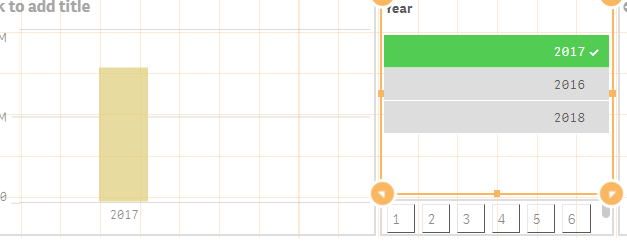 No
No
sunny_talwar
- Mark as New
- Bookmark
- Subscribe
- Mute
- Subscribe to RSS Feed
- Permalink
- Report Inappropriate Content
Make sense... try this
=Sum({$<Date = {">=$(=YearStart(Today()))<=$(=MonthEnd(Today()))"}>} FactSoldAmount)
=Sum({$<Year, Date = {">=$(=YearStart(AddYears(Today(), -1)))<=$(=MonthEnd(AddYears(Today(), -1)))"}, Company = p({<Year = {"$(=Max(Year))"}>})>} FactSoldAmount)
=Sum({$<Year, Date = {">=$(=YearStart(AddYears(Today(), -2)))<=$(=MonthEnd(AddYears(Today(), -2)))"}, Company = p({<Year = {"$(=Max(Year))"}>})>}FactSoldAmount)
- Mark as New
- Bookmark
- Subscribe
- Mute
- Subscribe to RSS Feed
- Permalink
- Report Inappropriate Content
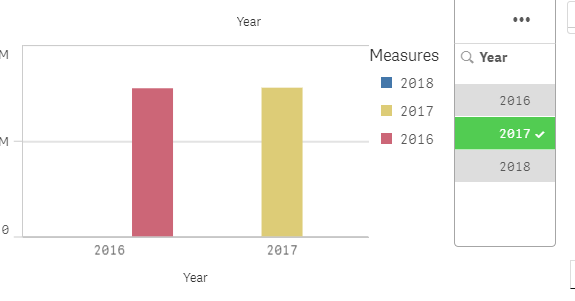
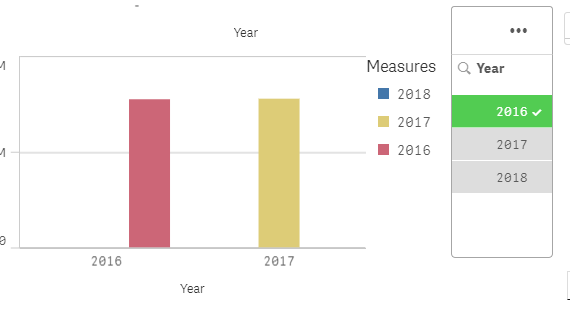
it shows the same amount of these years and they aren't the same. Also, 2018 should be shown( if it's possible )
sunny_talwar
- Mark as New
- Bookmark
- Subscribe
- Mute
- Subscribe to RSS Feed
- Permalink
- Report Inappropriate Content
Share a sample if possible
- « Previous Replies
- Next Replies »