Unlock a world of possibilities! Login now and discover the exclusive benefits awaiting you.

- Qlik Community
- :
- Forums
- :
- Analytics & AI
- :
- Products & Topics
- :
- Visualization and Usability
- :
- Re: qlik expression
- Subscribe to RSS Feed
- Mark Topic as New
- Mark Topic as Read
- Float this Topic for Current User
- Bookmark
- Subscribe
- Mute
- Printer Friendly Page

 nroy12
- Mark as New
- Bookmark
- Subscribe
- Mute
- Subscribe to RSS Feed
- Permalink
- Report Inappropriate Content
qlik expression
Hi All,
Kindly suggest me whats wrong with this statement?
i am getting invalid statement.
=min(If(Match(task_name,'Upload Content') and Match(workflow_name,'EMEA Content Upload and perform QC'),date(task_creation_date), '31/12/2025'))
thanks,
Accepted Solutions

 vinieme12
- Mark as New
- Bookmark
- Subscribe
- Mute
- Subscribe to RSS Feed
- Permalink
- Report Inappropriate Content
- Are the field names correct?
- Even if it says error in expression What happens if you just click "Apply"
- Can you post a screenshot of the Edit Expression window
Even below will return same result
=If(Match(task_name,'Upload Content') and Match(workflow_name,'EMEA Content Upload and perform QC')
,min(date(Date)), makedate(2025,12,31))
or
=if(
min({<task_name={'Upload Content'},workflow_name={'EMEA Content Upload and perform QC'}>}task_creation_date)
,min({<task_name={'Upload Content'},workflow_name={'EMEA Content Upload and perform QC'}>}task_creation_date)
,makedate(2025,12,31) )
If a post helps to resolve your issue, please accept it as a Solution.

 Or
Or
- Mark as New
- Bookmark
- Subscribe
- Mute
- Subscribe to RSS Feed
- Permalink
- Report Inappropriate Content
There does not appear to be anything wrong with this statement. It parses correctly in Data Load Editor.

 durgesh22
- Mark as New
- Bookmark
- Subscribe
- Mute
- Subscribe to RSS Feed
- Permalink
- Report Inappropriate Content
Above statement is valid, but make sure the FIELDS you are using in this expression are correct.
nroy12
- Mark as New
- Bookmark
- Subscribe
- Mute
- Subscribe to RSS Feed
- Permalink
- Report Inappropriate Content
yes but when i add the min function its giving me invalid in the report expression, otherwise wihtout min its working fine. i got 3 lines of dates. wanted to take min of these dates.
Or
- Mark as New
- Bookmark
- Subscribe
- Mute
- Subscribe to RSS Feed
- Permalink
- Report Inappropriate Content
Your issue is probably with using a string within the min() function. Try using a date instead of the string in the Else section.
durgesh22
- Mark as New
- Bookmark
- Subscribe
- Mute
- Subscribe to RSS Feed
- Permalink
- Report Inappropriate Content
Can you help with few lines of dummy data , it will help others is giving solution to your problem.
nroy12
- Mark as New
- Bookmark
- Subscribe
- Mute
- Subscribe to RSS Feed
- Permalink
- Report Inappropriate Content
i tried instead of string following:
=min(If(Match(task_name,'Upload Content') and Match(workflow_name,'EMEA Content Upload and perform QC'),date(task_creation_date), makedate(2025,12,31)))
still its saying invalid statement
vinieme12
- Mark as New
- Bookmark
- Subscribe
- Mute
- Subscribe to RSS Feed
- Permalink
- Report Inappropriate Content
- Are the field names correct?
- Even if it says error in expression What happens if you just click "Apply"
- Can you post a screenshot of the Edit Expression window
Even below will return same result
=If(Match(task_name,'Upload Content') and Match(workflow_name,'EMEA Content Upload and perform QC')
,min(date(Date)), makedate(2025,12,31))
or
=if(
min({<task_name={'Upload Content'},workflow_name={'EMEA Content Upload and perform QC'}>}task_creation_date)
,min({<task_name={'Upload Content'},workflow_name={'EMEA Content Upload and perform QC'}>}task_creation_date)
,makedate(2025,12,31) )
If a post helps to resolve your issue, please accept it as a Solution.
nroy12
- Mark as New
- Bookmark
- Subscribe
- Mute
- Subscribe to RSS Feed
- Permalink
- Report Inappropriate Content
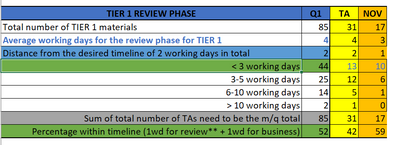
thanks its working correctly with my statement but i had to put this expression in the measure instead of dimension. but i have achieve result like following:
here the left side less than 3 days , 3-5 days this grouping is the dimension i wanted to count by above duration expression.
actual result i am getting now:

expected result:
thanks,
