Unlock a world of possibilities! Login now and discover the exclusive benefits awaiting you.

- Qlik Community
- :
- All Forums
- :
- GeoAnalytics
- :
- Change background color of 'empty' base map
- Subscribe to RSS Feed
- Mark Topic as New
- Mark Topic as Read
- Float this Topic for Current User
- Bookmark
- Subscribe
- Mute
- Printer Friendly Page

 beunderf
- Mark as New
- Bookmark
- Subscribe
- Mute
- Subscribe to RSS Feed
- Permalink
- Report Inappropriate Content
Change background color of 'empty' base map
Hi all,
I like to change the default background colour of the empty base map. It is a grey colour but I want to change it to white.
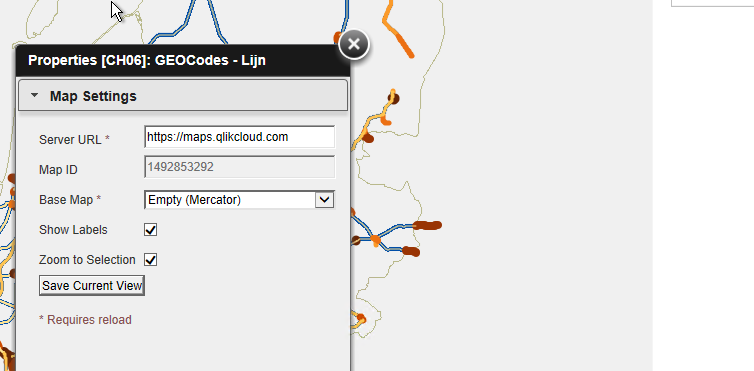
Thanks,
Frank
Accepted Solutions

 Patric_Nordstro
- Mark as New
- Bookmark
- Subscribe
- Mute
- Subscribe to RSS Feed
- Permalink
- Report Inappropriate Content
Hi Frank,
There is no setting for the background color.
However a big white box as a background layer will give the same effect.
Here's a geometry for a world covering box in WGS84, place in load script, use bg_box as dim/geometry
background:
load * inline "
id_box|bg_box
world|'[[ [-180, -80], [-180, 80], [ 180, 80], [ 180, -80], [-180, -80] ]]'
"
(ansi, txt, delimiter is '|', embedded labels)
;
To render: change draw order to Geodata layer, switch off the info bubble, don't include in AutoZoom, make the layer non-selectable and set color mode to single color: white.
Thanks,
Patric Nordström
Qlik
Patric_Nordstro- Mark as New
- Bookmark
- Subscribe
- Mute
- Subscribe to RSS Feed
- Permalink
- Report Inappropriate Content
Hi Frank,
There is no setting for the background color.
However a big white box as a background layer will give the same effect.
Here's a geometry for a world covering box in WGS84, place in load script, use bg_box as dim/geometry
background:
load * inline "
id_box|bg_box
world|'[[ [-180, -80], [-180, 80], [ 180, 80], [ 180, -80], [-180, -80] ]]'
"
(ansi, txt, delimiter is '|', embedded labels)
;
To render: change draw order to Geodata layer, switch off the info bubble, don't include in AutoZoom, make the layer non-selectable and set color mode to single color: white.
Thanks,
Patric Nordström
Qlik
