Unlock a world of possibilities! Login now and discover the exclusive benefits awaiting you.

- Qlik Community
- :
- Forums
- :
- Analytics & AI
- :
- Products & Topics
- :
- Connectivity & Data Prep
- :
- Re: How to remove 0 Data in Cross Table Load
- Subscribe to RSS Feed
- Mark Topic as New
- Mark Topic as Read
- Float this Topic for Current User
- Bookmark
- Subscribe
- Mute
- Printer Friendly Page

 syedsaqib
- Mark as New
- Bookmark
- Subscribe
- Mute
- Subscribe to RSS Feed
- Permalink
- Report Inappropriate Content
How to remove 0 Data in Cross Table Load
Hi Everyone,
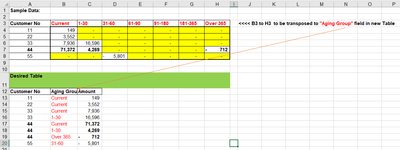
I am converting multiple fields of "Aging groups" from Columns to Rows using cross table as shown in attached screenshot.
There are many 0 values in the data (yellow highlighted) and all these '0's are also being loaded to final table after applying crosstable.
How can I load the same data with crosstable ignoring all "0" values ?
Thanks
Accepted Solutions

 MayilVahanan
- Mark as New
- Bookmark
- Subscribe
- Mute
- Subscribe to RSS Feed
- Permalink
- Report Inappropriate Content
Hi @syedsaqib
Try like below
T1:
CrossTable(AgingGroup, Amount1)
LOAD [Customer No],
Current,
[1-30],
[31-60],
[61-90],
[91-180],
[181-365],
[Over 365]
FROM
[D:\Qlik\Com\Sample Data and Desired result.xlsx]
(ooxml, embedded labels, table is Sheet2);
NoConcatenate
Load * Resident T1 Where (Amount1 <>0);
DROP Table T1;
Please close the thread by marking correct answer & give likes if you like the post.

 Qrishna
- Mark as New
- Bookmark
- Subscribe
- Mute
- Subscribe to RSS Feed
- Permalink
- Report Inappropriate Content
Sample Data and desired output pls?
syedsaqib
- Mark as New
- Bookmark
- Subscribe
- Mute
- Subscribe to RSS Feed
- Permalink
- Report Inappropriate Content
Hi, Sample data and desired output attached.


MayilVahanan
- Mark as New
- Bookmark
- Subscribe
- Mute
- Subscribe to RSS Feed
- Permalink
- Report Inappropriate Content
Hi @syedsaqib
Try like below
T1:
CrossTable(AgingGroup, Amount1)
LOAD [Customer No],
Current,
[1-30],
[31-60],
[61-90],
[91-180],
[181-365],
[Over 365]
FROM
[D:\Qlik\Com\Sample Data and Desired result.xlsx]
(ooxml, embedded labels, table is Sheet2);
NoConcatenate
Load * Resident T1 Where (Amount1 <>0);
DROP Table T1;
Please close the thread by marking correct answer & give likes if you like the post.
