Unlock a world of possibilities! Login now and discover the exclusive benefits awaiting you.


.png "Former Employee") hic
hic
- Subscribe to RSS Feed
- Mark as New
- Mark as Read
- Bookmark
- Subscribe
- Printer Friendly Page
- Report Inappropriate Content
It is, in fact, one of my favorite functions and I do not seem to be alone in this choice. Several of the QlikView developers who regularly write on QlikCommunity seem to share this preference and have written about this function, e.g., QlikView Notes, Quick Intelligence and QVApps.
So, what does the function do? Well, basically it is just a lookup function – it takes one value as input, checks if this value exists in a mapping table and returns the corresponding value from the second column in the mapping table. Think of it as a translation function where the translation is fetched from a pre-defined, two-column table. A simple translation function, but you can still do a lot with it...
What has this got to do with joins? Everything. A very common situation in data modeling is that you need to get a single field value (per record) from a different table than the current one. Then the standard way to do this is to use a join. However, in QlikView you can – and should – use Applymap() instead. The only time that you cannot use Applymap() instead of a join is if you want to fetch more than one single corresponding value (record) from the second table.
Let's look at an example of how to use Applymap(): In an ERP system, the customer table is the table where all information about the customer is stored, e.g. the name and country of the customer. Further, it could be that you need the customer’s country when making a calculation in the order table. This is a field that you don't have in the order table. In SQL you would join the two tables to get country into the order table.
In the QlikView script you would instead first define the mapping table that maps a customer ID to a customer country as follows:
MapCustomerIDtoCountry:
Mapping Load CustomerID, Country From Customers ;
The second step is to use this information when reading the order table, such as:
Orders:
Load *,
ApplyMap('MapCustomerIDtoCountry', CustomerID, null()) as Country
From Orders ;
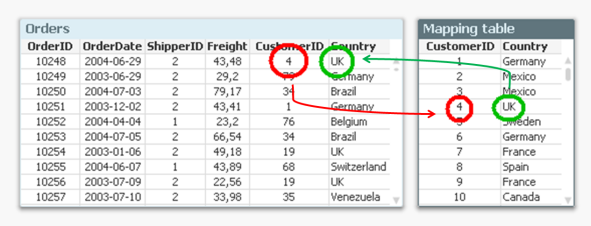
The "null()" as third parameter of the function defines what it should return when the customer ID isn't found in the mapping table.
And with this, you have joined the field Country with the order table – without using a join. And you have done it faster and with less chance of errors. Bottom line: Whenever you know that you just want to fetch one single value per record – don’t join. Use Applymap() instead.
See more in the Technical Brief on Joins and Lookups.
You must be a registered user to add a comment. If you've already registered, sign in. Otherwise, register and sign in.