Unlock a world of possibilities! Login now and discover the exclusive benefits awaiting you.

- Qlik Community
- :
- Blogs
- :
- Technical
- :
- Design
- :
- How to Rename Fields

.png "Former Employee") hic
hic
- Subscribe to RSS Feed
- Mark as New
- Mark as Read
- Bookmark
- Subscribe
- Printer Friendly Page
- Report Inappropriate Content
First of all, the most common way is to use aliases inside the Load or SELECT statements. If there are many fields to rename you may not want to do this, since it seems like tedious work having to enter all new field names manually in the script. But doing it has the advantage that it makes the script easy to understand for other developers.
CompanyName as CustomerName,
A second way is to use an Alias statement or a Qualify statement before the Load. These two statements are similar, in that they “silently” rename the fields in the output of the Load statement.
Alias CompanyName as CustomerName;
Load * From Customers;
However, a consequence of using the Alias or Qualify statement is that you cannot use a resident load that refers to an original field name – instead it must refer to the field name as defined in the Alias/Qualify statement. This is sometimes confusing – especially if the Alias statement is written earlier in the script, far from the Load statement. The Alias and Qualify statements will certainly make your script harder to understand for other developers.
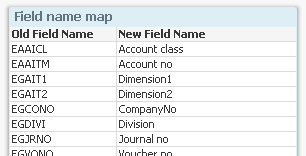
A third way to rename fields is to use the Rename statement. This is a very good method if you want to rename all or some fields at the end of the script run: The best way is to have a mapping table with the old and new field names and use this as follows:
FieldNameMap:
Mapping Load OldFieldName, NewFieldName From FieldNames ;
Rename Fields using FieldNameMap;
You can store the mapping table in your database or in an excel sheet so that it is easier to maintain.
Which methods do I use? I usually use aliases within the Load statements to define the data model. I never or rarely use the Alias or the Qualify statements.
In addition, I often end the script with a “Rename fields” statement to make the field names user-friendly. This way the script itself uses the database field names that are understandable for developers - who often are well familiar with the source database - while the app interface (list boxes, current selections, etc.) uses more user-friendly field names that are understandable for the users.
The result: I get the advantages of both naming schemes.
You must be a registered user to add a comment. If you've already registered, sign in. Otherwise, register and sign in.