Renaming fields in the script is something that all QlikView developers do, not only for creating links between tables, but also for making the sometimes cryptic database field names understandable for the users. So how do you best do that? The question seems trivial, but there are in fact a number of things to say about renaming fields.
First of all, the most common way is to use aliases inside the Load or SELECT statements. If there are many fields to rename you may not want to do this, since it seems like tedious work having to enter all new field names manually in the script. But doing it has the advantage that it makes the script easy to understand for other developers.
CompanyName as CustomerName,
A second way is to use an Alias statement or a Qualify statement before the Load. These two statements are similar, in that they “silently” rename the fields in the output of the Load statement.
Alias CompanyName as CustomerName; Load * From Customers;
However, a consequence of using the Alias or Qualify statement is that you cannot use a resident load that refers to an original field name – instead it must refer to the field name as defined in the Alias/Qualify statement. This is sometimes confusing – especially if the Alias statement is written earlier in the script, far from the Load statement. The Alias and Qualify statements will certainly make your script harder to understand for other developers.
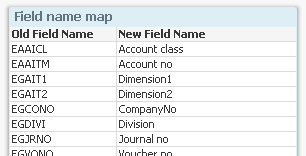
A third way to rename fields is to use the Rename statement. This is a very good method if you want to rename all or some fields at the end of the script run: The best way is to have a mapping table with the old and new field names and use this as follows:
FieldNameMap: Mapping LoadOldFieldName, NewFieldName From FieldNames ; Rename Fields using FieldNameMap;
You can store the mapping table in your database or in an excel sheet so that it is easier to maintain.
Which methods do I use? I usually use aliases within the Load statements to define the data model. I never or rarely use the Alias or the Qualify statements.
In addition, I often end the script with a “Rename fields” statement to make the field names user-friendly. This way the script itself uses the database field names that are understandable for developers - who often are well familiar with the source database - while the app interface (list boxes, current selections, etc.) uses more user-friendly field names that are understandable for the users.
The result: I get the advantages of both naming schemes.
I'm doing a Binary Load from the last transformation.
Then, I use the Rename Using function, to change the fields names.
But, on the layout all the objects show "unavailable" for the fields. Same on the expressions.
In fact, the new names are not associated to the existing layout.
I have tested this same procedure with two fields, and it works well. But my model is using around 600 fields. Is there any limit or restriction for this?
I have a project that I have to loop through (and load) 200 excel files - I want to be able to concatenate these 200 files into 1 table . Most of the names are the same but many are different. For example within the 200 files a column may be called "Cust", "Client", "CustNum", etc but I want it to be "Customer" for all. Is there any way to have a Rename that loops through each table and if it finds any of these field names ("Cust", "Client", "CustNum", etc) then it will rename to Customer. I know it can be done in a one to one relationship (per your example above) but how about if there is the possibility of several different names old names that I want to rename to the one new name. This will be a nightmare if I have to load each table separately and then do renames on each tables fields without any automation.
Yes, you can do this using the "Alias" command. For example:
Alias Cust as Customer,
Client as Customer,
CustNum as Customer;
LOAD * FROM [*.txt]
(txt, codepage is 1252, embedded labels, delimiter is ',', msq);
Note the wildcards, both in the field list and in the file name.
HIC
By the way, above solution works only if all fields (after the alias renaming) are the same. If you have some fields that are different, you should instead use
Alias Cust as Customer,
Client as Customer,
CustNum as Customer;
Set vConcatenate = ;
For each vFile in FileList('C:\Path\*.txt')
$(vConcatenate)
Load * FROM "$(vFile)"
(txt, codepage is 1252, embedded labels, delimiter is ',', msq);
Thanks much - very helpful! It worked for my example.
Just a couple follow up questions:
1. Is there some way to have fields being 'Alias' ed in a spreadsheet where it can be maintained - or has to be explicitly in script? Kind of like your example of mapping only with Alias's.
2. Not sure exactly what you are referring to here:
By the way, above solution works only if all fields (after the alias renaming) are the same. If you have some fields that are different, you should instead use
Alias Cust as Customer,
Client as Customer,
CustNum as Customer;
Set vConcatenate = ;
For each vFile in FileList('C:\Path\*.txt')
$(vConcatenate)
Load * FROM "$(vFile)"
(txt, codepage is 1252, embedded labels, delimiter is ',', msq);
I am setting up QlikView on top of SAP ERP and would also like to have one central Excel spreadsheet as Single Point Of Truth for the following purposes:
rename fields, get the complete history of a field's name from the SAP source table to the target user GUI in QlikView so every field can be tracked to where it comes from
get all descriptions and technical Details of a field
supply the end user with comments and example values so he or she has no uncertainties about the data
In the script every name of a field can easily be exchanged
comments, tags and renames all exist in one single Excel spreadsheet, you can even transfer the line breaks into QlikView for better visualisation
this Excel spreadsheet can serve as a (simple) ETL-specification
My question now is:
Shall I really do it in only one excel spreadsheet? Mabye one per extracted table? Or one sheet per table? I would like not to repeat information and the field MATNR for example will always have the same Information, regardless in which table it is loaded.
Should field Information from other Systems such as Excel also be included in this spreadsheet? Or one per System?
What do you generally think about this approach? Is there a better solution? The goal is to create a Single Point Of Truth!
I would definitely do it in a very similar way. Either in Excel, or in a database.
I would put all fields in one file, in one sheet. If you want fields from different systems, you can add this information as one additional column in your metadata table.
