Unlock a world of possibilities! Login now and discover the exclusive benefits awaiting you.

- Qlik Community
- :
- Forums
- :
- Analytics & AI
- :
- Products & Topics
- :
- Management & Governance
- :
- Re: P() function
- Subscribe to RSS Feed
- Mark Topic as New
- Mark Topic as Read
- Float this Topic for Current User
- Bookmark
- Subscribe
- Mute
- Printer Friendly Page

 Carlaf_93
- Mark as New
- Bookmark
- Subscribe
- Mute
- Subscribe to RSS Feed
- Permalink
- Report Inappropriate Content
P() function
Why the p funtion is not working on Qlik Sense?
It says that it isn't a valid function....
Accepted Solutions

 tresB
tresB
- Mark as New
- Bookmark
- Subscribe
- Mute
- Subscribe to RSS Feed
- Permalink
- Report Inappropriate Content
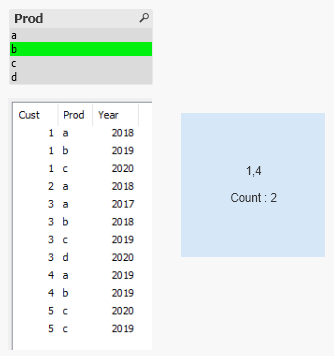
You might not need p() for this. You can try an expression like:
Count(DISTINCT {<Year={'$(=Max({<Prod>}Year)-1)'}>} Cust)

 rzenere_avvale
- Mark as New
- Bookmark
- Subscribe
- Mute
- Subscribe to RSS Feed
- Permalink
- Report Inappropriate Content
Goodmorning @Carlaf_93 ,
how are you trying to use it? Would you mind sharing an example of what you're trying to do?
I've used it on almost all QS versions without issues
Many thanks,
Riccardo
 lironbaram
- Mark as New
- Bookmark
- Subscribe
- Mute
- Subscribe to RSS Feed
- Permalink
- Report Inappropriate Content
hi
p function is only used inside set analysis
for more information look here
Carlaf_93
- Mark as New
- Bookmark
- Subscribe
- Mute
- Subscribe to RSS Feed
- Permalink
- Report Inappropriate Content
i woul like too see how many actual customers bought someting last year.
So i want to create a kpi that says if a selected customers bought something last year.
tresB
- Mark as New
- Bookmark
- Subscribe
- Mute
- Subscribe to RSS Feed
- Permalink
- Report Inappropriate Content
You might not need p() for this. You can try an expression like:
Count(DISTINCT {<Year={'$(=Max({<Prod>}Year)-1)'}>} Cust)
