Unlock a world of possibilities! Login now and discover the exclusive benefits awaiting you.

- Qlik Community
- :
- Support
- :
- Support
- :
- Knowledge
- :
- Support Articles
- :
- Qlik Sense Data Connectors are missing
- Subscribe to RSS Feed
- Mark as New
- Mark as Read
- Bookmark
- Subscribe
- Printer Friendly Page
- Report Inappropriate Content
Qlik Sense Data Connectors are missing

 Rakesh_HB
- Mark as New
- Bookmark
- Subscribe
- Mute
- Subscribe to RSS Feed
- Permalink
- Report Inappropriate Content
Qlik Sense Data Connectors are missing
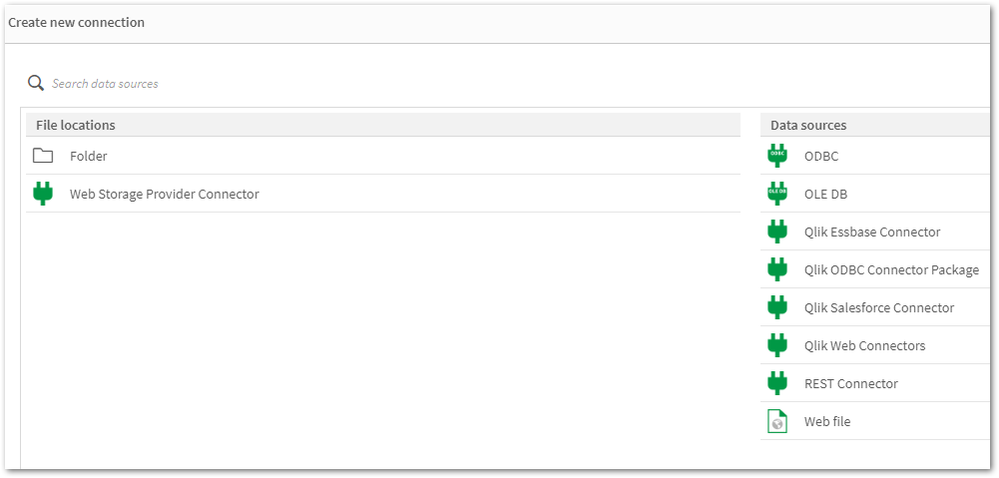
Qlik Sense Connectors are missing from the Data source except few REST connectors.
Resolution
Solution 1
Repair Qlik Sense with the Qlik Sense Setup file (identical version).
Solution 2
- Obtain a copy of the folder "C:\Program Files\Common Files\Qlik\Custom Data\" from a different, but working Qlik Sense Enterprise on a Windows environment (identical version). A test installation can be set up to obtain it.
- Replace the files/folders with the copied version. This action needs to be carried out on all nodes if it is a multi-node environment.
Solution 3
Encryption keys:
- Verify if the Encryption keys are present in the User's directory.
- Check if you have multiple encryption keys stored in the User's directory.
- Delete and recreate the Encryption keys using Setting an encryption key
Encryption keys will be stored in either "C:\Users\{sense service user}\AppData\Roaming\Qlik\QwcKeys\" Or "C:\Users\{sense service user}\AppData\Roaming\Qlik\Keys\"
Cause
- The Connector folders or executables are corrupted or deleted.
- Connector folders or executables are being scanned and removed from their path. Therefore, it is mandatory to exclude Qlik folders if any scanning software is present on Qlik Sense Windows machines. For more information about exclusions, please refer to the document titled Qlik Sense Folder And Files To Exclude From Anti-Virus Scanning
- Encryption Keys are either deleted or corrupted.
Related Content
An error occurred / Failed to load connection error message in Qlik Sense - Server Has No Internet
Environment


 brunoeroliveira
- Mark as Read
- Mark as New
- Bookmark
- Permalink
- Report Inappropriate Content
If your data connections folder is there, this solution won't work.
In my case, after reseting the service user password, all my connections crashed.
I tried almost everything, read every article but didn't found a solution for my case.
Only when I created another user, give adm rights on windows and changed the services to run with this new adm user it worked for me. So I'm here to spread the word.

 pbiprod
- Mark as Read
- Mark as New
- Bookmark
- Permalink
- Report Inappropriate Content
Thanks brunoeroliveira,I had the same problem as you apparently. Thank you very much
 Filippo_Nicolus
- Mark as Read
- Mark as New
- Bookmark
- Permalink
- Report Inappropriate Content
Based on you description:
"In my case, after reseting the service user password, all my connections crashed.
I tried almost everything, read every article but didn't found a solution for my case.
Only when I created another user, give adm rights on windows and changed the services to run with this new adm user it worked for me. So I'm here to spread the word."
by experience it leads me to :
1) your initial service user account was corrupted somehow.
2) the service user account was deleted by mistake , and recreated with same name ; in that case however SID of changes.
Happy that you found a solution ; in case it happens again involve your IT for a fast check on above.
 jchoucq
- Mark as Read
- Mark as New
- Bookmark
- Permalink
- Report Inappropriate Content
Hi and thank you for this article.
after following this procedure https://help.qlik.com/en-US/connectors/Content/Connectors_Home/Setting-encryption-key.htm#anchor-4 to create encryption key, i lost Dataconnectors exactly as we can see in the printscreen at the top of this article.
If i delete the files in the C:\Users\<Service Account user>\AppData\Roaming\Qlik\QwcKeys\ directory, connectors are back ...
Did anyone already meet this situation ? Because i need to create Encryption Key in order to use Sharepoint connection, i'm stuck for the moment ... although everything was fine in development architecture, which is exactly the same ...
BR
Johann
jchoucq
- Mark as Read
- Mark as New
- Bookmark
- Permalink
- Report Inappropriate Content
Update: It was due to a special character in the key... after replacing it with another character, it worked as expected.
