Unlock a world of possibilities! Login now and discover the exclusive benefits awaiting you.

- Qlik Community
- :
- All Forums
- :
- Qlik NPrinting
- :
- Re: Excel report from 2 resources
- Subscribe to RSS Feed
- Mark Topic as New
- Mark Topic as Read
- Float this Topic for Current User
- Bookmark
- Subscribe
- Mute
- Printer Friendly Page

 tomcatxx
- Mark as New
- Bookmark
- Subscribe
- Mute
- Subscribe to RSS Feed
- Permalink
- Report Inappropriate Content
Excel report from 2 resources
Hi, there.
I want to make a Excel Report with many sheetes One sheet is only for one product and every sheet contains 2 diagramms. They are Diagramm1 and Diagramm2.
Diagramm1 is from 1.qvw. Diagramm2 is from 2.qvw. Field 'Product' exists in 1.qvw and also in 2.qvw.
Now What I want is like so.
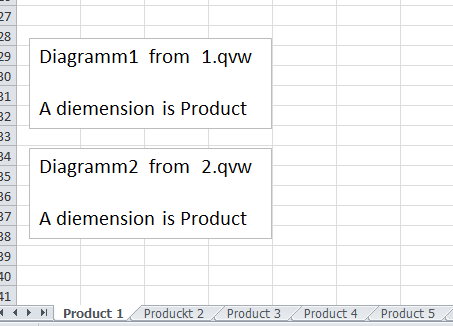
The problem is when I add 'Product' from 1.qvw in Nprinting page. Then there is same Diagram2 in all sheets. That means that only Diagramm1 changes in every sheet.
But when I add 'Product' from 2.qvw in Nprinting page. Then there is same Diagram1 in all sheets. That means that only Diagramm2 changes in every sheet.
I think the point is 1.qvw and 2.qvw can not be connected with 'Product' or something like that.
Can u help me to solve it or explain it? Thank you very much.
Accepted Solutions

 Ruggero_Piccoli
- Mark as New
- Bookmark
- Subscribe
- Mute
- Subscribe to RSS Feed
- Permalink
- Report Inappropriate Content
Hi,
First I suggest you to upgrade to latest 16 version, the 16.8 so you will take advantages from all solved bugs.
Then you have to add the linked field you created in the Pages node. I suppose you sre still usgin the one of the two Product fields.
Best Regards,
Ruggero
---------------------------------------------
When applicable please mark the appropriate replies as CORRECT https://community.qlik.com/docs/DOC-14806. This will help community members and Qlik Employees know which discussions have already been addressed and have a possible known solution. Please mark threads as HELPFUL if the provided solution is helpful to the problem, but does not necessarily solve the indicated problem. You can mark multiple threads as HELPFUL if you feel additional info is useful to others.
Best Regards,
Ruggero
---------------------------------------------
When applicable please mark the appropriate replies as CORRECT. This will help community members and Qlik Employees know which discussions have already been addressed and have a possible known solution. Please mark threads with a LIKE if the provided solution is helpful to the problem, but does not necessarily solve the indicated problem. You can mark multiple threads with LIKEs if you feel additional info is useful to others.
Ruggero_Piccoli
- Mark as New
- Bookmark
- Subscribe
- Mute
- Subscribe to RSS Feed
- Permalink
- Report Inappropriate Content
Hi,
What version of Qlik NPrinting are you using?
If it is 16.* you need to create a linked field with the Product.
If you are using 17+ the linked fields are not yet implemented so you have to find a different solution. You can evaluate to create a single .qvw with data from the two you are speaking about and with a single Product filed that can be added to the Pages node.
Best Regards,
Ruggero
---------------------------------------------
When applicable please mark the appropriate replies as CORRECT https://community.qlik.com/docs/DOC-14806. This will help community members and Qlik Employees know which discussions have already been addressed and have a possible known solution. Please mark threads as HELPFUL if the provided solution is helpful to the problem, but does not necessarily solve the indicated problem. You can mark multiple threads as HELPFUL if you feel additional info is useful to others.
Best Regards,
Ruggero
---------------------------------------------
When applicable please mark the appropriate replies as CORRECT. This will help community members and Qlik Employees know which discussions have already been addressed and have a possible known solution. Please mark threads with a LIKE if the provided solution is helpful to the problem, but does not necessarily solve the indicated problem. You can mark multiple threads with LIKEs if you feel additional info is useful to others.
tomcatxx
- Mark as New
- Bookmark
- Subscribe
- Mute
- Subscribe to RSS Feed
- Permalink
- Report Inappropriate Content
Hi, Ruggero. Thank you for ur help. My NPrinting version is 16.3.0.0. I found linked field in resources.
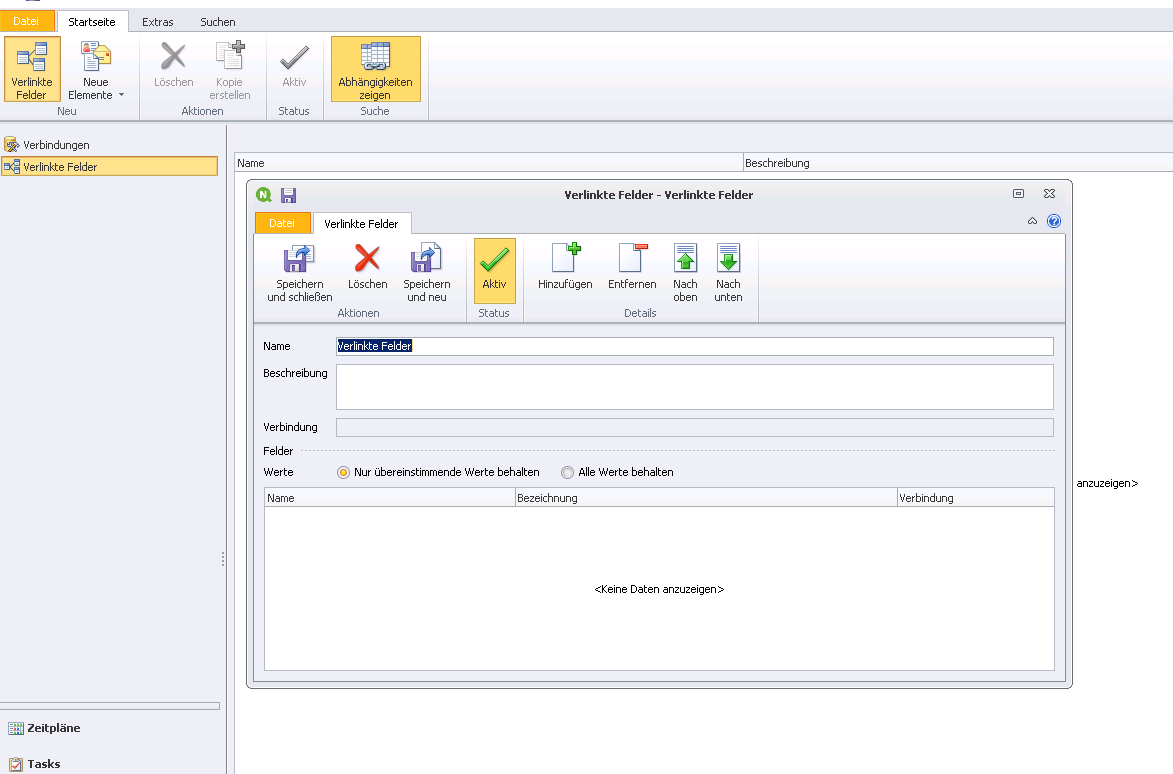
So I first added field 'Product_1' from qvw.1. Then I added 'Product_2' from qwv.2. The Fieldnames are different in two qvw documents. Then I stored that. But go back to Excel Report, it still does not work. Maybe I made something wrong or?

 Lech_Miszkiewic
- Mark as New
- Bookmark
- Subscribe
- Mute
- Subscribe to RSS Feed
- Permalink
- Report Inappropriate Content
once you get back to your template you can add linked field tag (NOT Product_1 and NOT Product_2) to your Level or Page to allow the same selection to flow through.
You can also use your linked field in your filters!
Linked field tag will be additional field on field list once you will try to add it in your Level or Page.
regards
Lech
Lech_Miszkiewic- Mark as New
- Bookmark
- Subscribe
- Mute
- Subscribe to RSS Feed
- Permalink
- Report Inappropriate Content
more details here as one of the references:
How to Use Linked Fields with Keep All Matching Values Only
Ruggero_Piccoli
- Mark as New
- Bookmark
- Subscribe
- Mute
- Subscribe to RSS Feed
- Permalink
- Report Inappropriate Content
Hi,
First I suggest you to upgrade to latest 16 version, the 16.8 so you will take advantages from all solved bugs.
Then you have to add the linked field you created in the Pages node. I suppose you sre still usgin the one of the two Product fields.
Best Regards,
Ruggero
---------------------------------------------
When applicable please mark the appropriate replies as CORRECT https://community.qlik.com/docs/DOC-14806. This will help community members and Qlik Employees know which discussions have already been addressed and have a possible known solution. Please mark threads as HELPFUL if the provided solution is helpful to the problem, but does not necessarily solve the indicated problem. You can mark multiple threads as HELPFUL if you feel additional info is useful to others.
Best Regards,
Ruggero
---------------------------------------------
When applicable please mark the appropriate replies as CORRECT. This will help community members and Qlik Employees know which discussions have already been addressed and have a possible known solution. Please mark threads with a LIKE if the provided solution is helpful to the problem, but does not necessarily solve the indicated problem. You can mark multiple threads with LIKEs if you feel additional info is useful to others.
Ruggero_Piccoli
- Mark as New
- Bookmark
- Subscribe
- Mute
- Subscribe to RSS Feed
- Permalink
- Report Inappropriate Content
We wrote the same answer at the same time 🙂
Ciao Lech
Best Regards,
Ruggero
---------------------------------------------
When applicable please mark the appropriate replies as CORRECT. This will help community members and Qlik Employees know which discussions have already been addressed and have a possible known solution. Please mark threads with a LIKE if the provided solution is helpful to the problem, but does not necessarily solve the indicated problem. You can mark multiple threads with LIKEs if you feel additional info is useful to others.
Lech_Miszkiewic- Mark as New
- Bookmark
- Subscribe
- Mute
- Subscribe to RSS Feed
- Permalink
- Report Inappropriate Content
yep - noticed that too 
Ciao!
