Unlock a world of possibilities! Login now and discover the exclusive benefits awaiting you.

- Qlik Community
- :
- All Forums
- :
- Qlik NPrinting
- :
- NPrinting Upgrade Error.
- Subscribe to RSS Feed
- Mark Topic as New
- Mark Topic as Read
- Float this Topic for Current User
- Bookmark
- Subscribe
- Mute
- Printer Friendly Page

 silvacarlos
- Mark as New
- Bookmark
- Subscribe
- Mute
- Subscribe to RSS Feed
- Permalink
- Report Inappropriate Content
NPrinting Upgrade Error.
Hi community! I need your help:
We have NPrinting November 2017 and we need to upgrade to September 2018 (because we need to use macros in an excel report we have right now).
When I was trying to install NPrinting Sept 2018 gives an error about DLLs, really weird. Then I've tried to install February 2018 (the following version of Nov 2017) because I think it was a version problem, unfortunately the same error:
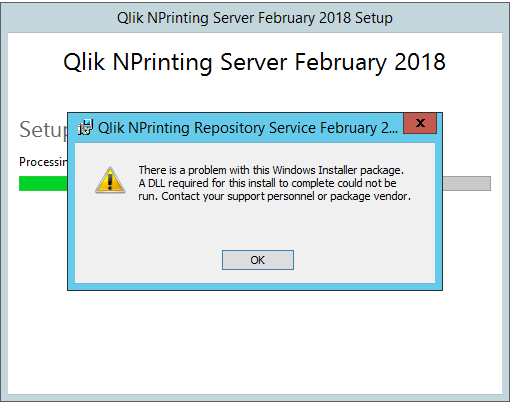
Logs says me this:
[1590:17B0][2019-01-21T11:00:08]e000: Error 0x80070643: Failed to install MSI package.
[1590:17B0][2019-01-21T11:00:08]e000: Error 0x80070643: Failed to execute MSI package.
[2118:23E8][2019-01-21T11:00:08]e000: Error 0x80070643: Failed to configure per-machine MSI package.
I was looking in the community but many people suggest to make a clean install of NPrinting...but I need to Upgrade, we have many reports, filters and task so I can't waste to much time doing again everything
Thanks in advance
CS
- Tags:
- qliksense
Accepted Solutions

 Frank_S
- Mark as New
- Bookmark
- Subscribe
- Mute
- Subscribe to RSS Feed
- Permalink
- Report Inappropriate Content
This type of issue is indicative of an NP server that may not have internet access.
Without the full set of logs to review, we can't say for sure.
However, if you are in an 'offline' state to internet access, you may need to manually perform all Windows Updates with include .NET Framework updates.
See article following: https://qliksupport.force.com/articles/000039702
If you have internet access for your NP server and all your windows updates are up to date including .NET framework, then please contact Qlik Support to raise a support case to assist you directly.
Frank_S
- Mark as New
- Bookmark
- Subscribe
- Mute
- Subscribe to RSS Feed
- Permalink
- Report Inappropriate Content
This type of issue is indicative of an NP server that may not have internet access.
Without the full set of logs to review, we can't say for sure.
However, if you are in an 'offline' state to internet access, you may need to manually perform all Windows Updates with include .NET Framework updates.
See article following: https://qliksupport.force.com/articles/000039702
If you have internet access for your NP server and all your windows updates are up to date including .NET framework, then please contact Qlik Support to raise a support case to assist you directly.
silvacarlos
- Mark as New
- Bookmark
- Subscribe
- Mute
- Subscribe to RSS Feed
- Permalink
- Report Inappropriate Content
Thank you again!

 AlexOmetis
- Mark as New
- Bookmark
- Subscribe
- Mute
- Subscribe to RSS Feed
- Permalink
- Report Inappropriate Content
Just to note that I had the Error 0x80070643 relating to the Messaging Service when re-installing NPrinting on a server (downgrade to do a restore before re-upgrading). I found I had to uninstall Erlang and kill the epmd process and remove the Erlang folder from Program Files before it would install successfully.
