Unlock a world of possibilities! Login now and discover the exclusive benefits awaiting you.

- Qlik Community
- :
- Forums
- :
- Groups
- :
- Industry and Topics
- :
- Scalability
- :
- Re: Qlik Sense Scalability Tools
- Subscribe to RSS Feed
- Mark Topic as New
- Mark Topic as Read
- Float this Topic for Current User
- Bookmark
- Subscribe
- Mute
- Printer Friendly Page
- Feature this Topic

 Daniel_Larsson
- Mark as New
- Bookmark
- Subscribe
- Mute
- Subscribe to RSS Feed
- Permalink
- Report Inappropriate Content
Qlik Sense Scalability Tools
This package (referred to as Qlik Sense Scalability Tools) contains a complete set of tools for easy creation, execution and analysis of load/performance tests.
This tool is now deprecated and will not receive any further updates, please use the Qlik Sense Enterprise Scalability Tools instead.
Supported versions of Qlik Sense: all 2020, all 2021, 2022-aug
Included parts are:
- Standalone application for creating and executing a simulation script
- Documentation on how to use the package
- Regression analyzer
- Benchmarking package
- App evaluator package
QlikView and Qlik Sense documents to help analyze result and log files (previously included in this package) can be found here :https://community.qlik.com/docs/DOC-15451
Troubleshooting
For help to troubleshoot connection problems, please review Appendix A of the documentation or Connection Troubleshooting Tips
Change log
v5.17.0
- Add support for Qlik Sense May 2022 release
- Add support for Qlik Sense Aug 2022 release
v5.16.0
- Add support for Qlik Sense Feb 2022 release
v5.15.0
- Add support for Qlik Sense Nov 2021 release
v5.14.0
- Add support for Qlik Sense Aug 2021 release
(See Readme.txt for changes in earlier versions of the tool.)
Your use of Qlik Sense Scalability Tool will be subject to the same license agreement between you and Qlik for your Qlik Sense License. Qlik does not provide maintenance and support services for the Qlik Sense Scalability Tool, however please check QlikCommunity for additional information on use of these products.
- Tags:
- Group_Documents
- load testing
- load_testing
- performance
- performance_&_scalability
- performance_testing
- scalability
 Sebastian_Frede
- Mark as New
- Bookmark
- Subscribe
- Mute
- Subscribe to RSS Feed
- Permalink
- Report Inappropriate Content
Hi Rohit,
That question has been asked by you before in a separate thread and been answered, see here:
In short - yes there is a Sense version of the analyzer.
cheers
Sebstian

 rohitk1609
- Mark as New
- Bookmark
- Subscribe
- Mute
- Subscribe to RSS Feed
- Permalink
- Report Inappropriate Content
Hi Sebastian,
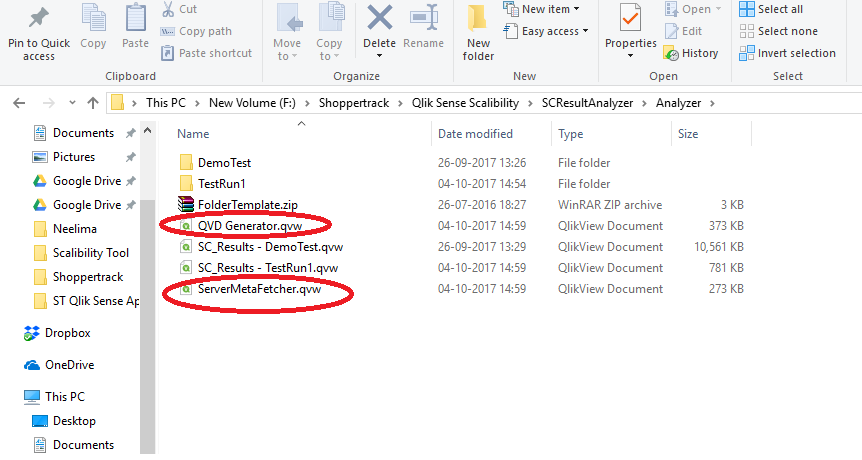
I really appreciate your instant reply but when I have downloaded QSSTAnalyzer.zip it has only QSSTAnalyzer.qvf file. I am asking for QVD Generator and ServerMetaFetcher files version are available for Qlik Sense ?
We need these two file for generate ServerInfor.xml and Qvds for run our STAnalyzer.qvf file.
Daniel_Larsson
- Mark as New
- Bookmark
- Subscribe
- Mute
- Subscribe to RSS Feed
- Permalink
- Report Inappropriate Content
Rohit Kumar wrote:
Hi Sebastian,
I really appreciate your instant reply but when I have downloaded QSSTAnalyzer.zip it has only QSSTAnalyzer.qvf file. I am asking for QVD Generator and ServerMetaFetcher files version are available for Qlik Sense ?
We need these two file for generate ServerInfor.xml and Qvds for run our STAnalyzer.qvf file.
The Sense analyzer app does not read from qvd's nor utilize the serverInfo.xml. Please read the Readme sheet (first sheet in the app) on how to use this app.
rohitk1609
- Mark as New
- Bookmark
- Subscribe
- Mute
- Subscribe to RSS Feed
- Permalink
- Report Inappropriate Content
Sorry I missed that point in README file.
So can you please know what exactly the error in attached snapshot, what I am missing ?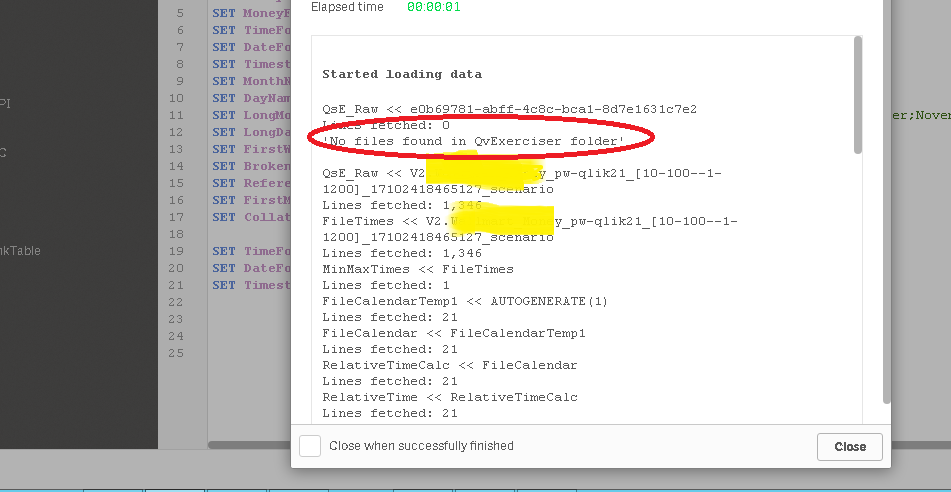
Sebastian_Frede- Mark as New
- Bookmark
- Subscribe
- Mute
- Subscribe to RSS Feed
- Permalink
- Report Inappropriate Content
Hi,
It is just an infomessage as logs can be either in Exerciser or QvExerciser directory. Checking in both folders is there for legacy reasons
rohitk1609
- Mark as New
- Bookmark
- Subscribe
- Mute
- Subscribe to RSS Feed
- Permalink
- Report Inappropriate Content
So I believe with ST tool output file and server manager output file , two files are enough for QS ST.
Thanks Sebastian.

- Mark as New
- Bookmark
- Subscribe
- Mute
- Subscribe to RSS Feed
- Permalink
- Report Inappropriate Content
Hi Daniel,
Same result even with "filepath" key. No json file gets created in Sep2017 folder at execution. Please check if there is any mistake in below command or suggest some other option to retrieve app structure.


Regards,
Animesh Kumar
Daniel_Larsson
- Mark as New
- Bookmark
- Subscribe
- Mute
- Subscribe to RSS Feed
- Permalink
- Report Inappropriate Content
Hi this config looks ok for what I can see, so strange it doesn't work. I uploaded a new tool (4.1.1) where they only changes are increased error loggings and an increased timeout (2min) for gettings app structure. Both when running from command line (sept only), and in tool logs to file. Hopefully the new logs will tell us what goes wrong.
Daniel_Larsson
- Mark as New
- Bookmark
- Subscribe
- Mute
- Subscribe to RSS Feed
- Permalink
- Report Inappropriate Content
Also, forgot to say, you will need to use the app GUID, not the friendly name, when getting the app structure this way.
In regards to other ways, you can write the object id's manually in the script. There's a few different ways to get the object id's, none of them very straight forward.
Option 1
If your app contains titles (i.e. show title option checked) you can use a bookmarklet to replace the titles with the object Id’s.
Such a bookmarklet can be obtained here:
https://gist.github.com/mindspank/17e518f67f674c3caae5
However be aware that this will only work with nonhierarchical objects, e.g. filterpanes will show the id for the filterpane not the containing listbox/es.
Option 2
Using engine api explorer
This however has the same problems as Option 2 for hierarchical objects.
Option 3
Using Chrome developer tools, finding the correct message within the websocket frames can be somewhat cumbersome, but possible. Example:
{"jsonrpc":"2.0","id":20,"result":{"qReturn":{"qType":"GenericObject","qHandle":9,"qGenericType":"table","qGenericId":"cVDbaR"}}}
- Mark as New
- Bookmark
- Subscribe
- Mute
- Subscribe to RSS Feed
- Permalink
- Report Inappropriate Content
Hi Daniel,
I tried with ST 4.1.1 by GUI as well as command line, same behavior. No json file is created in the end. I am always using GUID in APP text field.
-------------------Log File for 4.1.1 command line execution-----------------
Time Ticks Level ResponseTime VirtualUser SessionName AppName Action Label ActionId ObjectId ObjectType Recieved Sent Details MessageType Error RequestsSent Stack
2017-10-26 19:23:31.4332+02:00 1267032502105 SCENARIO APPGUID {"LogDir":"","ConfigName":"getappstruct411","UserNamePrefix":"Exerciser","ConcurrentUsers":1,"Iterations":1,"RampupDelay":10.0,"Server":"qliksenseserver","App":"APPGUID","Port":null,"SSL":false,"Scenario":null,"Worker":5,"AfterIterationWaitTime":0,"AfterIterationWait":0,"Scheduler":0,"WsTimeout":300000,"ExecutionTime":1,"AppMode":0,"InstanceNumber":1,"NewUserForEachIteration":true,"VirtualProxyPrefix":"ptest","HeaderName":"ptest-sense-header","ConnectionType":1,"ArrivalPattern":{"DistributionType":0,"Constant":{"InstanceNumber":1,"WaitTime":10.0},"Uniform":{"InstanceNumber":1,"Min":1.0,"Max":10.0},"Exponential":{"InstanceNumber":1,"Lambda":0.1,"MaxValue":300.0},"Poisson":{"InstanceNumber":1,"Lambda":4.0,"MaxValue":300.0},"Pareto":{"InstanceNumber":1,"Scale":2.0,"Shape":20.0,"MaxValue":300.0},"LogNormal":{"InstanceNumber":1,"Mu":0.0,"Sigma":0.25,"MaxValue":300.0}},"ReUseSelections":false,"UsernameFilePath":"","WriteRegression":false,"UserList":["User@Domain"],"UserCreationMethod":3,"Version":"13.1.3.0","CustomConfig":{"filepath":"xyz.json"},"Cloud":null,"AllowUntrustedCertificate":true,"NumberOfRandomSheets":1,"NumberOfRandomObjects":10,"DefaultTimerDelay":{"Action":"TimerDelayItem - Uniform(12.5:2.5)","Param1":12.5,"Param2":2.5,"Distribution":1,"Label":"","State":null,"Disabled":false},"SessionAppFromTemplate":false} Config
2017-10-26 19:23:31.4489+02:00 1267032555981 SCENARIO APPGUID 1950865 Ticks freq
2017-10-26 19:23:31.4489+02:00 1267032556081 SCENARIO APPGUID Starting test towards Uri: ws://qliksenseserver/ptest StartTest
2017-10-26 19:23:31.4489+02:00 1267032556114 SCENARIO 1 UsersLoadedFromList
---------------------------------------------------------------------------------------------------------
I tried another option of installing Qlik Sense Desktop locally for getting app structure and it worked. I can then use the app structure to build scenario to run it against Qlik sense server.
Although we were not able to get app structure from server, but you are doing a great job helping everyone to get the tool running.
Thanks again. I will post again if I have any following question...
Regards,
Animesh Kumar