Unlock a world of possibilities! Login now and discover the exclusive benefits awaiting you.

Suggest an Idea
- Qlik Community
- :
- Support
- :
- Ideation
- :
- Submit an Idea
- :
- Ideation
- :
- Ideas
- :
- Fix continuous line chart's display of missing val...
- Subscribe to RSS Feed
- Mark as New
- Mark as Read
- Bookmark
- Subscribe
- Printer Friendly Page
- Report Inappropriate Content
Fix continuous line chart's display of missing values

 mmarchese
- Mark as New
- Bookmark
- Subscribe
- Mute
- Subscribe to RSS Feed
- Permalink
- Report Inappropriate Content
Fix continuous line chart's display of missing values
Line charts have 3 options for how to handle missing values:
- Show as connections
- Show as zeros
- Show as gaps
But this feature is limited and unintuitive, leading to periodic forum posts over the years (such as my own) from bewildered Qlik app creators. In this article, Qlik acknowledges this feature's problems to some extent but states that it's "impossible" to fix because there's no way to know which points are missing.
Well, I reject that response. Why? Because it's plainly not impossible. A line chart requires exactly one dimension to be provided for the horizontal axis, and that field contains all the missing points. Maybe the algorithm to extract those missing points from that field wouldn't fit nicely into the Qlik engine, but that's very different from impossible.
Example:
SET DateFormat = 'yyyy-mm-dd';

Fact_Revenue:
LOAD
	[Date],
	Revenue
INLINE [
	Date, Revenue
	2020-01-01, 100
	2020-01-03, 200
];

Dim_Calendar:
LOAD
	[Date]
INLINE [
	Date
	2020-01-01
	2020-01-02
	2020-01-03
];
I create a line chart and choose "Show as gaps."

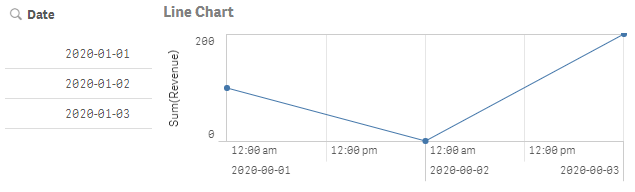
With no dates filtered out, Sum(Revenue) is shown as 0 for 2020-01-02 if no filtering is applied. This is a borderline case. I'm personally ok with it because Sum(no data) = 0 and because I happen to want to see a zero in this case, but I could see the argument that it's wrong since it's ignoring the "Show as gaps" choice.
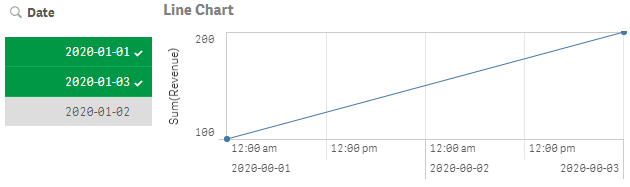
When I filter out 2020-01-02, the corresponding data point vanishes and I am left with a connection across it instead of a gap as I had chosen. This case is clear-cut: it's definitely wrong. And the answer to the question of "Which points are missing?" is obvious from looking at the Date field.
Since the missing values dropdown has already been a part of Qlik's app editing interface for many years, effort should be put into getting trivial cases like this to work as users expect.
mmarchese
on
2020-07-21
08:50 AM
You must be a registered user to add a comment. If you've already registered, sign in. Otherwise, register and sign in.