Unlock a world of possibilities! Login now and discover the exclusive benefits awaiting you.

- Qlik Community
- :
- Forums
- :
- Analytics & AI
- :
- Products & Topics
- :
- Visualization and Usability
- :
- Re: Date filters in Set Analysis
- Subscribe to RSS Feed
- Mark Topic as New
- Mark Topic as Read
- Float this Topic for Current User
- Bookmark
- Subscribe
- Mute
- Printer Friendly Page

 salleninsd
- Mark as New
- Bookmark
- Subscribe
- Mute
- Subscribe to RSS Feed
- Permalink
- Report Inappropriate Content
Date filters in Set Analysis
Hello, Rookie question:
I am trying to filter a measure in a KPI box using set analysis on a "date" field. In the table, it shows up as right-aligned YYYY-MM-DD. I tried the following:
Sum(${< Year[Episode.NonAdmitDate]={2018},Month[Episode.NonAdmitDate]={'Jan','Feb','Mar','Apr','May','Jun','Jul','Aug'},[Episode.IsNonAdmit]={1}>} [Episode.IsNonAdmit])
I do not get an error, but none of the filters are working. I also tried double quotes in the Month names. I am using QlikSense Enterprise 3.0, and I do not have access to the binary load script. Here is what the table looks like:
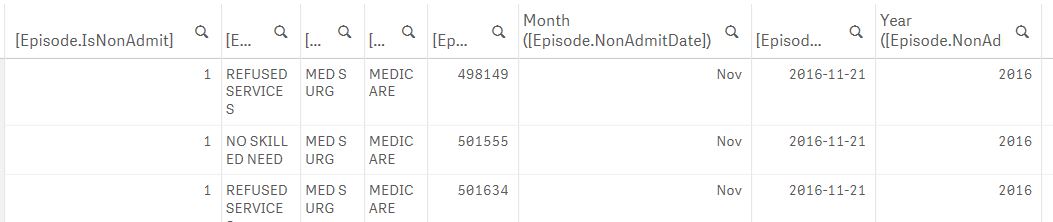
Any suggestions? Thanks in advance for your help!!!
salleninsd
- Mark as New
- Bookmark
- Subscribe
- Mute
- Subscribe to RSS Feed
- Permalink
- Report Inappropriate Content
I think I got it! Here is my solution:
Sum({$<[Episode.NonAdmitDate]={">=2018-01-01 <=2018-08-31"}>}[Episode.IsNonAdmit])
I'd like to reference this blog that helped me out, by Henric Cronström :

 nsetty
- Mark as New
- Bookmark
- Subscribe
- Mute
- Subscribe to RSS Feed
- Permalink
- Report Inappropriate Content
Can you try below.
Sum(${< Year(DATE#([Episode.NonAdmitDate],'YYYY-MM-DD'))={2018},Month(DATE#([Episode.NonAdmitDate], 'YYYY-MM-DD'))={'Jan','Feb','Mar','Apr','May','Jun','Jul','Aug'},[Episode.IsNonAdmit]={1}>} [Episode.IsNonAdmit])
salleninsd
- Mark as New
- Bookmark
- Subscribe
- Mute
- Subscribe to RSS Feed
- Permalink
- Report Inappropriate Content
Thank you, Nagesh. I was able to get correct results from the formula listed above.
Take care,
Scott
nsetty
- Mark as New
- Bookmark
- Subscribe
- Mute
- Subscribe to RSS Feed
- Permalink
- Report Inappropriate Content
Hello Scott,
If you agree with the solution that works for you, can you please mark answered/helpful
Qlik Community Tip: Marking Replies as Correct or Helpful
Thanks
Nagesh
