Unlock a world of possibilities! Login now and discover the exclusive benefits awaiting you.

- Qlik Community
- :
- Forums
- :
- Analytics & AI
- :
- Products & Topics
- :
- Visualization and Usability
- :
- Just only show Total Row
- Subscribe to RSS Feed
- Mark Topic as New
- Mark Topic as Read
- Float this Topic for Current User
- Bookmark
- Subscribe
- Mute
- Printer Friendly Page

 phongnnguyen
- Mark as New
- Bookmark
- Subscribe
- Mute
- Subscribe to RSS Feed
- Permalink
- Report Inappropriate Content
Just only show Total Row
Hi guys,
I want to show just one row is Totals Row ( Totals is Sum) in straight table
Like that
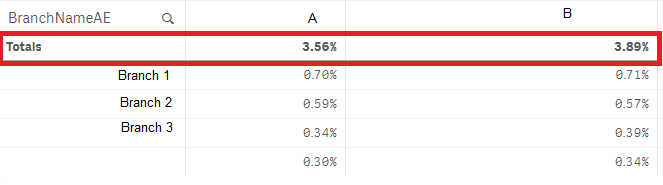
I just want to keep Totals Row in this table. Do you have any solution about this . My final purpose is how to plot this Total Rows on Bar Chart
Thanks for your help .

 andrey_krylov
- Mark as New
- Bookmark
- Subscribe
- Mute
- Subscribe to RSS Feed
- Permalink
- Report Inappropriate Content
Hi, Phong. I think, you can achieve it by using a calculated dimension ='Total'. No more dimensions are needed.

 ChennaiahNallan
- Mark as New
- Bookmark
- Subscribe
- Mute
- Subscribe to RSS Feed
- Permalink
- Report Inappropriate Content
try like below
Column1 = 'Total'
Column2 = YourExpresion and in propertice ->Appesentation -> pretentaion-> disable totals

- Mark as New
- Bookmark
- Subscribe
- Mute
- Subscribe to RSS Feed
- Permalink
- Report Inappropriate Content
Hi Phong,
To show only one row as per your business you have to check the Enable Conditional box in dimensions
mention the condition as if(1=1,0,1)
Then you have to go to expressions select the expression and check the No Totals button.
Then you will get the expected result.
PFA for refrence
Regards
Ritesh


 martinpohl
- Mark as New
- Bookmark
- Subscribe
- Mute
- Subscribe to RSS Feed
- Permalink
- Report Inappropriate Content
Or use a KPI object with Expression, no dimension is needed-
Regards
 OmarBenSalem
- Mark as New
- Bookmark
- Subscribe
- Mute
- Subscribe to RSS Feed
- Permalink
- Report Inappropriate Content
Can I know what is the purpose of usgin the total in ur bar chart?
Do u want to use it with other measures(as a reference line?) alone (one bar represeting the total and basta?)
would it be static (independant of any selection? or depends on the selection? (the total of what u select)?
Please, provide the explanation of the desired outcome so that our help would respond directly to ur need