Unlock a world of possibilities! Login now and discover the exclusive benefits awaiting you.

- Qlik Community
- :
- Forums
- :
- Analytics & AI
- :
- Products & Topics
- :
- Visualization and Usability
- :
- Re: Switching between 2 date sets
- Subscribe to RSS Feed
- Mark Topic as New
- Mark Topic as Read
- Float this Topic for Current User
- Bookmark
- Subscribe
- Mute
- Printer Friendly Page

 roisolberg
- Mark as New
- Bookmark
- Subscribe
- Mute
- Subscribe to RSS Feed
- Permalink
- Report Inappropriate Content
Switching between 2 date sets
Hi Everybody,
In my model i have 2 sets of dates, 'CreationDate' and 'OperationDate'
I have created 2 master calendars for each date set.
I am trying to find an extension or any other solution that i can choose for example creation date and it will select only the dates related for creation date.
I have tried using Field UI extension but it seems to be working only for measures.
Any ideas?
Thanks,
Roi
roisolberg
- Mark as New
- Bookmark
- Subscribe
- Mute
- Subscribe to RSS Feed
- Permalink
- Report Inappropriate Content
Hi All,
i will explain a bit better with an example.
this is what i have tried to do:
i've set two fields that will be used as buttons:
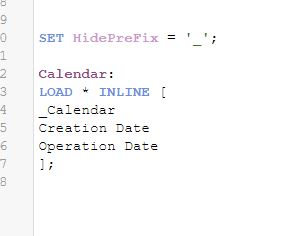
then i defined a variable
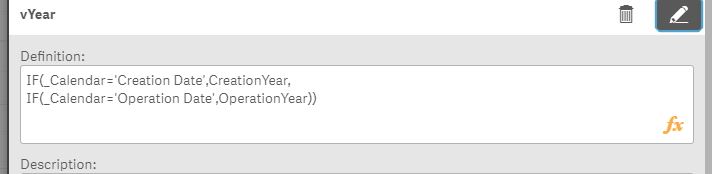
and i used a Field UI extension in order to chose the selected date set:
(the date filters are connected to the variable =$(vYear) )

and now i want to chose dates that will reflect on the selected date set (in this example 'Creation Date')
but when i chose a year, the selections get mixed all together:
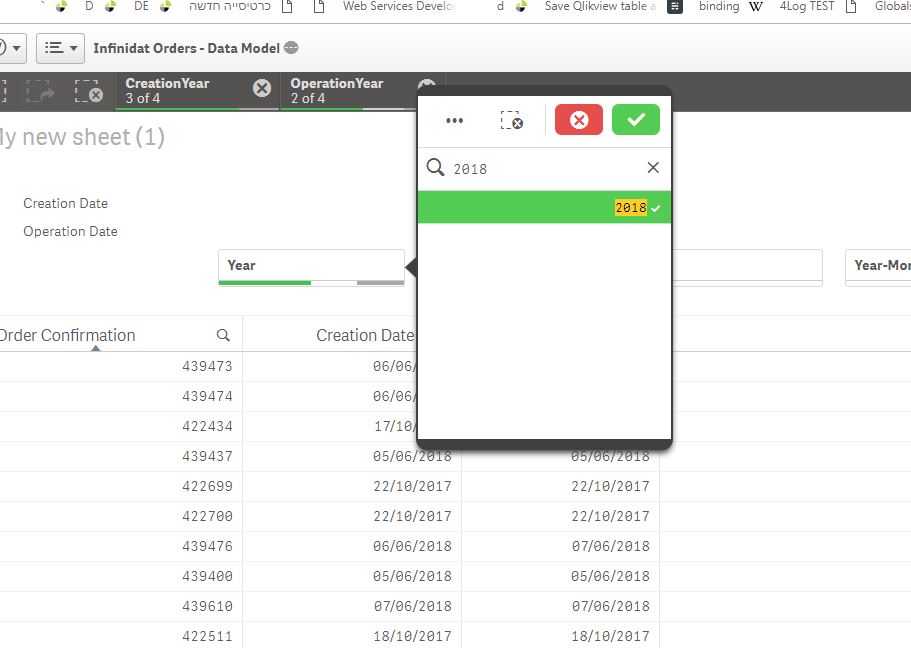
i want the chosed date type to be the leading date for the model.
if possible it could also be only 1 column that is changing between the date types or it could be like the example with 2 fields, a solution of any kind would be great..
Thanks!

 Mark_Little
- Mark as New
- Bookmark
- Subscribe
- Mute
- Subscribe to RSS Feed
- Permalink
- Report Inappropriate Content
Hi,
I would read this
This is how i approach the problem, without using multiple calendars.
Mark

 vishalarote
- Mark as New
- Bookmark
- Subscribe
- Mute
- Subscribe to RSS Feed
- Permalink
- Report Inappropriate Content
Load
Creation_Date as Date,
'Creation' as DateFlag
from table1;
concatenate
Load
Operation_Date as Date,
'Operation' as DateFlag
from table2;
Then Create Date Calendar which basis of "Date".
