A common situation when loading data into a Qlik document is that the data model contains several dates. For instance, in order data you often have one order date, one required date and one shipped date.
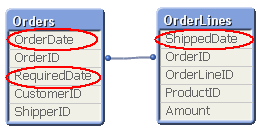
This means that one single order can have multiple dates; in my example one OrderDate, one RequiredDate and several ShippedDates - if the order is split into several shipments:
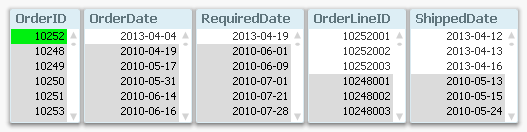
So, how would you link a master calendar to this?
Well, the question is incorrectly posed. You should not use one single master calendar for this. You should use several. You should create three master calendars.
The reason is that the different dates are indeed different attributes, and you don’t want to treat them as the same date. By creating several master calendars, you will enable your users to make advanced selections like “orders placed in April but delivered in June”. See more on Why You sometimes should Load a Master Table several times.
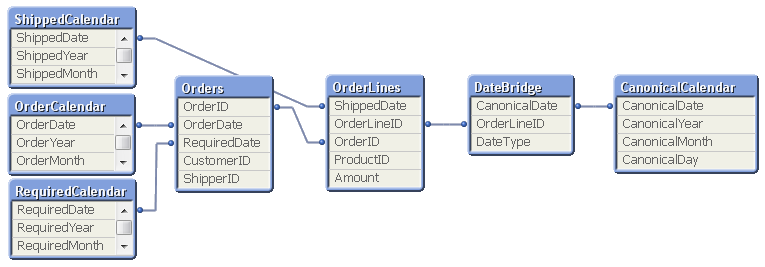
Your data model will then look like this:
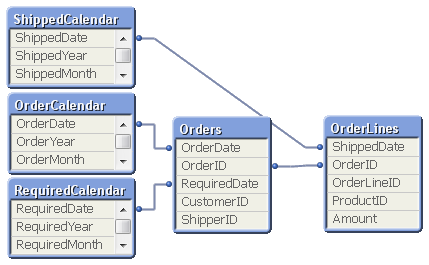
But several different master calendars will not solve all problems. You can for instance not plot ordered amount and shipped amount in the same graph using a common time axis. For this you need a date that can represent all three dates – you need a Canonical Date. This is how you create it:
First you must find a table with a grain fine enough; a table where each record only has one value of each date type associated. In my example this would be the OrderLines table, since a specific order line uniquely defines all three dates. Compare this with the Orders table, where a specific order uniquely defines OrderDate and RequiredDate, but still can have several values in ShippedDate. The Orders table does not have a grain fine enough.
This table should link to a new table – a Date bridge – that lists all possible dates for each key value, i.e. a specific OrderLineID has three different canonical dates associated with it. Finally, you create a master calendar for the canonical date field.
You may need to use ApplyMap() to create this table, e.g. using the following script:
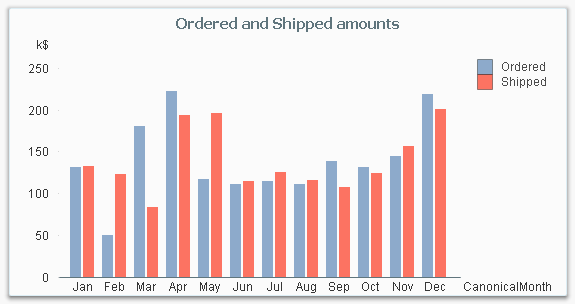
If you now want to make a chart comparing ordered and shipped amounts, all you need to do is to create it using a canonical calendar field as dimension, and two expressions that contain Set Analysis expressions:
The canonical calendar fields are excellent to use as dimensions in charts, but are somewhat confusing when used for selections. For this, the fields from the standard calendars are often better.
Summary:
Create a master calendar for each date. Use these for list boxes and selections.
Create a canonical date with a canonical calendar. Use these fields as dimension in charts.
Use the DateType field in a Set Expression in the charts.
A good alternative description of the same problem can be found here. Thank you, Rob, for inspiration and good discussions.
I have read these posts on canonical date/ date bridges - due to my task of getting some data together in an APP but I'm not sure if this is what I need; I definitely cant get it work but its a bit more confusing than dates attached to the one ID, I suppose I want to discount the dates in one table when my week commencing begins in the other...
I have a theatre data set, that runs hourly showing past & future activity booked into theatre slots, I was using the futures dates for PLANNED, and I now want to bring in historic activity (which I was going to use the same dataset however these are based on OPDATE not discharged) so I am bringing an inpatient table with discharged date as ACTUAL.
Two different datasets: I want to show a table count at whatever time in the month selected, by week commencing i.e.. for January as of now - I have 3 weeks of actual from 31/12/18, and 2 weeks left of planned 21/1, 28/1 - so I am able to work out how far they are away from baseline activity in month based on what's actually happened so far and what's left booked in.? - I have this in a spreadsheet very manual, I just know it could go into QlivKiew and be way more useful, less time consuming to produce and more live with all the cancelled slots we have being refreshed.
31-Dec
07-Jan
14-Jan
21-Jan
28-Jan
Daycase
ACT
ACT
ACT
PL
PL
Sum Jan
Target Jan
Variance
Breast Surgery
5
3
3
7
2
20
30
-10
Endoscopy
101
183
159
213
136
792
700
92
ENT
6
25
32
28
25
116
100
16
Colorectal Surgery
0
9
2
0
3
14
7
7
General Surgery
16
23
15
12
4
70
92
-22
Upper Gastrointestinal Surgery
0
1
1
3
0
5
2
3
Vascular Surgery
2
3
5
12
4
26
23
3
Gynaecology
18
24
26
8
10
86
110
-24
Paediatrics
2
7
4
0
0
13
15
-2
Ophthalmology
41
71
83
49
44
288
266
22
Oral Surgery
6
22
28
31
15
102
138
-36
Pain Management
20
16
20
18
0
74
114
-40
Plastic Surgery
34
51
57
47
26
215
233
-18
Trauma & Orthopaedics
8
30
25
30
19
112
124
-12
Urology
53
92
126
103
44
418
375
43
Total
312
560
586
561
332
2351
2329
22
But how do I get to show this in one table without duplicating - I haven't got that fine grain table described earlier which is where I think I'm going wrong? OR do I need this if I want one dataset shown only when the week has passed - but I still need to join them up using dates.
I have four tables with different date fields; MT_Planned_Completion in Milestone Table, DT_Forecast_Date in Design Table, CT_Forecast_Date in Construction Table and AE_Forecast_Table in Account Expense Table.
I am trying to use your method to create a single date dimension. Your article mentions picking a table with grain fine enough to create date bridge table. I am not sure which table to pick on my case, because the Project_ID is the only common link between the tables and it doesn't necessarily defines the date fields uniquely.
Like others here, I am having an issue where I don't have a field with fine enough grain that it relates to just one date in the two separate calendars I am trying to join. In my case, I am trying to link order date and view date by product id. My canonical calendar is only showing one date for each product id (the 1st possible date), rather than all relevant dates. It seems to me there should be away to create a DateBridge table with each product id listed multiple times so that there is a row for each product id and date combination. This would solve the issue with granularity-is it not possible?
1. You just need to use a joined TABLE with the finer grain. So if you have a separate 'sales invoice header' table (one row per invoice number) joined (by invoice number) to a 'sales invoice line' (many rows per invoice) table you must join to the 'sales invoice line' table (the finer grain). Not the 'sales invoice header' table.
2. You can join to the link table using a created unique row number. Like eg >>> 'link' & '/' & rowno() as rowname.
3. Sometimes I concatenate tables (rather than join or join keep) to get the desired result. For example I would never concatenate the invoice header and invoice lines tables but might invoice lines and invoice deliveries. As in this example
Thank you for the excellent post. As a Newbie to Qlik I am trying to following the logic but i am seeing a lot of duplicated values in my pivot table (see attachment). Will your Canonical Calendar work for the following scenario please?
I am creating a scorecard to review the performance of our vendors (each vendor has a unique number).
Currently I have three tables, all of which have a common field 'Vendor' number.
The first Table: Sums the number of delivered items by Goods Receipt Date (MB51 - ReportDate)
The Second Table: Counts the number of non-conformances by Date Raised = (QM10 - ReportDate)
The Third Table: Sums the cost of Non-conformances by Posting Date = (ZNOTIF - ReportDate)
As per the attachment, I would like to plot each of the three measures, by vendor, against the same YearMonth time line but i am seeing a lot of duplicated values.
It won't work the way you have done this. as the data bridge table needs a one to one relationship. Not a one to many. (because the way you have set this up vendor may have more than one date. So how can the link table link to the appropriate date?)
What I would do in this situation is concatenate the three tables. with one common date. So then you then will not need a canonical date
Give a common name to the three tables. Say 'znotif' as TableName , etc and then use this as required in set analysis.
Another option (this might work - you would need to try it) would to have a unique row number in each table >> znotif & rowno() and use this to join to the Data Bridge
It depends on circumstances though. I try to keep a model simple and often concatenation is the best way. But not always